On this page
In 2023, data breaches exposed over 442 million records worldwide. This has affected businesses of every size.
And then there’s also a cost associated with failing to secure sensitive information.
A data leak, often dismissed as a minor oversight, can have catastrophic consequences. It exposes trade secrets to erode customer trust. Such a fallout will result in financial loss and also damage your business’s security and reputation.
The stakes are even higher when you realize how easy it is for attackers to exploit weak links. Take small businesses as an example — 43% of cyberattacks target them, yet only 14% are prepared to defend against such threats.
One thing is for sure: the number of cyber attacks is only going to increase year on year, with 2025 expected to affect US $10.29 trillion.

Width: 603px, Height: 603px
Width: 603px, Height: 603px
Width: 603px, Height: 603px
Width: 603px, Height: 603px
Width: 603px, Height: 603px
Width: 603px, Height: 603px
Width: 603px, Height: 603px
Width: 603px, Height: 603px
Width: 0px, Height: 0px
Width: 1199px, Height: 1199px
Width: 1198px, Height: 1198px
Width: 1193px, Height: 1193px
Width: 1188px, Height: 1188px
Width: 1183px, Height: 1183px
Width: 1175px, Height: 1175px
Width: 1170px, Height: 1170px
Width: 1163px, Height: 1163px
Width: 1157px, Height: 1157px
Width: 1152px, Height: 1152px
Width: 1148px, Height: 1148px
Width: 1145px, Height: 1145px
Width: 1140px, Height: 1140px
Width: 1132px, Height: 1132px
Width: 1117px, Height: 1117px
Width: 1104px, Height: 1104px
Width: 1090px, Height: 1090px
Width: 1075px, Height: 1075px
Width: 1063px, Height: 1063px
Width: 1045px, Height: 1045px
Width: 1020px, Height: 1020px
Width: 1003px, Height: 1003px
Width: 984px, Height: 984px
Width: 969px, Height: 969px
Width: 954px, Height: 954px
Width: 945px, Height: 945px
Width: 940px, Height: 940px
Width: 938px, Height: 938px
Width: 932px, Height: 932px
Width: 927px, Height: 927px
Width: 919px, Height: 919px
Width: 910px, Height: 910px
Width: 905px, Height: 905px
Width: 902px, Height: 902px
Width: 895px, Height: 895px
Width: 889px, Height: 889px
Width: 882px, Height: 882px
Width: 877px, Height: 877px
Width: 872px, Height: 872px
Width: 865px, Height: 865px
Width: 857px, Height: 857px
Width: 852px, Height: 852px
Width: 840px, Height: 840px
Width: 825px, Height: 825px
Width: 818px, Height: 818px
Width: 814px, Height: 814px
Width: 808px, Height: 808px
Width: 802px, Height: 802px
Width: 794px, Height: 794px
Width: 788px, Height: 788px
Width: 783px, Height: 783px
Width: 777px, Height: 777px
Width: 773px, Height: 773px
Width: 769px, Height: 769px
Width: 767px, Height: 767px
Width: 765px, Height: 765px
Width: 764px, Height: 764px
Width: 763px, Height: 763px
Width: 762px, Height: 762px
Width: 760px, Height: 760px
Width: 758px, Height: 758px
Width: 757px, Height: 757px
Width: 755px, Height: 755px
Width: 752px, Height: 752px
Width: 747px, Height: 747px
Width: 744px, Height: 744px
Width: 742px, Height: 742px
Width: 742px, Height: 742px
Width: 740px, Height: 740px
Width: 738px, Height: 738px
Width: 735px, Height: 735px
Width: 732px, Height: 732px
Width: 730px, Height: 730px
Width: 725px, Height: 725px
Width: 723px, Height: 723px
Width: 719px, Height: 719px
Width: 718px, Height: 718px
Width: 713px, Height: 713px
Width: 707px, Height: 707px
Width: 703px, Height: 703px
Width: 700px, Height: 700px
Width: 697px, Height: 697px
Width: 695px, Height: 695px
Width: 694px, Height: 694px
Width: 690px, Height: 690px
Width: 687px, Height: 687px
Width: 682px, Height: 682px
Width: 679px, Height: 679px
Width: 677px, Height: 677px
Width: 674px, Height: 674px
Width: 673px, Height: 673px
Width: 670px, Height: 670px
Width: 669px, Height: 669px
Width: 667px, Height: 667px
Width: 663px, Height: 663px
Width: 659px, Height: 659px
Width: 658px, Height: 658px
Width: 655px, Height: 655px
Width: 653px, Height: 653px
Width: 652px, Height: 652px
Width: 649px, Height: 649px
Width: 647px, Height: 647px
Width: 643px, Height: 643px
Width: 640px, Height: 640px
Width: 638px, Height: 638px
Width: 637px, Height: 637px
Width: 635px, Height: 635px
Width: 635px, Height: 635px
Width: 634px, Height: 634px
Width: 632px, Height: 632px
Width: 630px, Height: 630px
Width: 628px, Height: 628px
Width: 624px, Height: 624px
Width: 623px, Height: 623px
Width: 622px, Height: 622px
Width: 622px, Height: 622px
Width: 620px, Height: 620px
Width: 619px, Height: 619px
Width: 618px, Height: 618px
Width: 618px, Height: 618px
Width: 617px, Height: 617px
Width: 615px, Height: 615px
Width: 614px, Height: 614px
Width: 613px, Height: 613px
Width: 613px, Height: 613px
Width: 612px, Height: 612px
Width: 610px, Height: 610px
Width: 609px, Height: 609px
Width: 608px, Height: 608px
Width: 605px, Height: 605px
Width: 605px, Height: 605px
Width: 604px, Height: 604px
Width: 603px, Height: 603px
There are different reasons for data leaks — from misconfigured software and stolen credentials to unsecured devices and sometimes sheer negligence.
Regardless of the root cause, the result remains the same—a costly disruption to business continuity. And with regulatory fines for data protection violations, businesses have more than their systems to lose.
But there’s a silver lining. When implemented effectively, cybersecurity software can shield businesses from such incidents. By proactively addressing vulnerabilities, organizations can not only protect their data but also secure their future.
In this piece, we’ll explore the dangers posed by data leaks, dissect their underlying causes, and also outline actionable steps to keep business security high.
» What is a Data Leak?
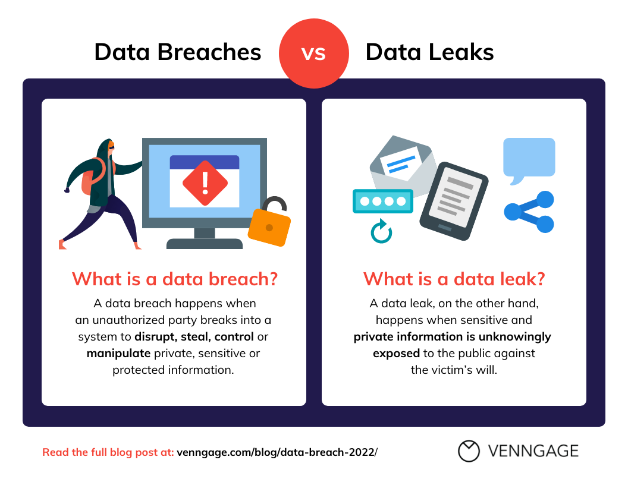
A data leak occurs when sensitive information—like customer data, financial records, or trade secrets—leaves a company’s secure environment and ends up in unauthorized hands. Unlike a data breach, which often involves malicious intent and hacking, a data leak is usually accidental.
Data leaks could be as simple as an employee emailing sensitive files to the wrong recipient or using an unsecured device to access confidential systems.
» How Is a Data Leak Different from a Data Breach?
Let’s clear up a common misconception. While both terms are linked to compromised information, a data breach is typically the result of a deliberate attack—hackers breaking into a network to steal data.
On the other hand, a data leak is often the result of human error or misconfiguration, where the information inadvertently becomes accessible to the wrong people. A data breach is like a break-in, while a data leak is more like accidentally leaving the front door wide open.
Width: 600px, Height: 0px
Width: 600px, Height: 463px
Width: 600px, Height: 0px
Width: 600px, Height: 463px
Width: 600px, Height: 463px
Width: 600px, Height: 463px
Width: 0px, Height: 0px
Width: 1054px, Height: 814px
Width: 1052px, Height: 813px
Width: 1049px, Height: 811px
Width: 1047px, Height: 809px
Width: 1041px, Height: 804px
Width: 1034px, Height: 799px
Width: 1031px, Height: 797px
Width: 1027px, Height: 794px
Width: 1022px, Height: 790px
Width: 1021px, Height: 789px
Width: 1019px, Height: 787px
Width: 1018px, Height: 787px
Width: 1016px, Height: 785px
Width: 1012px, Height: 782px
Width: 1006px, Height: 777px
Width: 1003px, Height: 775px
Width: 999px, Height: 772px
Width: 994px, Height: 768px
Width: 991px, Height: 766px
Width: 988px, Height: 763px
Width: 982px, Height: 759px
Width: 977px, Height: 755px
Width: 973px, Height: 752px
Width: 972px, Height: 751px
Width: 968px, Height: 748px
Width: 964px, Height: 745px
Width: 958px, Height: 740px
Width: 952px, Height: 736px
Width: 946px, Height: 731px
Width: 943px, Height: 729px
Width: 942px, Height: 728px
Width: 939px, Height: 726px
Width: 934px, Height: 722px
Width: 928px, Height: 717px
Width: 922px, Height: 712px
Width: 918px, Height: 709px
Width: 913px, Height: 705px
Width: 912px, Height: 705px
Width: 908px, Height: 702px
Width: 907px, Height: 701px
Width: 903px, Height: 698px
Width: 901px, Height: 696px
Width: 898px, Height: 694px
Width: 897px, Height: 693px
Width: 896px, Height: 692px
Width: 893px, Height: 690px
Width: 891px, Height: 688px
Width: 886px, Height: 685px
Width: 883px, Height: 682px
Width: 882px, Height: 682px
Width: 879px, Height: 679px
Width: 877px, Height: 678px
Width: 876px, Height: 677px
Width: 873px, Height: 675px
Width: 872px, Height: 674px
Width: 869px, Height: 671px
Width: 868px, Height: 671px
Width: 866px, Height: 669px
Width: 861px, Height: 665px
Width: 858px, Height: 663px
Width: 857px, Height: 662px
Width: 856px, Height: 661px
Width: 856px, Height: 661px
Width: 854px, Height: 660px
Width: 854px, Height: 660px
Width: 853px, Height: 659px
Width: 851px, Height: 658px
Width: 849px, Height: 656px
Width: 848px, Height: 655px
Width: 846px, Height: 654px
Width: 844px, Height: 652px
Width: 844px, Height: 652px
Width: 843px, Height: 651px
Width: 841px, Height: 650px
Width: 838px, Height: 648px
Width: 837px, Height: 647px
Width: 836px, Height: 646px
Width: 834px, Height: 644px
Width: 832px, Height: 643px
Width: 832px, Height: 643px
Width: 827px, Height: 639px
Width: 824px, Height: 637px
Width: 819px, Height: 633px
Width: 818px, Height: 632px
Width: 817px, Height: 631px
Width: 814px, Height: 629px
Width: 813px, Height: 628px
Width: 809px, Height: 625px
Width: 808px, Height: 624px
Width: 806px, Height: 623px
Width: 804px, Height: 621px
Width: 802px, Height: 620px
Width: 801px, Height: 619px
Width: 798px, Height: 617px
Width: 796px, Height: 615px
Width: 792px, Height: 612px
Width: 789px, Height: 610px
Width: 788px, Height: 609px
Width: 787px, Height: 608px
Width: 786px, Height: 607px
Width: 784px, Height: 606px
Width: 782px, Height: 604px
Width: 781px, Height: 603px
Width: 778px, Height: 601px
Width: 776px, Height: 600px
Width: 774px, Height: 598px
Width: 774px, Height: 598px
Width: 772px, Height: 597px
Width: 771px, Height: 596px
Width: 769px, Height: 594px
Width: 767px, Height: 593px
Width: 759px, Height: 586px
Width: 753px, Height: 582px
Width: 744px, Height: 575px
Width: 741px, Height: 573px
Width: 737px, Height: 569px
Width: 733px, Height: 566px
Width: 729px, Height: 563px
Width: 724px, Height: 559px
Width: 722px, Height: 558px
Width: 721px, Height: 557px
Width: 721px, Height: 557px
Width: 718px, Height: 555px
Width: 717px, Height: 554px
Width: 712px, Height: 550px
Width: 707px, Height: 546px
Width: 703px, Height: 543px
Width: 701px, Height: 542px
Width: 697px, Height: 539px
Width: 696px, Height: 538px
Width: 691px, Height: 534px
Width: 688px, Height: 532px
Width: 687px, Height: 531px
Width: 686px, Height: 530px
Width: 684px, Height: 529px
Width: 684px, Height: 529px
Width: 683px, Height: 528px
Width: 681px, Height: 526px
Width: 679px, Height: 525px
Width: 676px, Height: 522px
Width: 672px, Height: 519px
Width: 669px, Height: 517px
Width: 668px, Height: 516px
Width: 667px, Height: 515px
Width: 666px, Height: 515px
Width: 664px, Height: 513px
Width: 663px, Height: 512px
Width: 661px, Height: 511px
Width: 657px, Height: 508px
Width: 656px, Height: 507px
Width: 653px, Height: 505px
Width: 652px, Height: 504px
Width: 651px, Height: 503px
Width: 648px, Height: 501px
Width: 647px, Height: 500px
Width: 646px, Height: 499px
Width: 643px, Height: 497px
Width: 641px, Height: 495px
Width: 637px, Height: 492px
Width: 634px, Height: 490px
Width: 632px, Height: 488px
Width: 629px, Height: 486px
Width: 628px, Height: 485px
Width: 627px, Height: 484px
Width: 626px, Height: 483px
Width: 625px, Height: 483px
Width: 623px, Height: 481px
Width: 623px, Height: 481px
Width: 621px, Height: 480px
Width: 620px, Height: 479px
Width: 618px, Height: 477px
Width: 617px, Height: 476px
Width: 616px, Height: 476px
Width: 615px, Height: 475px
Width: 613px, Height: 473px
Width: 612px, Height: 473px
Width: 611px, Height: 472px
Width: 610px, Height: 471px
Width: 608px, Height: 470px
Width: 607px, Height: 469px
Width: 606px, Height: 468px
Width: 605px, Height: 467px
Width: 602px, Height: 465px
Width: 601px, Height: 464px
Width: 600px, Height: 463px
Width: 0px, Height: 0px
Width: 1047px, Height: 809px
Width: 1041px, Height: 804px
Width: 982px, Height: 759px
Width: 974px, Height: 753px
Width: 959px, Height: 741px
Width: 949px, Height: 733px
Width: 935px, Height: 722px
Width: 930px, Height: 719px
Width: 924px, Height: 714px
Width: 919px, Height: 710px
Width: 914px, Height: 706px
Width: 905px, Height: 699px
Width: 897px, Height: 693px
Width: 887px, Height: 685px
Width: 876px, Height: 677px
Width: 866px, Height: 669px
Width: 854px, Height: 660px
Width: 842px, Height: 651px
Width: 821px, Height: 634px
Width: 807px, Height: 624px
Width: 795px, Height: 614px
Width: 782px, Height: 604px
Width: 772px, Height: 597px
Width: 761px, Height: 588px
Width: 754px, Height: 583px
Width: 747px, Height: 577px
Width: 746px, Height: 576px
Width: 742px, Height: 573px
Width: 736px, Height: 569px
Width: 735px, Height: 568px
Width: 732px, Height: 566px
Width: 731px, Height: 565px
Width: 729px, Height: 563px
Width: 727px, Height: 562px
Width: 724px, Height: 559px
Width: 704px, Height: 544px
Width: 702px, Height: 542px
Width: 696px, Height: 538px
Width: 695px, Height: 537px
Width: 694px, Height: 536px
Width: 692px, Height: 535px
Width: 691px, Height: 534px
Width: 690px, Height: 533px
Width: 690px, Height: 533px
Width: 689px, Height: 532px
Width: 687px, Height: 531px
Width: 686px, Height: 530px
Width: 685px, Height: 529px
Width: 684px, Height: 529px
Width: 682px, Height: 527px
Width: 681px, Height: 526px
Width: 680px, Height: 525px
Width: 680px, Height: 525px
Width: 679px, Height: 525px
Width: 677px, Height: 523px
Width: 676px, Height: 522px
Width: 676px, Height: 522px
Width: 675px, Height: 522px
Width: 674px, Height: 521px
Width: 672px, Height: 519px
Width: 671px, Height: 518px
Width: 670px, Height: 518px
Width: 669px, Height: 517px
Width: 667px, Height: 515px
Width: 666px, Height: 515px
Width: 665px, Height: 514px
Width: 664px, Height: 513px
Width: 664px, Height: 513px
Width: 662px, Height: 512px
Width: 660px, Height: 510px
Width: 659px, Height: 509px
Width: 657px, Height: 508px
Width: 656px, Height: 507px
Width: 654px, Height: 505px
Width: 652px, Height: 504px
Width: 650px, Height: 502px
Width: 647px, Height: 500px
Width: 645px, Height: 498px
Width: 644px, Height: 498px
Width: 642px, Height: 496px
Width: 641px, Height: 495px
Width: 640px, Height: 495px
Width: 639px, Height: 494px
Width: 637px, Height: 492px
Width: 636px, Height: 491px
Width: 635px, Height: 491px
Width: 634px, Height: 490px
Width: 632px, Height: 488px
Width: 631px, Height: 488px
Width: 630px, Height: 487px
Width: 630px, Height: 487px
Width: 629px, Height: 486px
Width: 626px, Height: 484px
Width: 625px, Height: 483px
Width: 623px, Height: 481px
Width: 623px, Height: 481px
Width: 620px, Height: 479px
Width: 619px, Height: 478px
Width: 618px, Height: 478px
Width: 616px, Height: 476px
Width: 615px, Height: 475px
Width: 613px, Height: 474px
Width: 611px, Height: 472px
Width: 611px, Height: 472px
Width: 610px, Height: 472px
Width: 609px, Height: 471px
Width: 608px, Height: 470px
Width: 606px, Height: 468px
Width: 605px, Height: 468px
Width: 604px, Height: 467px
Width: 603px, Height: 466px
Width: 601px, Height: 465px
Width: 600px, Height: 464px
Width: 599px, Height: 463px
Width: 598px, Height: 462px
Width: 596px, Height: 461px
Width: 593px, Height: 458px
Width: 591px, Height: 457px
Width: 591px, Height: 457px
Width: 594px, Height: 459px
Width: 595px, Height: 460px
Width: 596px, Height: 461px
Width: 599px, Height: 463px
Width: 600px, Height: 464px
Width: 600px, Height: 464px
A single data leak can undermine business security in ways that are difficult to recover from. In addition to financial losses, it can lead to customer distrust, regulatory fines, and even legal battles. Because of these factors, organizations need to remain proactive in securing their information.
To understand the scale of this issue, consider the 2019 Capital One incident. Due to a misconfigured cloud storage service, sensitive information from over 100 million customer accounts was exposed.
Similarly, many such businesses faced massive losses because they underestimated how quickly a minor misstep could spiral into a crisis.
The table below highlights the differences.
| Parameter | Data Leak | Data Breach |
| Definition | Accidental exposure of sensitive information to unauthorized parties without malicious intent. | Deliberate, unauthorized access to sensitive information, often involving hacking or cyberattacks. |
| Cause | Human error, misconfiguration, unsecured devices, or careless handling of data. | Exploitation of vulnerabilities through malware, phishing, or brute-force attacks. |
| Intent | Unintentional; Often caused by negligence or oversight. | Malicious; Typically carried out by cybercriminals or insider threats. |
| Detection Time | Often detected quickly but sometimes can go unnoticed for days or weeks. | It may take months to discover, especially in sophisticated attacks. |
| Impact on Business Security | Loss of trust, minor financial penalties, and potential reputation damage. | Severe financial losses, regulatory fines, legal repercussions, and long-term damage to reputation. |
| Prevention Measures | Enforcing strong data handling policies Securing endpoints Using access controls | Advanced cybersecurity software Regular vulnerability testing Employee training |
| Cost of Recovery | Generally lower but still impactful, it mainly involves restoring compliance and reputation. | Extremely high, involving legal costs, ransom payments, and infrastructure overhaul. |
| Examples | Sending an email to the wrong recipient Misconfigured cloud servers Lost devices. | Ransomware attacks Hacking corporate networks Data theft by employees |
» Common Causes of Data Leaks
We live in a world where information flows faster than ever. Therefore, it becomes important for businesses to protect sensitive data, which has become a daunting challenge for businesses.
Now, as for the data leaks, they can arise from different sources—some intentional, others purely accidental. A single misstep, like sending an email to the wrong recipient or neglecting a security update, can trigger a cascade of consequences.

Width: 605px, Height: 0px
Width: 605px, Height: 0px
Width: 605px, Height: 0px
Width: 605px, Height: 475px
Width: 605px, Height: 475px
Width: 605px, Height: 475px
Width: 605px, Height: 475px
Width: 0px, Height: 0px
Width: 1285px, Height: 1010px
Width: 1281px, Height: 1007px
Width: 1275px, Height: 1002px
Width: 1265px, Height: 994px
Width: 1251px, Height: 983px
Width: 1240px, Height: 975px
Width: 1227px, Height: 964px
Width: 1199px, Height: 942px
Width: 1182px, Height: 929px
Width: 1164px, Height: 915px
Width: 1150px, Height: 904px
Width: 1134px, Height: 891px
Width: 1120px, Height: 880px
Width: 1111px, Height: 873px
Width: 1101px, Height: 865px
Width: 1086px, Height: 854px
Width: 1072px, Height: 843px
Width: 1057px, Height: 831px
Width: 1031px, Height: 810px
Width: 1010px, Height: 794px
Width: 991px, Height: 779px
Width: 969px, Height: 762px
Width: 941px, Height: 740px
Width: 915px, Height: 719px
Width: 891px, Height: 700px
Width: 875px, Height: 688px
Width: 864px, Height: 679px
Width: 849px, Height: 667px
Width: 831px, Height: 653px
Width: 811px, Height: 637px
Width: 796px, Height: 626px
Width: 779px, Height: 612px
Width: 766px, Height: 602px
Width: 754px, Height: 593px
Width: 744px, Height: 585px
Width: 732px, Height: 575px
Width: 719px, Height: 565px
Width: 710px, Height: 558px
Width: 707px, Height: 556px
Width: 707px, Height: 556px
Width: 702px, Height: 552px
Width: 700px, Height: 550px
Width: 700px, Height: 550px
Width: 697px, Height: 548px
Width: 695px, Height: 547px
Width: 694px, Height: 546px
Width: 691px, Height: 543px
Width: 690px, Height: 543px
Width: 689px, Height: 542px
Width: 687px, Height: 540px
Width: 685px, Height: 538px
Width: 684px, Height: 537px
Width: 681px, Height: 535px
Width: 680px, Height: 534px
Width: 677px, Height: 532px
Width: 676px, Height: 531px
Width: 675px, Height: 530px
Width: 672px, Height: 528px
Width: 670px, Height: 526px
Width: 666px, Height: 523px
Width: 664px, Height: 522px
Width: 662px, Height: 520px
Width: 661px, Height: 519px
Width: 659px, Height: 518px
Width: 655px, Height: 515px
Width: 654px, Height: 514px
Width: 652px, Height: 512px
Width: 650px, Height: 511px
Width: 649px, Height: 510px
Width: 647px, Height: 508px
Width: 646px, Height: 507px
Width: 645px, Height: 507px
Width: 644px, Height: 506px
Width: 642px, Height: 504px
Width: 641px, Height: 504px
Width: 640px, Height: 503px
Width: 639px, Height: 502px
Width: 637px, Height: 500px
Width: 636px, Height: 500px
Width: 635px, Height: 499px
Width: 634px, Height: 498px
Width: 631px, Height: 496px
Width: 630px, Height: 495px
Width: 627px, Height: 493px
Width: 626px, Height: 492px
Width: 625px, Height: 491px
Width: 625px, Height: 491px
Width: 622px, Height: 489px
Width: 621px, Height: 488px
Width: 619px, Height: 486px
Width: 617px, Height: 485px
Width: 617px, Height: 485px
Width: 616px, Height: 484px
Width: 614px, Height: 482px
Width: 614px, Height: 482px
Width: 612px, Height: 481px
Width: 611px, Height: 480px
Width: 610px, Height: 479px
Width: 609px, Height: 478px
Width: 606px, Height: 476px
Width: 606px, Height: 476px
Width: 605px, Height: 475px
Below, we’ll explore these causes in detail to help you understand the nuances behind data leaks and the potential risks they pose to business security.
› 1) Human Errors
Human mistakes are among the most frequent triggers of data leaks. Even the most advanced cybersecurity software cannot always compensate for lapses in judgment or accidental oversights.
Examples
- Sending confidential documents to unintended recipients.
- Incorrectly uploading sensitive files to public folders.
- Mishandling or discarding physical documents without proper shredding.
Impact
These small errors can quickly lead to unauthorized access to sensitive data, often unnoticed until it’s too late.
› 2) Weak Password Practices
A strong password policy is a cornerstone of secure systems, yet weak or reused passwords remain a common vulnerability.
Examples:
- Use simple passwords like “123456” or “password.”
- Sharing credentials across multiple team members.
- Failing to change default passwords on devices and applications.
Impact:
Weak passwords create an easy entry point for attackers using brute-force techniques, significantly undermining business security.
› 3) Misconfigured Cloud Storage
The shift to cloud-based systems has revolutionized data storage, but misconfigurations continue to create openings for data leaks.
Read Also: Is Data More Secure in the Cloud than On-Premises?
Examples:
- Leaving cloud storage buckets publicly accessible.
- Forgetting to enable encryption for files stored in the cloud.
- Granting overly broad access permissions to users or applications.
Impact:
Such missteps make it effortless for unauthorized users to discover and extract sensitive information.
› 4) Outdated Software and Systems
Using outdated or unpatched software introduces vulnerabilities that cybercriminals actively exploit.
Examples:
- Running end-of-life systems like unsupported Windows versions.
- Neglecting routine updates and patches for applications.
- Using legacy systems incompatible with modern security standards.
Impact:
Unpatched vulnerabilities provide attackers with known exploits to access your systems and data.
› 5) Insider Threats
Not every data leak originates outside an organization. Insiders—whether careless or malicious—pose a serious threat.
Examples:
- Disgruntled employees deliberately leak sensitive information.
- Untrained employees mishandled data unintentionally.
- Contractors with access to sensitive files violate confidentiality agreements.
Impact:
Insiders have direct access to systems, making it easier for them to bypass external security layers.
› 6) Third-Party Risks
Outsourcing and partnerships are integral to modern businesses, but they also extend the attack surface.
Examples:
- Vendors fail to secure shared systems or data.
- Third-party platforms with inadequate security protocols.
- Integration with poorly vetted software tools.
Impact:
Data leaks through third parties can compromise both your systems and the integrity of your cybersecurity software.
› 7) Email Phishing and Social Engineering
Attackers use clever tactics to trick employees into unintentionally exposing sensitive data.
Examples:
- Phishing emails that mimic trusted sources.
- Fake login pages designed to harvest user credentials.
- Calls or messages impersonating internal departments to extract information.
Impact:
These attacks exploit human psychology, bypassing even the most advanced technical safeguards.
» How Organizations Can Prevent Data Leaks?
You need to secure sensitive information. And for this, you’ll need a major approach to combine advanced technology, robust processes, and active participation across teams.
But then, you are not confined to a single department. Instead, you will have to have other departments take up the shared responsibility for proactive measures.
Below, we’ll explore some of the key actions that you should take to prevent the data leaks.
› Strengthen Password Policies and Access Controls
Implementing strong password practices and limiting data access are critical for safeguarding sensitive information.
Such measures ensure that only authorized individuals can access critical systems as they reduce the opportunity for accidental or unauthorized exposure.
Best practices for passwords
- Enforce multi-factor authentication (MFA) for all systems handling sensitive data.
- Ensure passwords are unique, complex, and regularly updated.
- Eliminate the use of default passwords and prohibit reuse across platforms.
Access control measures
- Adopt role-based access control (RBAC) to assign permissions based on job roles.
- Regularly audit and adjust access levels as roles change.
- Restrict data access to only those who genuinely need it.
› Train Employees on Cybersecurity Awareness
Empowering employees with knowledge and practical skills enhances an organization’s ability to detect and prevent security incidents. When implemented, well-informed employees act as an additional layer of defense, capable of identifying and addressing risks before they escalate.
Major training elements
- Teach employees how to recognize phishing attempts and other social engineering tactics.
- Provide clear guidelines for securely handling sensitive information.
- Conduct regular simulations, such as mock phishing exercises, to reinforce training.
Ongoing engagement
- Share updates on emerging threats and evolving best practices.
- Use interactive training formats to make learning engaging and effective.
› Encrypt Sensitive Data
Encryption is a fundamental tool that ensures data remains secure, even in the event of unauthorized access. With encryption, you can render sensitive data unreadable to unauthorized users, providing a robust shield against misuse.
Where to apply encryption
- Protect data stored on servers, cloud systems, and devices.
- Use end-to-end encryption for communications and file transfers.
How to implementation
- Automatically encrypt all files stored in cloud environments.
- Apply full-disk encryption on employee devices.
Recommended: List of Top Encryption Software to Boost Data Security
› Leverage Advanced Cybersecurity Software
Modern cybersecurity software provides tools to identify, prevent, and respond to potential threats in real time. These technologies enhance visibility and control over sensitive data, allowing organizations to act decisively against risks.
Essential Features:
- Data loss prevention (DLP) is used to block the unauthorized sharing of sensitive data.
- Implement Endpoint Detection and Response (EDR) to monitor and secure devices connected to the network.
- Leverage cloud security software that secure data stored and accessed via cloud platforms.
› Regularly Audit Security Policies
Security policies form the base for an organization’s security and data protection strategy. However, even that will require regular updates to remain effective against evolving threats. Therefore, security policies need auditing to close security gaps and proactively comply with regulatory standards. Auditing also helps organizations identify vulnerabilities early and implement timely fixes, strengthening the overall security framework.
Steps to Take
- Review Permissions and Access Logs: Examine who accessed sensitive data and identify any unusual patterns. This will help detect unauthorized attempts or insider misuse.
- Assess Third-Party Dependencies: Evaluate the security of external systems integrated into your processes. Misaligned vendor policies can expose you to unnecessary risks.
- Update Policies: Ensure your policies address the latest threats, such as advanced phishing tactics, ransomware trends, and new data privacy laws.
How to Implement
- Assign dedicated teams or use automated tools to carry out these audits quarterly.
- Involve compliance experts to ensure alignment with laws like GDPR or HIPAA.
› Secure Third-Party Relationships
Collaborations with vendors, partners, or contractors often extend an organization's attack surface. Even with strong internal measures, insecure third-party systems can create vulnerabilities. Stronger vendor relationships, clear protocols, and regular evaluations ensure that third-party vulnerabilities don’t compromise your systems.
How to Ensure Safety
- Conduct Vendor Risk Assessments: Before onboarding, analyze the vendor’s security measures, data-handling practices, and compliance with industry standards.
- Enforce Strong Contracts: Include clauses that mandate data protection, outline consequences for non-compliance, and ensure notification in case of incidents.
- Limit Third-Party Access: Restrict vendor access to only the specific systems or data they need to fulfill their responsibilities.
› Monitor and Protect Endpoints
Endpoints—devices like laptops, smartphones, and tablets—are integral to modern workflows. With remote work becoming commonplace, these devices often serve as gateways to sensitive systems. Secure endpoints to reduce the risk of data leaks resulting from compromised devices so that the sensitive information remains protected regardless of access point.
Steps to Secure Endpoints:
- Mobile Device Management (MDM): Deploy MDM solutions to enforce security policies across all devices, such as mandatory encryption, application control, and VPN usage.
- Endpoint Detection and Response (EDR): Use Endpoint Protection Software that detect suspicious activities, such as unauthorized software installations or unexpected data transfers.
- Remote Wipe Capabilities: Ensure all devices, especially those accessing sensitive systems, have features to erase data remotely in case of loss or theft.
» Is Cybersecurity Software a Solution For Protecting Your Business Data?
One way to negate and better deal with data leaks and security issues is to use cybersecurity software. It offers security tools so that you can proactively defend against data leaks and safeguard sensitive information to uphold business security.
Width: 0px, Height: 0px
Width: 1278px, Height: 668px
Width: 1278px, Height: 668px
Width: 1278px, Height: 668px
Width: 1277px, Height: 667px
Width: 1270px, Height: 664px
Width: 1263px, Height: 660px
Width: 1257px, Height: 657px
Width: 1254px, Height: 655px
Width: 1252px, Height: 654px
Width: 1249px, Height: 653px
Width: 1247px, Height: 652px
Width: 1244px, Height: 650px
Width: 1239px, Height: 648px
Width: 1237px, Height: 647px
Width: 1234px, Height: 645px
Width: 1232px, Height: 644px
Width: 1229px, Height: 642px
Width: 1223px, Height: 639px
Width: 1219px, Height: 637px
Width: 1169px, Height: 611px
Width: 1169px, Height: 611px
Width: 1102px, Height: 576px
Width: 1093px, Height: 571px
Width: 1074px, Height: 561px
Width: 1070px, Height: 559px
Width: 1068px, Height: 558px
Width: 1063px, Height: 556px
Width: 1058px, Height: 553px
Width: 1050px, Height: 549px
Width: 1039px, Height: 543px
Width: 1032px, Height: 539px
Width: 1024px, Height: 535px
Width: 1020px, Height: 533px
Width: 1015px, Height: 530px
Width: 1009px, Height: 527px
Width: 1003px, Height: 524px
Width: 997px, Height: 521px
Width: 990px, Height: 517px
Width: 987px, Height: 516px
Width: 982px, Height: 513px
Width: 973px, Height: 509px
Width: 969px, Height: 506px
Width: 967px, Height: 505px
Width: 965px, Height: 504px
Width: 963px, Height: 503px
Width: 960px, Height: 502px
Width: 957px, Height: 500px
Width: 953px, Height: 498px
Width: 949px, Height: 496px
Width: 947px, Height: 495px
Width: 942px, Height: 492px
Width: 939px, Height: 491px
Width: 937px, Height: 490px
Width: 934px, Height: 488px
Width: 932px, Height: 487px
Width: 927px, Height: 484px
Width: 923px, Height: 482px
Width: 910px, Height: 476px
Width: 909px, Height: 475px
Width: 908px, Height: 475px
Width: 907px, Height: 474px
Width: 904px, Height: 472px
Width: 893px, Height: 467px
Width: 892px, Height: 466px
Width: 890px, Height: 465px
Width: 889px, Height: 465px
Width: 888px, Height: 464px
Width: 887px, Height: 464px
Width: 884px, Height: 462px
Width: 883px, Height: 461px
Width: 882px, Height: 461px
Width: 880px, Height: 460px
Width: 879px, Height: 459px
Width: 877px, Height: 458px
Width: 873px, Height: 456px
Width: 872px, Height: 456px
Width: 869px, Height: 454px
Width: 867px, Height: 453px
Width: 864px, Height: 452px
Width: 859px, Height: 449px
Width: 854px, Height: 446px
Width: 850px, Height: 444px
Width: 847px, Height: 443px
Width: 844px, Height: 441px
Width: 840px, Height: 439px
Width: 839px, Height: 438px
Width: 837px, Height: 437px
Width: 835px, Height: 436px
Width: 830px, Height: 434px
Width: 827px, Height: 432px
Width: 818px, Height: 428px
Width: 807px, Height: 422px
Width: 800px, Height: 418px
Width: 793px, Height: 414px
Width: 789px, Height: 412px
Width: 785px, Height: 410px
Width: 782px, Height: 409px
Width: 775px, Height: 405px
Width: 770px, Height: 402px
Width: 765px, Height: 400px
Width: 763px, Height: 399px
Width: 762px, Height: 398px
Width: 760px, Height: 397px
Width: 759px, Height: 397px
Width: 754px, Height: 394px
Width: 752px, Height: 393px
Width: 749px, Height: 391px
Width: 745px, Height: 389px
Width: 744px, Height: 389px
Width: 740px, Height: 387px
Width: 739px, Height: 386px
Width: 737px, Height: 385px
Width: 733px, Height: 383px
Width: 724px, Height: 378px
Width: 720px, Height: 376px
Width: 715px, Height: 374px
Width: 708px, Height: 370px
Width: 699px, Height: 365px
Width: 693px, Height: 362px
Width: 687px, Height: 359px
Width: 682px, Height: 356px
Width: 675px, Height: 353px
Width: 670px, Height: 350px
Width: 668px, Height: 349px
Width: 667px, Height: 349px
Width: 665px, Height: 348px
Width: 665px, Height: 348px
Width: 663px, Height: 347px
Width: 663px, Height: 347px
Width: 663px, Height: 347px
Width: 663px, Height: 347px
Width: 663px, Height: 347px
Width: 663px, Height: 0px
Whether you’re a small startup or a large enterprise, having the right cybersecurity tools in place is crucial for maintaining business security and preventing data leaks.
Here’s what the cybersecurity software will do for your business:
› Detecting Threats Before They Happen
Cybersecurity software will constantly run tests and checks so that you’re alerted at the first sign of trouble. With constant surveillance, it minimizes the window of opportunity for threats, ensuring issues are identified and mitigated before data is exposed.
Key Functions:
- Identifies unauthorized access attempts or unusual user behaviors.
- Monitors data flow across the organization to detect irregularities.
- Flags potential vulnerabilities in systems and applications.
› Data Loss Prevention (DLP) Capabilities
Data Loss Prevention tools integrated into cybersecurity software prevent unauthorized sharing or transfer of sensitive data. Moreover, with DLC, you are ensured that the sensitive information stays within the organization’s control, reducing the risk of accidental or intentional leaks.
Key Functions:
- Monitors emails, file uploads, and external device usage to block unauthorized transfers.
- Enforces data classification rules to ensure critical information is handled securely.
- Applies automated restrictions based on pre-set policies.
› Encryption of Data at Rest and in Transit
Cybersecurity software uses encryption to secure sensitive information, both when it’s stored and when it’s transmitted. Encryption makes leaked data unusable, ensuring that even if accessed, the information remains protected.
Key Functions:
- Automatically encrypts files stored on devices, servers, and cloud systems.
- Secures data transmitted over networks using protocols like TLS/SSL.
- Ensures that only authorized users with decryption keys can access the data.
› Role-Based Access Control (RBAC)
Cybersecurity software enforces strict access policies, allowing only authorized personnel to view or handle sensitive data. Implement RBAC to reduce the risk of insider threats and minimize exposure to sensitive information.
Key Functions:
- Assigns permissions based on job roles and responsibilities.
- Restricts access to high-risk data and systems.
- Tracks access logs to audit user behavior and pinpoint anomalies.
› Incident Response and Recovery
When data leaks or breaches occur, cybersecurity software provides tools to contain the incident and restore normal operations quickly. A rapid response limits the impact of data leaks, preserving business continuity and minimizing downtime.
Key Functions:
- Isolates affected systems to prevent the spread of a breach.
- Facilitates recovery of compromised or lost data through secure backups.
- Provides detailed logs and insights for post-incident analysis.
› Compliance Management and Reporting
Compliance with regulations such as GDPR, HIPAA, and PCI DSS is simplified through automated compliance tools within cybersecurity software.
Key Functions:
- Tracks and logs all data-related activities for audit purposes.
- Ensures policies align with industry standards and legal requirements.
- Provides detailed reports to demonstrate regulatory compliance.
» Conclusion
Now you know that data leaks can occur from something as simple as a misstep in data handling or as complex as a sophisticated cyberattack. Understanding the causes of these leaks, whether human error, misconfigured systems, or insider threats, is the first step toward building a robust defense.
The solutions are clear: combine proactive measures like employee training, regular audits, and encryption with the advanced capabilities of cybersecurity software. These tools are designed to detect vulnerabilities, monitor data activity, and prevent unauthorized access in real time, ensuring your business remains protected.
For organizations of all sizes, the message is simple: take action now. Start by assessing your current security framework. Are there gaps in how you manage access or secure endpoints? Do you have the right tools in place to identify and block potential data leaks? If not, it’s time to prioritize cybersecurity software as a critical investment.
By acting today, you’re not just protecting your data—you’re safeguarding your reputation, ensuring compliance, and building trust with clients and partners. Cybersecurity isn’t just a one-time task; it’s an ongoing commitment to staying ahead of potential risks.
Your next move matters. Take the step to implement comprehensive measures, integrate cybersecurity software, and create a culture of vigilance. In doing so, you’ll be equipped to prevent data leaks, strengthen your organization’s defenses, and confidently navigate the digital age.