On this page
When your employees start paying for the productivity software using their own credit cards, the immediate instinct is to treat it as a compliance breach. That instinct is only half right.
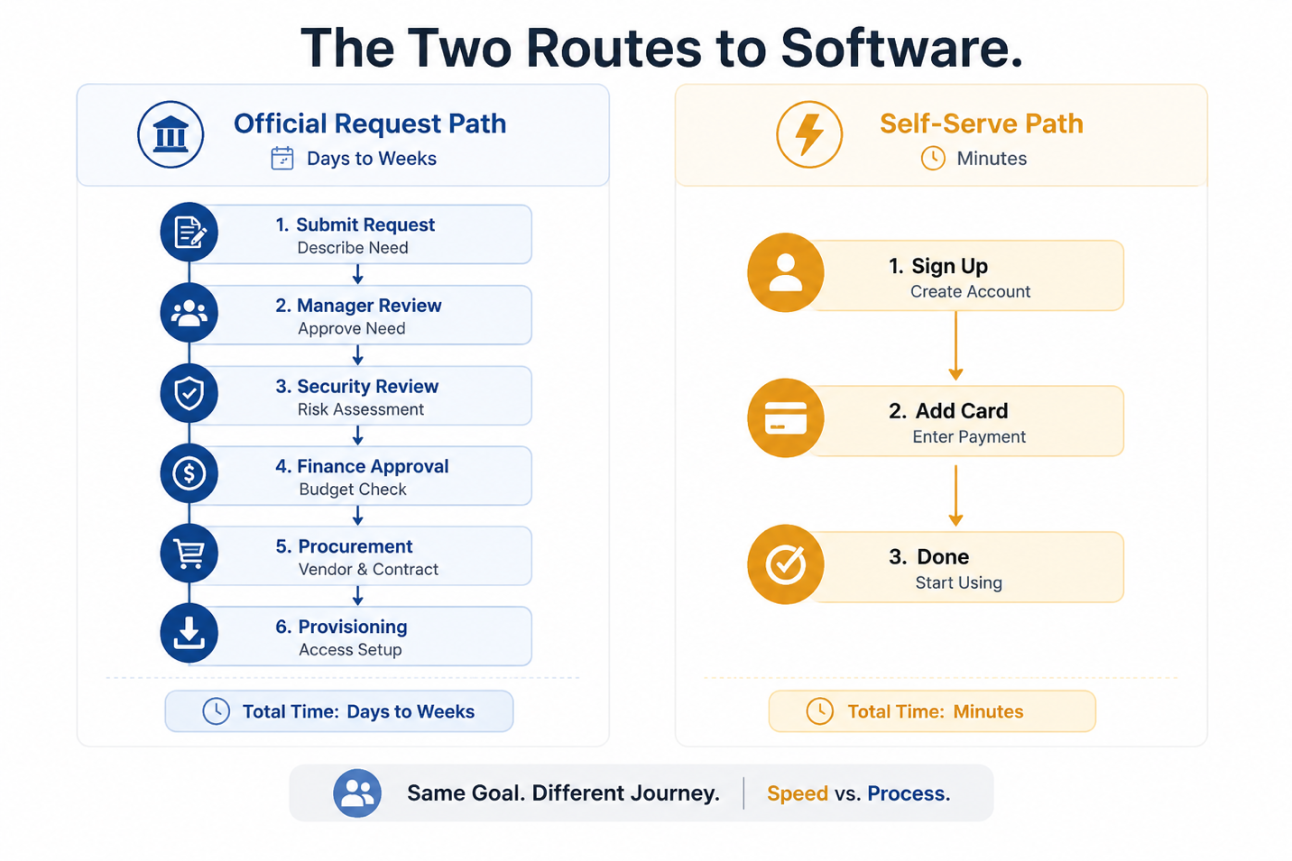
In many cases, this purchase is more of a workaround than an act of rebellion. The approved tool didn’t fit their workflow, and the software request they raised sat in the queue for three weeks. Or your employee wasn’t aware of who approved a new app, as there is no clear process. The personal card then becomes the fastest available means of solving this immediate problem.
That doesn’t mean the risk is small. It just changes how you can perceive this problem. An unapproved app is not automatically dangerous. But that app with no accountable owner, defined data controls, or offboarding plan can quietly gain access to customer information, connected business systems, and even internal files long before IT becomes aware of it.
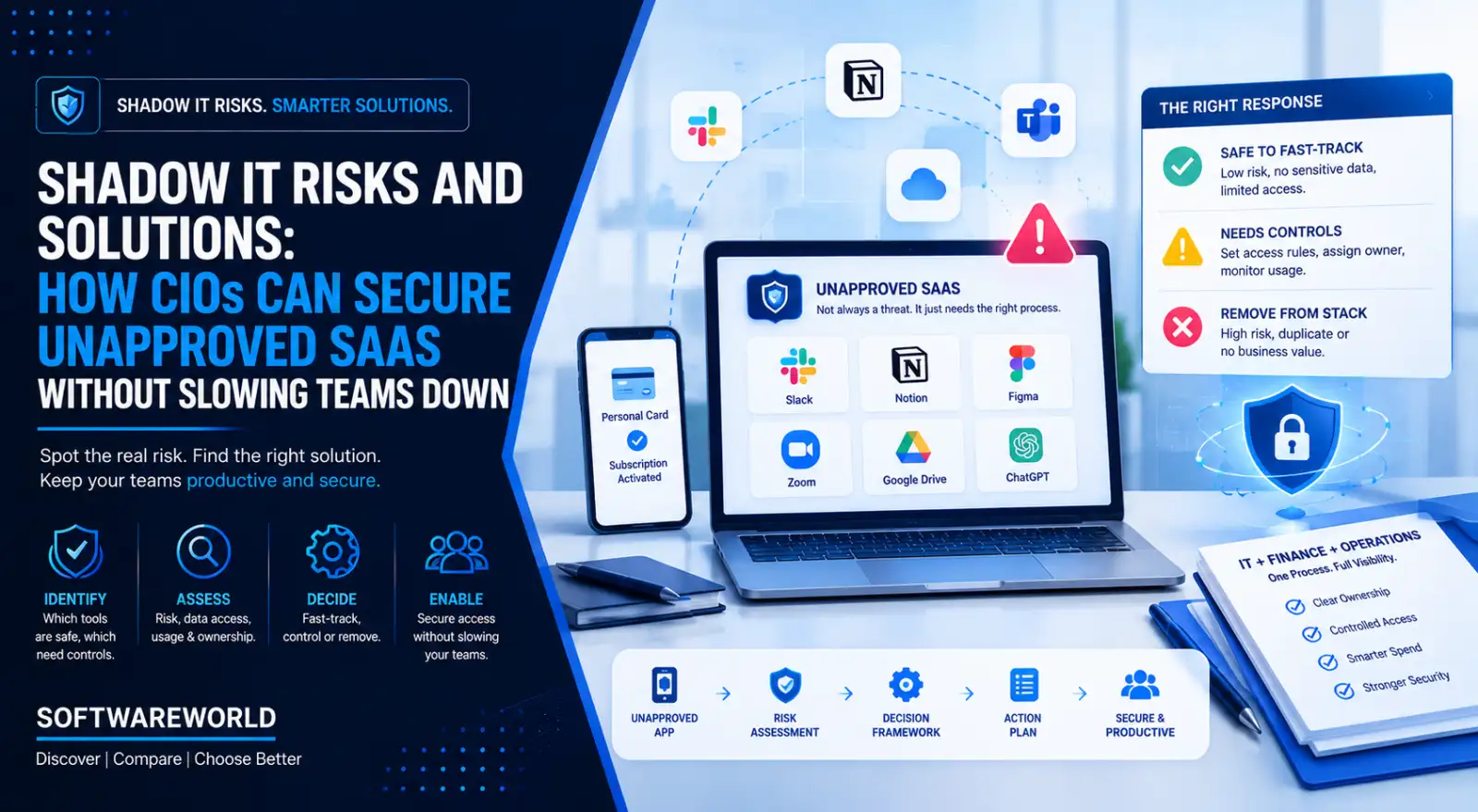
You shouldn’t try to shut down every tool your employees discover on their own. What follows is a practical way to tell which unapproved tools are safe to fast-track, which need controls, and which need to go from your stack, complete with a framework for turning shadow IT risks and solutions into a repeatable decision process.
› Why Employees Bypass IT in the First Place
Your employees don’t start out with the intention to create a security risk. They simply choose a route that helps them get work done faster. Today, that means a five-minute SaaS signup instead of a software request that would probably take three weeks to resolve.
This is more of a speed and service design problem than a people problem. As the approved route takes longer, employees are forced to find another way. The personal card isn’t the root cause. It is the easiest payment mechanism available against the slow, unclear, and poorly matched processes, pushing the person outside the official path.
That distinction matters. Treating every unapproved purchase as deliberate non-compliance may encourage your teams to hide these tools carefully. By understanding the reason behind their purchase, you know the technology operating model is falling short because of approval timelines, tool fit, procurement ownership, and access to emerging capabilities.
| What’s Driving It | What It Looks Like | What It Should Infer |
| Slow approval cycles | The team waits for weeks to get a simple scheduling, reporting, or file tool | Your approval timeline doesn’t match the urgency of the team |
| Poor tool fit | Employees have an enterprise license but use the niche alternative | The approved tool stack doesn’t fit their workflow or team needs |
| Unclear ownership | Nobody knows who approves a new software or what evidence they need | You have a hard-to-find and harder-to-navigate request process |
| Consumer-style buying | A free trial or even a browser extension takes a few minutes to activate | Procurement is competing with self-service checkout experiences. These two cannot match on speed |
| Tool fragmentation | Different teams inherited different systems after growth or acquisition | Your software inventory didn’t keep pace with the organisation |
| AI feature urgency | Teams adopt AI tools to write, analyse, summarise, and automate their work | You don’t have a clear AI adoption or data-use policy |
None of the mentioned drivers excuses bypassing review. But it does give you an answer. It is not a stricter policy alone. You need to establish a faster and clearer route to give your employees a legitimate way to get the tools they need.
Width: 0px, Height: 0px
Width: 1292px, Height: 861px
Width: 1292px, Height: 861px
Width: 1292px, Height: 861px
› The Real Risk Is Unmanaged Access
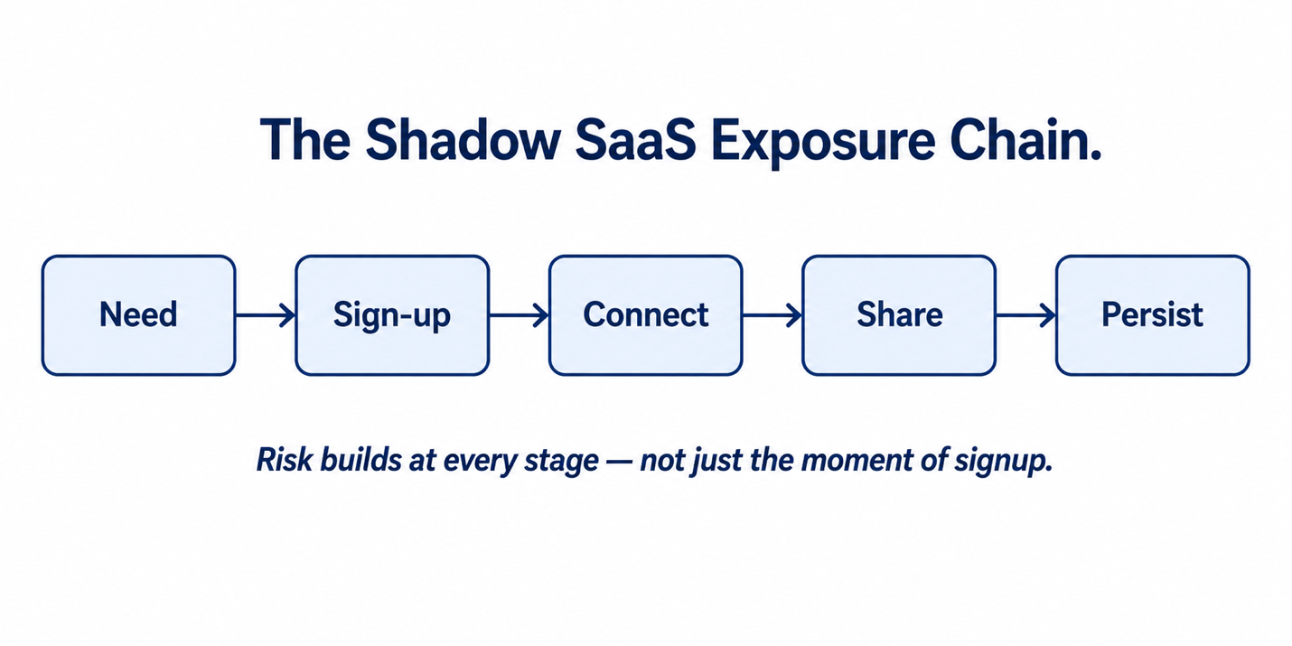
A new app appearing on your IT’s radar doesn’t automatically make it a breach. The actual risk on your side begins when nobody can answer these questions. What data entered the tool? Who can access it? What permissions were granted to the new tool? How can access be removed when an employee, project, or vendor relationship changes?
| Risk Layer | What Can Happen | CIO Question | Example |
| Data exposure | Staff uploads contracts, product plans, customer lists, and even internal reports | What business data is entering the tool? | A team uploads the customer spreadsheet to an unapproved AI tool |
| Identity and OAuth permissions | The app is granted access to files, calendars, emails, contacts, and collaboration platforms | What did A actually authorise the app to do? | A browser-based tool is provided with read access to a shared drive |
| Account ownership | The account is tied to your employee’s work and personal email as well as their personal payment method | Could the company recover this account tomorrow if it had to? | A departing employee is the sole administrator of the project workspace |
| Offboarding and retention | Access, data, API tokens, and integrations outlive the person/project | How can access be revoked and who is responsible? | An inactive account will hold live company files |
| Compliance and vendor risks | Provider hasn’t been checked against data, privacy, retention, security, or contractor requirements | Does the vendor meet the benchmark for this kind of data? | Regulated records are stored in a tool with no formal agreement |
| Financial duplication | Separate teams are paying for overlapping products that in turn perform the same job | Are we already paying for this capability elsewhere? | Three teams are subscribing to different survey platforms. |
| Operational dependency | A business-critical workflow quietly depends on an employee’s unowned and undocumented account | What breaks if this account disappears? | A recurring client-report automation that’s owned by one employee and has no documentation |
Here’s what most shadow IT conversations miss. A free tool connected through OAuth carries more risk than a paid standalone subscription. Subscriptions are purchasing/visibility issues. But OAuth grants that standalone app access into company systems, and it remains active till someone identifies and removes it.
That’s why “is this app approved?” isn’t the most useful first question. You can ask what all it can access, what data it handles, and who is responsible for it.
The answer to this question will determine whether you should fast-track the tool, add controls, replace it with another approved tool, or remove it from your stack.
Width: 0px, Height: 0px
Width: 1292px, Height: 646px
Width: 1292px, Height: 646px
Width: 1292px, Height: 646px
› The Four-Outcome Triage Model
Banning every unapproved tool doesn’t remove the risk. It simply pushes the activity out of view. Your employee switches to another unapproved tool, uses their personal account, or avoids disclosing workflow altogether when they want to solve their problem.
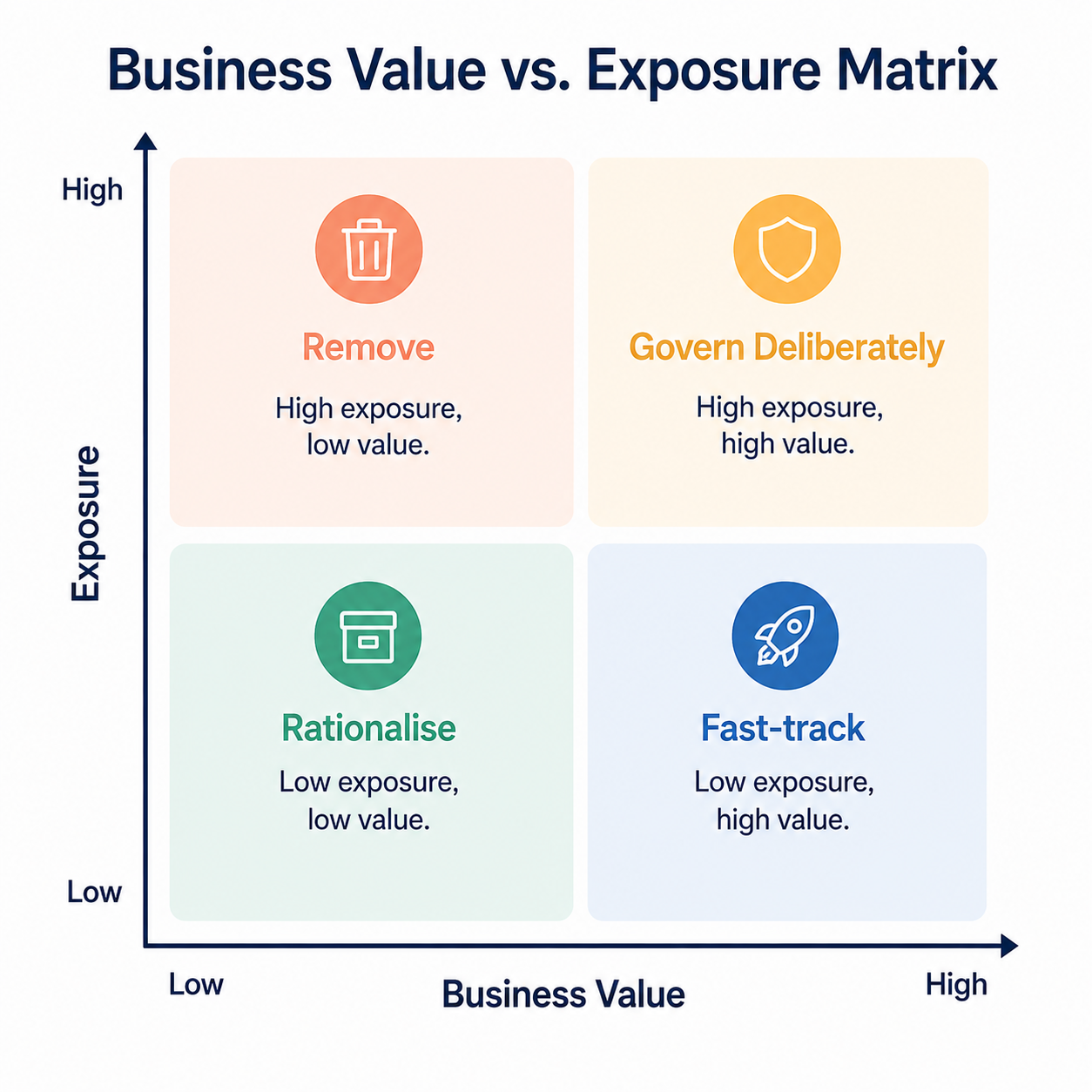
A more useful approach than disapproving of these tools would be to classify them into four categories. The aim of this approach is to have a clear and consistent decision using the value it provides and the exposure it creates.
| Outcome | When It Applies | IT Action | Employee Experience |
| Approve and govern | The tool meets your legitimate business need and even passes security, privacy, and ownership | Assign a business owner. Configure SSO wherever possible, and document permitted data use. Also establish renewal and offboarding controls | The team gets to keep the tool with clear guardrails |
| Fast-track with Conditions | Your team has an urgent need and full review hasn’t been completed yet | Limit permissions to access data, restrict the number of users or integrations, and set a review deadline. Define temporary safeguards | A controlled interim option instead of an incentive to go further underground |
| Replace | The use case is valid, but the specific tool doesn’t meet the organization’s needs. | Recommend an approved or comparable alternative that will solve underlying workflow issues | Their problem is solved |
| Contain or Remove | Exposure is unacceptable, required controls unavailable, and no accountable owner is identified | Revoke access, migrate or delete data where appropriate, communicate the reasons, and provide next steps | Clear explanation and replacement path is available |
Sorting the tools from your stack into one of these outcomes takes more than just checking if they appear on the approved-software list. You must weigh these decision dimensions by asking the right questions to decide what happens next.
| Decision Dimension | Questions to Ask |
| Business value | What problem does this solve, how urgent is it, and how many people depend on it? |
| Data sensitivity | What information does it process? Is it public, internal, confidential, customer, financial, or regulated data? |
| Identity access | Does it use corporate login, OAuth permissions, API tokens, service accounts, or administrator consent? |
| Vendor confidence | Does the vendor meet the organisation’s requirements for privacy, security, support and contractual protections? |
| Ownership | Is there a named business and technical owner along with a workable plan for renewals, access removal or offboarding? |
Two apps may look very similar on the surface. They may fall in the same category, have similar price points, and even the same user ratings. But they are completely different decisions once you assess them for these four points.
For example, a standalone low-cost writing tool used for public copy becomes suitable for fast-tracking. The free tool connected to a cloud drive or CRM via OAuth may require immediate containment even when it doesn’t cost you much.
This is the whole point of the model. It shows that you must stay consistent with the decision-making process instead of choosing from a static list of approved brand names.
Width: 0px, Height: 0px
Width: 1254px, Height: 1254px
Width: 1254px, Height: 1254px
› Shadow IT Risks and Solutions: A Governance System People Can Actually Use
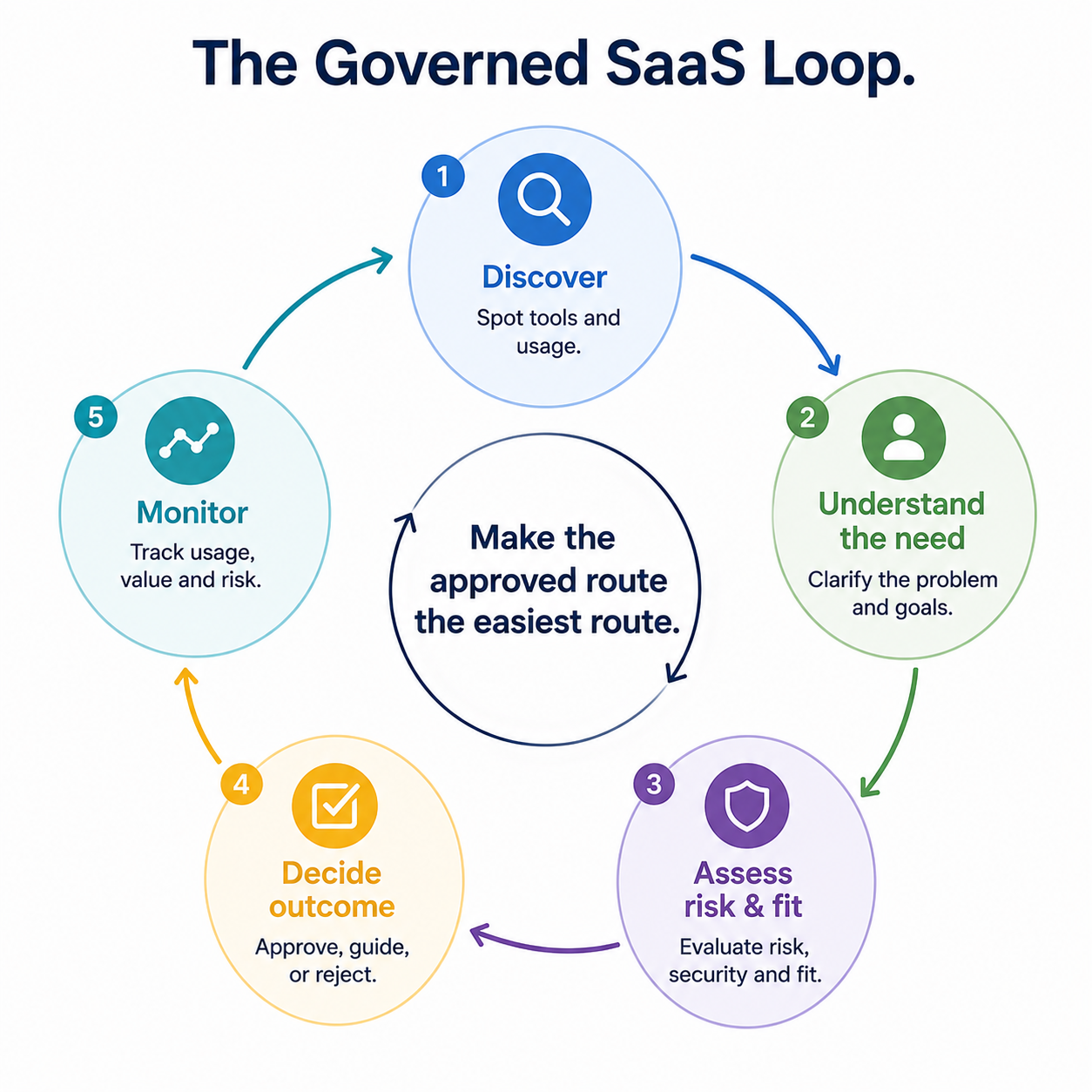
A policy works only when it is easier to follow than to ignore it. That means your shadow IT shouldn’t increase restrictions. It should create a governance system that helps IT identify demand early, access it consistently, and let employees access the tools they need.
| Governance Layer | What to Build | Why It Works |
| Continuous discovery | Combine SSO logs, OAuth consent records, expense data, procurement data, and other available signals. Don’t restrict to an annual audit. | No single source reveals every app. But together, these signals create a more accurate picture of the SaaS management software your teams are using |
| A visible catalogue | Publish all approved tools by their business use case along with product name and IT category | Employees will find a safe option without having to understand the internal approval process |
| A fast request path | Create a short intake form, published Review timelines, and clear risk tiers | Predictable route reduces the incentive to self-provision software |
| Risk-based review | It prioritises assessment according to data sensitivity, identity access, business value, and integrations ownership | IT spends review time where operational dependency and exposure are the highest. |
| Lifecycle ownership | Assign responsibility for renewals, access reviews, data retention, and administration access | Tools don’t outlive your employees, projects, and business needs |
Here’s an example showing how it works in practice. A content team needs an AI transcription tool for customer interviews. They don’t need to choose between a multi-week review and an unapproved signup because IT provided a fast-track path. The path ensures no customer data is uploaded until review is complete, the business owner is named, a small pilot group is defined, and a decision is made within 5 business days.
With this approach, the team gets a timely solution, while IT gets complete visibility into the tool, data it processes, people using it, and conditions for wider rollout.
These are the signs that indicate the governance model is improving.
- The number of newly discovered unapproved apps trends down over time
- The time from software request to low-risk approval decision is shorter
- Fewer teams request the same unmet capabilities repeatedly. This indicates the approved catalogue is widely useful.
Your goal is to make the approved route easier, faster, and more reliable than a workaround.
Width: 0px, Height: 0px
Width: 1254px, Height: 1254px
Width: 1254px, Height: 1254px
› Turn Your Hidden SaaS Demand Into Better Software Strategy
Every time a team buys software outside the approved process, it is telling your IT that the current stack doesn’t fully meet their work requirements. Repeated shadow adoption helps identify security risks and demand signals you can investigate.
That doesn’t mean IT should standardise every tool an employee selects. The original app may create unacceptable data, ownership, vendor, or access risk, but they still need to understand the use before approving.
While software research and comparison helps gather information, it cannot certify if the product is safe for the specific environment. That would be the responsibility of your security, privacy, legal, and procurement teams. But this research can help IT move from “someone bought this tool” to “we understand the category, credible alternatives, and questions to answer before standardising” faster.
Using category research, product comparisons, and integration information helps you make a better software decision.
› Conclusion
Employees will continue to find, take trials, and buy software at consumer speed. You cannot contain that behaviour. But trying to centralise every software decision through slow or unclear control is not a realistic answer either.
The goal is to make the safe, approved route faster and easier for your employees than the workaround. Combine continuous discovery with proportionate triage, clear ownership, and practical approval paths to manage shadow IT risks and solutions.
The next unapproved app your team discovers isn’t a failure to prevent, but rather evidence that your employees need a faster decision or a missing capability. The question is whether your governance system is ready to use that information.
Before your team standardises a new tool, compare credible alternatives by business fit, integrations, pricing models and vendor support. Use the research to create a stronger shortlist and then apply your procurement, privacy and security review.
› FAQs
1. What is shadow IT?
Ans. Shadow IT is a stack of software, cloud services, workflows, and devices employees use for their work without formal IT approval or lacking central visibility. It includes Saas subscriptions, browser extensions, AI tools, integrations outside normal procurement, and file-sharing services.
2. Why do employees buy unapproved SaaS tools with personal cards?
Ans. Employees buy unapproved SaaS tools with their personal cards because the official process is slower than the work can afford to wait. It also happens when existing tools don’t fit their workflow, or they don’t know how to request a new tool. The card is a symptom of an unmet need or high-friction process.
3. What should CIOS do first on discovering shadow IT?
Ans. The first instinct is to block the tool. But always start by determining what data it handles, what identity/permissions it has, and whether there is an accountable owner. Also ask whether access can be removed and whether there are approved alternatives to the tool. Once you have the answers, classify the tool as per the governance framework discussed.
4. How can IT reduce shadow IT without creating a restrictive culture?
Ans. Create safe options that are easier to use than workarounds. Maintain a visible catalogue of approved tools, keep the software request route fast and clear and use proportionate risk reviews. Explain why a particular tool is accepted, restricted, replaced or removed.