On this page
Every year you stay with the wrong software costs you more than migration ever would. You spend on workarounds, support tickets, and features you have quietly stopped asking for.
Yet, you still delay the software vendor migration for a single reason: the fear of losing years of customer data in the process.
While that fear is reasonable, it is also solvable.
Width: 1292px, Height: 706px
Width: 1292px, Height: 706px
Width: 1292px, Height: 706px
Width: 1292px, Height: 706px
Width: 1292px, Height: 706px
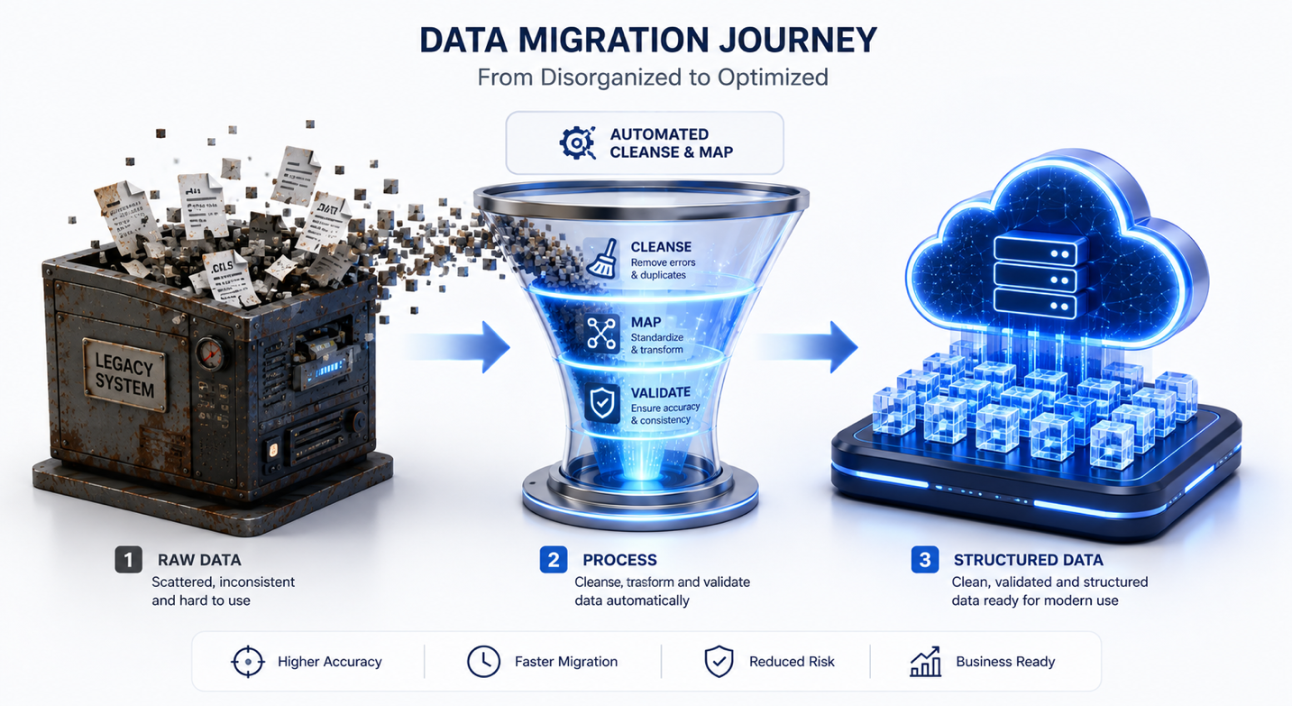
So, is it safe to migrate customer data between platforms? Yes, only when you break it into manageable steps instead of treating it as a single leap.
Done this way, moving platforms becomes a project you can plan and control at every stage. Skip that planning, and you aren’t avoiding the risk; you are just taking the jump blind. The ultimate goal isn’t to make that switch alone. It is to know exactly what could go wrong before you start and be ready for it anyway.
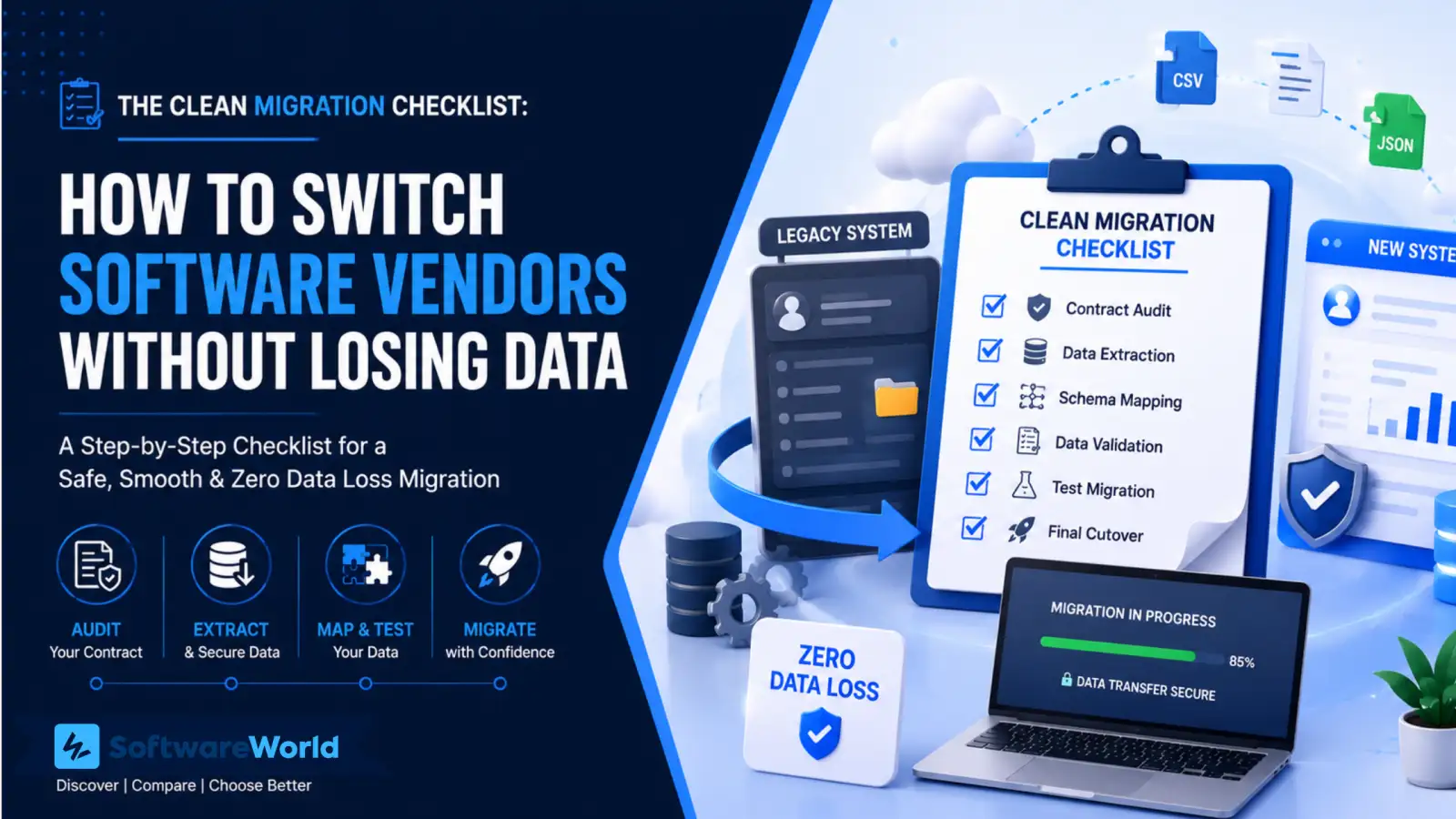
In this guide, we break down the entire process into four phases, from contract audit to zero-downtime cutover, enabling you to check, test, and verify before moving production data.
› TL;DR: The Clean Migration Checklist
Most data loss during a software vendor migration isn’t caused by the switch. It’s caused by a step that you skipped or worse, assumed done without verifying it. Closing that gap is the difference between a migration you control vs the one you are hoping goes well.
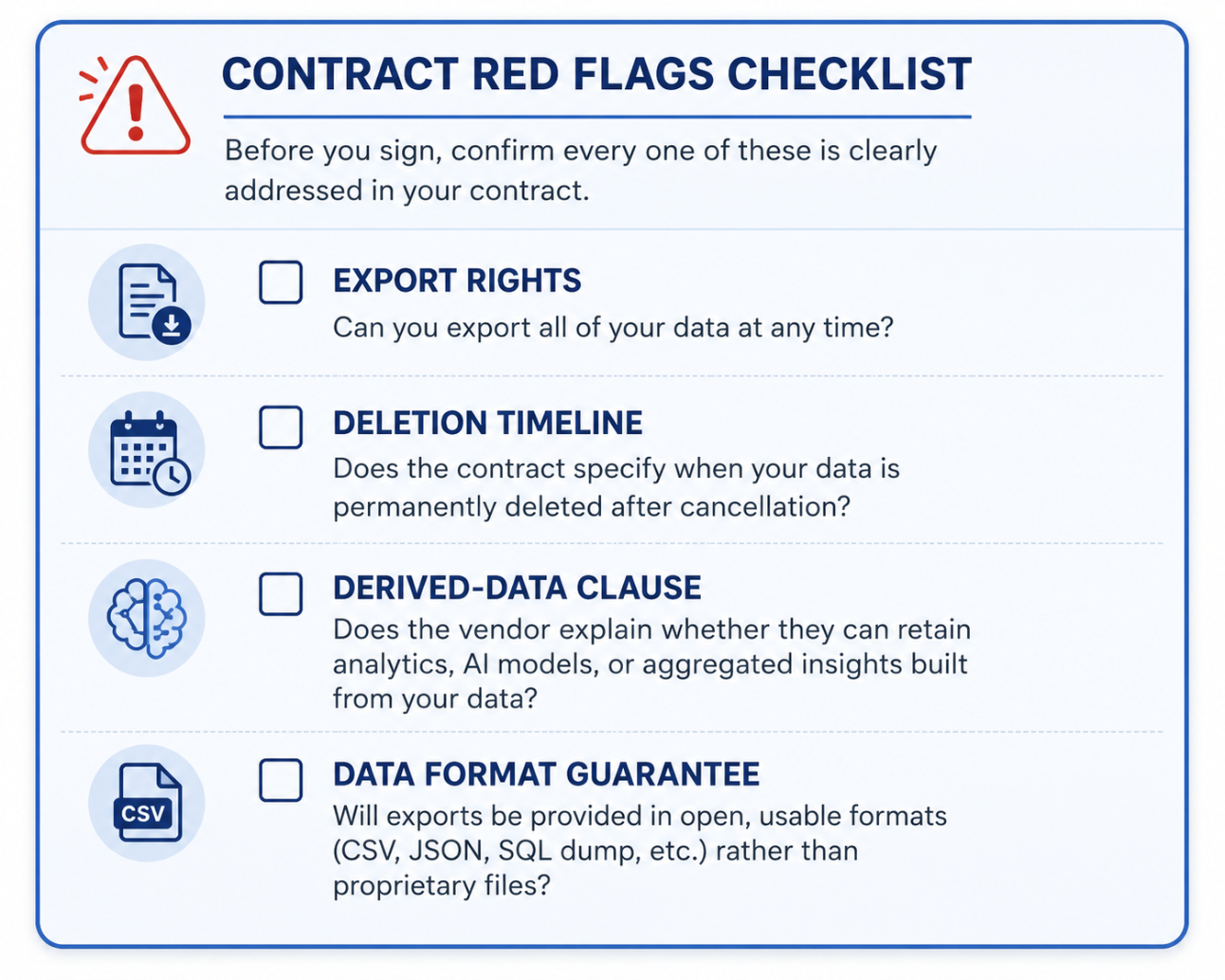
The Legal Check: Audit your contract for export rights, deletion timeline, and who owns the derived data before starting with technical work
The Mapping Fix: Map every field between your old and new systems. Check data formats and character encoding. Most corruptions happen here
The Trial Run: Test a 10% sample before committing your full data set. Catch mapping errors while stakes are still small
The Safety Net: Run both systems in parallel during cutover. Have a rollback plan you have tested, not something you improvised mid-migration.
› The Hidden Trap: Vendor Lock-In and Data Ownership
Software vendor migrations fail legally before they break down technically. Vague contract language lets your vendor hand you a “reasonable export” instead of the full one. They bury data ownership terms in fine print and leave deletion timelines undefined. By this time, you are already negotiating exit with them.
Sorting this out isn’t legal busywork; it is how you protect your data and budget before starting the technical work.
The average enterprise migration project costs $315,000 after you include data migration, refactoring, retraining, and downtime. That’s reason enough to lock down contract terms early.
Here’s everything to check before you sign a contract.
- Export Rights: Confirm your contract guarantees a full data export. Vague language here will cost you weeks of back-and-forth before getting a usable file
- Deletion Timelines: Some vendors are contractually bound to purge your data within 30-90 days of offboarding, while others aren’t. Know which one you are dealing with before leaning on their backup.
- Derived Data Ownership: Any analytics or AI-generated insight on the platform using your data may technically belong to them. It’s a trap most migration guides skip to mention.
Gartner research backs this up. 58% of customers who feel trapped by a vendor eventually leave anyway. These switching costs just delay the decision; they don’t prevent it.
Fifteen minutes with your legal team saves you weeks of pain later.
› Phase 1 Pre-Migration Data Extraction and Legal Audit
Legal groundwork clear? Good. Now let’s make sure the data you are extracting is actually trustworthy, not just complete.
Safe data extraction gets built in from the start or skipped entirely. Avoiding it makes you carry your old problems to a new platform as is.
» Audit Contracts
Go back to your vendor SLA and confirm data export clauses in writing. It shouldn’t be what came up in a sales call. If the language is vague about what you are entitled to, get clarity before extracting anything.
» Secure Formats
Insist on universal, uncompressed formats like CSV or JSON rather than a proprietary export. Proprietary formats are a quiet form of vendor lock-in. They make your data harder to use anywhere else, including on the platform you are switching to.
Confirm the dedicated data extraction tool pulls out data cleanly and supports open formats natively before committing to it.
Width: 0px, Height: 0px
Width: 1292px, Height: 1034px
Width: 1292px, Height: 1034px
Width: 1292px, Height: 1034px
» Backup Protocols
Create immutable and isolated snapshots of your legacy database before moving anything. This is separate from the regular backup schedule. It’s a frozen copy you return to only if something goes wrong later.
This phase is cheap insurance. Skip it, and every later phase inherits the risk.
› Phase 2: Closing the Compatibility Gap Schema Mapping
Data loss during transition rarely happens with a loud failure, a crash, an error message, or something you would notice immediately. It happens quietly, in the gap between how your old system stored a field and how your new one expects it.
That is schema mapping. It is the single-most common place a software vendor migration goes wrong without anyone realising until weeks later.
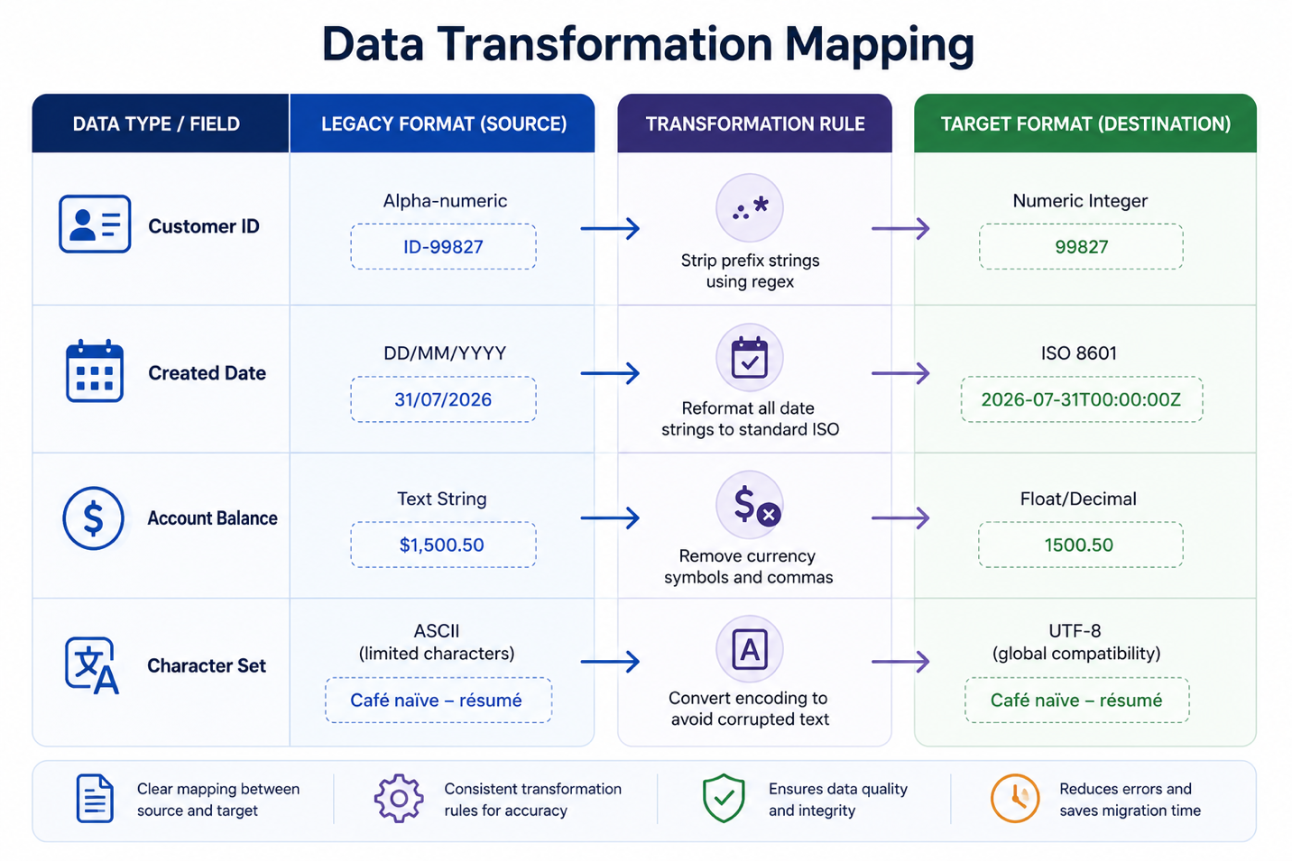
Fields may not match between your legacy system and the new one. For example, a customer ID is stored as an alphanumeric string in your existing platform. However, it must be converted into a clean integer for the new system to understand it.
Different date formats lead to unreadable data post-transition. That’s why you must map every field by hand and account for these mismatches before migration. Double-check everything before you hit the button for migration.
| Field | Format in Legacy System | Format of New System | What Should Happen Before Transition? |
| Customer ID | Alpha-numeric. Example: ID-99827 | Numeric Integer 99827 | The prefix ID must be removed. Only the integers must be present. |
| Created Date | DD/MM/YYYY 31/07/2026 | ISO 8601 format. YYYY-MM-DD with time format (2026-07-31 T00:00:00Z) | The standard date formats are standardized to ISO norms. This includes time as well. |
| Account Balance | Text String $1,500.50 | Float/Decimal 1500.50 | Currency symbols, commas, and other strings are removed. Only the numbers and decimals are present. |
| Character Set | ASCII-limited characters | UTF-8 global compatibility | The characters are re-encoded to achieve global compatibility |
Width: 0px, Height: 0px
Width: 1292px, Height: 861px
Width: 1292px, Height: 861px
Width: 1292px, Height: 861px
A character encoding mismatch can easily derail your migration efforts. ASCII to UTF-8 conversion errors quietly lead to corrupted names and addresses in your new system. You only encounter these issues after the system goes live and support tickets start coming in.
UTF-8, defined by IETF standard RFC 3629, is a protocol your new system expects. By converting your existing characters to this early, you can avoid explaining corrupted records to your team after the go-live stage.
› Phase 3 Test Before You Trust: Pilot & Verification
Your plan looks good on paper, but can it survive contact with real data? That’s the question this phase asks and answers. It helps catch mistakes before they touch your full dataset. The cost of being wrong is still small at this point.
Start with a pilot test. Migrate only 10% of your sample to get started. It’s fast, low-risk, and helps identify formatting issues, mapping errors, and missing fields while you can still fix them.
Check if your 10% data arrived correctly into the new system. The row counts should match between the source and target systems. Review using cryptographic checksums to catch corruptions that simple counts miss.
Next, stress-test the new system. Run a traffic spike with realistic workloads. You will know if the system will buckle under real user load or not.
We use the same formula to evaluate and verify the software on our site. Remember, a software vendor migration deserves no less scrutiny than the tools you are migrating to.
A single failed pilot costs you a day. But a failed migration costs you both data and the team’s trust. So, choose wisely.
› Phase 4: The Zero Downtime Cutover (And What Happens When It Goes Wrong)
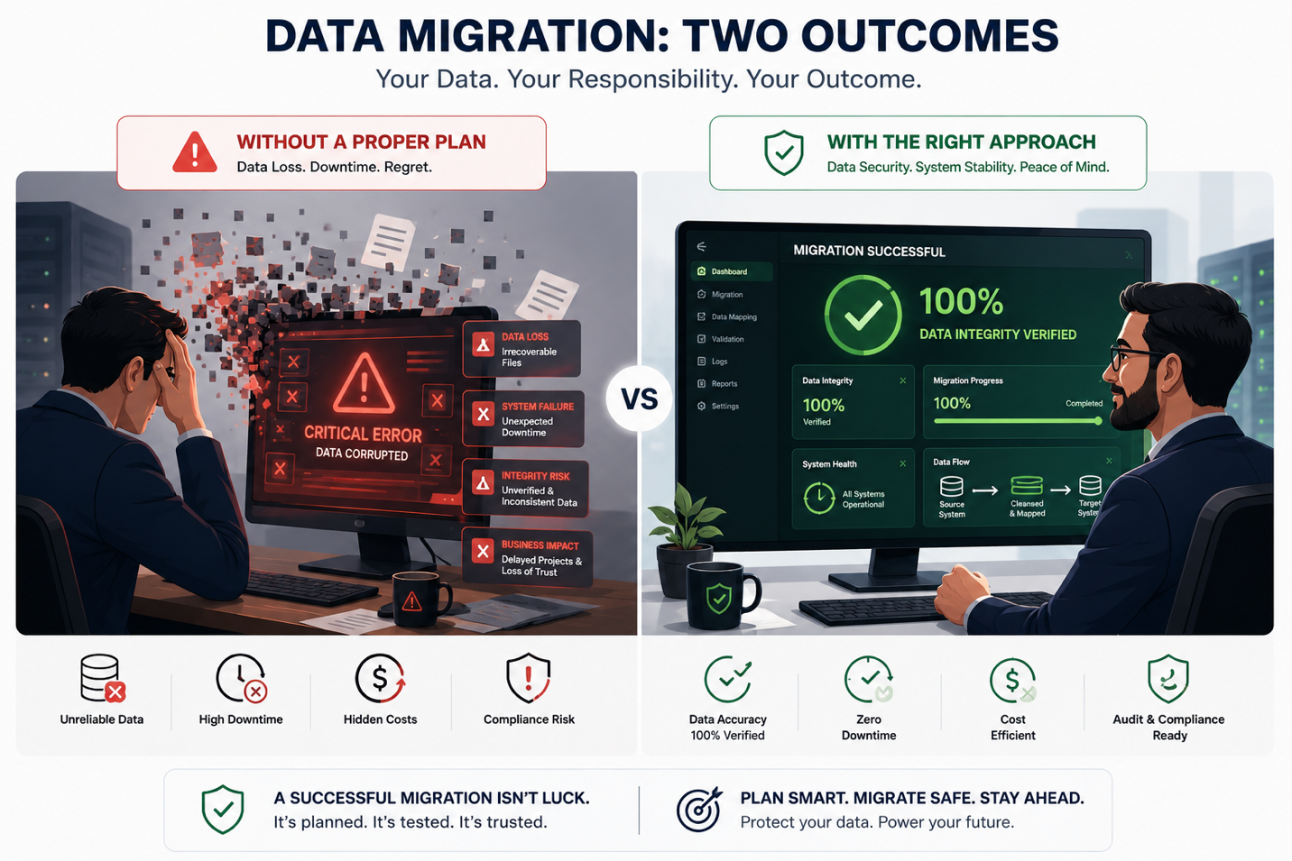
Every phase till now has been building towards this moment. But one thing worth remembering is that zero-downtime cutover is a sequence of small and reversible steps. It is not a single irreversible jump. Treat it that way, and the fear surrounding this phase suddenly disappears.
» Freeze the System
Lock your legacy system so no new data enters while cutover is happening. A database that keeps changing during migration causes mismatched records even after a clean pilot.
» Run in Parallel
Let your new system handle real traffic alongside the old one. Run it side-by-side for a short evaluation window. Compare outputs before fully committing to the new system. This is your cheapest and final window to catch a problem before your team and customers start relying on the new platform completely.
Width: 0px, Height: 0px
Width: 1292px, Height: 861px
Width: 1292px, Height: 861px
Width: 1292px, Height: 861px
» Ready a Rollback Plan
What happens when something goes wrong mid-cutover? Most migration guides don’t talk about this phase. You need to have a tested rollback script ready before the process starts. Your team should be able to reverse cutover in minutes, not days.
That’s what makes this entire checklist trustworthy even under pressure. It’s not that nothing can go wrong. But, if and when it does, you are fully prepared for it.
› The Clean Migration Checklist (Summary Matrix)
A clean migration doesn’t mean nothing went wrong; it just means you didn’t leave anything unverified.
A software vendor migration touches all facets of your organization, IT, data, and even operations simultaneously. It’s easy for each team to assume someone else has covered a particular gap.
That’s why you must use checklists. They help verify every assumption before progressing.
We have created a matrix to solve this gap. It names every stage, what needs to happen, who owns it, and how to verify completeness.
This migration unfolds in five stages.
- Pre-migration: Locks down your legacy rights to extract data. Create an untouched backup as a safety net
- Data Cleansing: Remove duplicate and stale records. You won’t migrate clutter into a clean system
- Testing: Run a small-scale pilot to catch mapping errors before they impact your full dataset
- Cutover: It is the live transition. Freeze your old system. Run both platforms in parallel while having a rollback plan active in case something goes wrong.
- Post Migration: Decommission the old platform. Make sure old data doesn’t sit around as a security risk.
| Migration Phase | Critical Task | Primary Owner | Verification Method |
| Pre-Migration | Validate contract extraction rights | Legal/CIO | Signed data release confirmation |
| Pre-Migration | Create immutable system backup | Database Admin | Cryptographic checksum matching |
| Data Cleansing | Remove duplicate and stale records | Data Steward | Row-count reduction validation |
| Testing | Execute a 10% sample pilot run | QA Lead | Automated schema validation testing |
| Cutover | Freeze system and run two systems in paralle | Operations Lead | Dual reporting system reconciliation |
| Cutover | Active rollback plan (if needed) | Operations Lead | Rollback script execution log |
| Post-Migration | Decommission old software platform | IT director | Secure data shredding certificate |
Notice the pattern in this table. No task is marked complete because someone said so. Each task has a paper trail, signature, hash, log, or certification.
Data loss during transition rarely happens because you skipped a step during the process. It happens when you assume the step was done correctly and never verified it.
Print this table, attach it to your migration ticket, and check off rows as they are verified, not completed.
› FAQ
1. Is it safe to migrate customer data between software platforms?
Ans. Yes, when you use the right process. Backups, a tested pilot, and a rollback plan turn your migration into a project you can control and succeed with. Most data loss traces back to a skipped or unverified step.
2. How long does a zero-downtime software migration take?
Ans. It depends on your system’s complexity and data volume. Most migrations run both old and new platforms in parallel to check for errors and issues before moving to the new system entirely. This happens for a few days, not weeks.
3. What data should never be migrated as-is?
Ans. Avoid migrating duplicate records, stale entries, and unresolved character-encoding issues. Clean this data before starting with the transition. If you don’t, these errors would corrupt your new system before you catch them.
Ans. Map every field before you migrate the data. Don’t rely on row counts alone; verify each piece of data with checksums. Row counts can easily match even if the data on it didn’t move into the new system. Corruption checksums catch these count mismatches early in the migration.
› Conclusion
Whether it is corrupted records, downtime, or vendor lock-in, every fear points towards the same root cause. It happens only when you treat migration as a single leap instead of small, verified steps.
Follow this checklist and your software vendor migration is no longer a risk you absorb. It becomes a project you run and launch successfully.
Once you have decided to make the switch, you should use this planning mindset to choose the next platform.
Explore pre-vetted and peer-reviewed alternatives on SoftwareWorld before you decide anything.