On this page
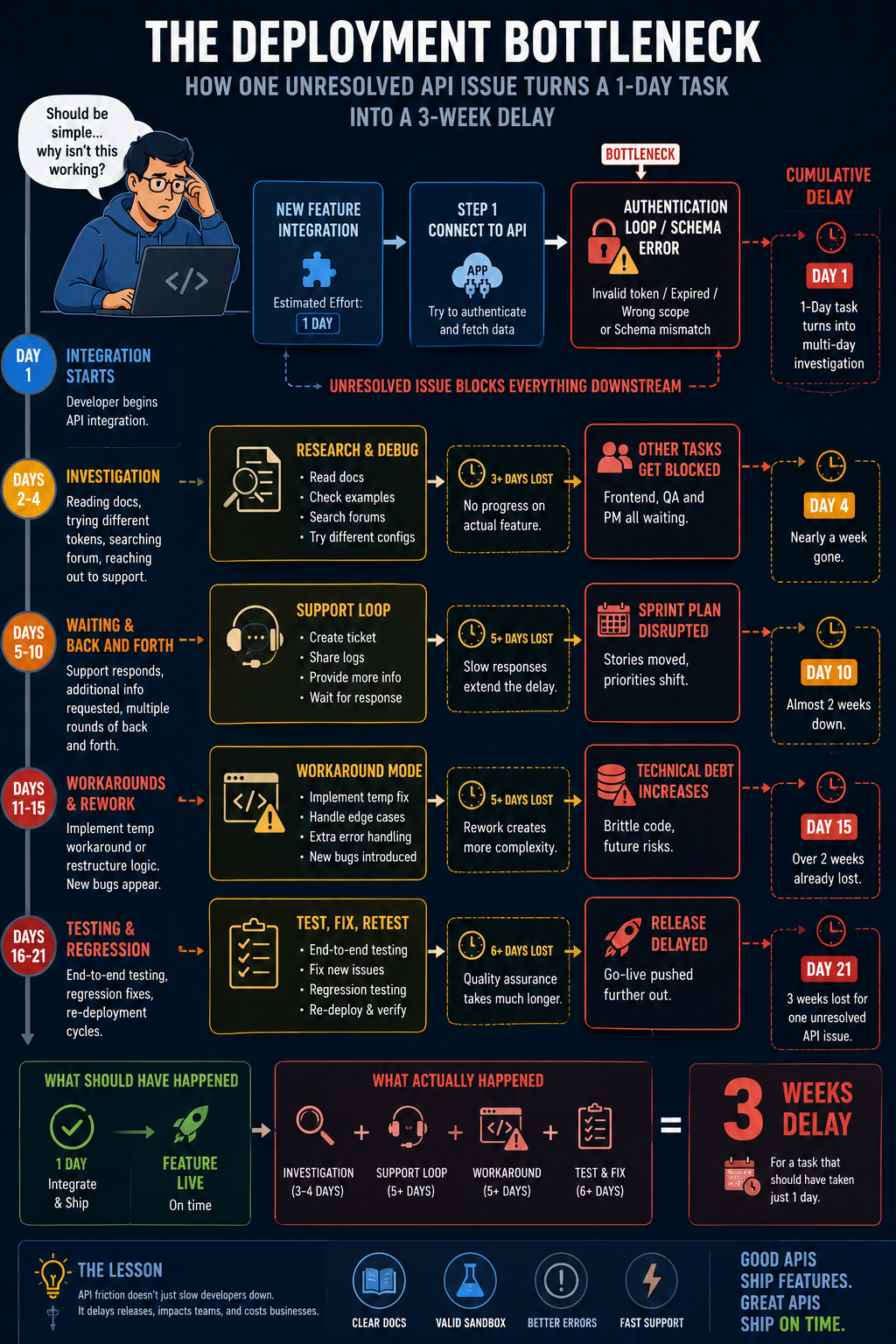
Consider a situation where you have signed the contract with an approved budget and the leadership has taken this software as a win. Six weeks into the purchase, your system is still offline.
Authentication fails without any warning and schemas don’t match. If something breaks during the integration, your developers have to debug cryptic error codes with no documentation to guide them.
Looking back, that demo session was incredible and the sales representative you interacted with promised a quick rollout. So, what went wrong? Somewhere between your purchase and production, your deployment was delayed, and no one on the buying team can explain why.
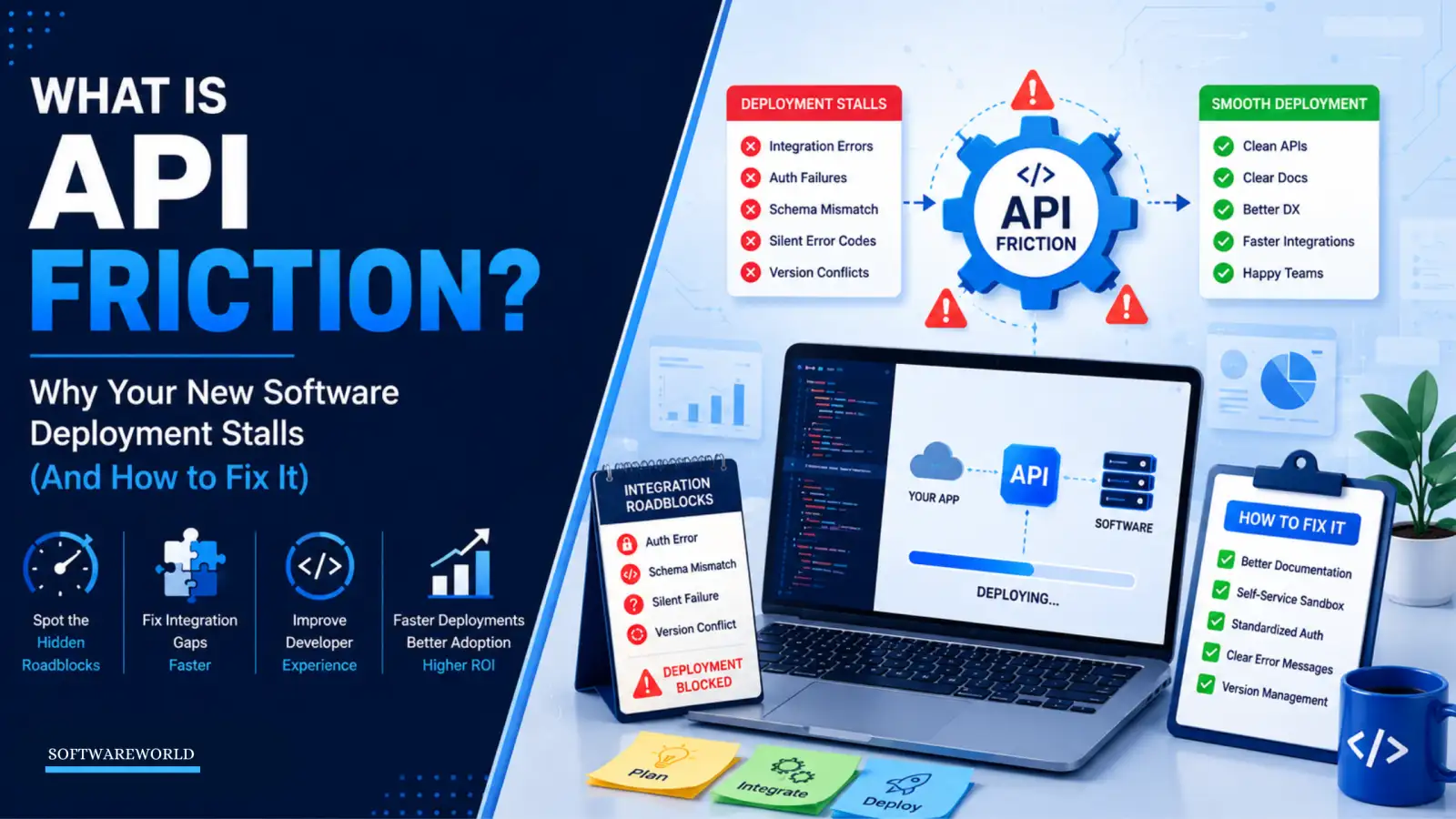
The problem here is API friction. It is the hidden technical tax your developer must fight before going live with your software.
API friction, not process failure, stalled your deployment. The best part is you can fix it at the design level.
Learn where this friction actually comes from and what to do about it before your engineering team faces an obstacle.
› TL;DR: Key Takeaways
A six-week delay in your software deployment doesn’t happen because your engineering team lacked the skill or the internal process failed. It occurs due to API friction that causes authentication problems, rigid schemas, and cryptic codes.
You cannot close this gap between your demo and live integration version with a document refresh. Naming the friction is your first step. Measuring it would be step two. Redesigning your developer’s first touchpoint is what actually turns a shelf-bound purchase into a live one.
The Diagnosis: API friction is just one layer below the interface you assessed in the demo version. That’s why you weren’t able to see the silent error failures or schema issues it carried.
The Metric: Time-to-First-Hello-World (TTFHW), how long it actually takes your developer to get one working call through. It’s minutes, not weeks, if the API you are integrating is built right.
The Fix: Ask for self-service sandboxes, strict OpenAPI versioning, and contextual error payloads to close these delays.
› The Hidden Anchor: Defining API Friction in Modern Deployments
When you invest in new software, a polished interface, strong feature checklist, and confident sales demo act as a catalyst. None of these tells you how difficult it is to connect the software to everything else it needs to work with.
Weeks after you signed the contract, you and the rest of the leadership are left asking why the deployment stalled. The immediate is to blame project management or organisational inertia.
In reality, the issue was always there, just one layer underneath the interface you evaluated during the demo session, inside the API layer. The problem you have been trying to fix is typically API friction.
Width: 1024px, Height: 1536px
Width: 1024px, Height: 1536px
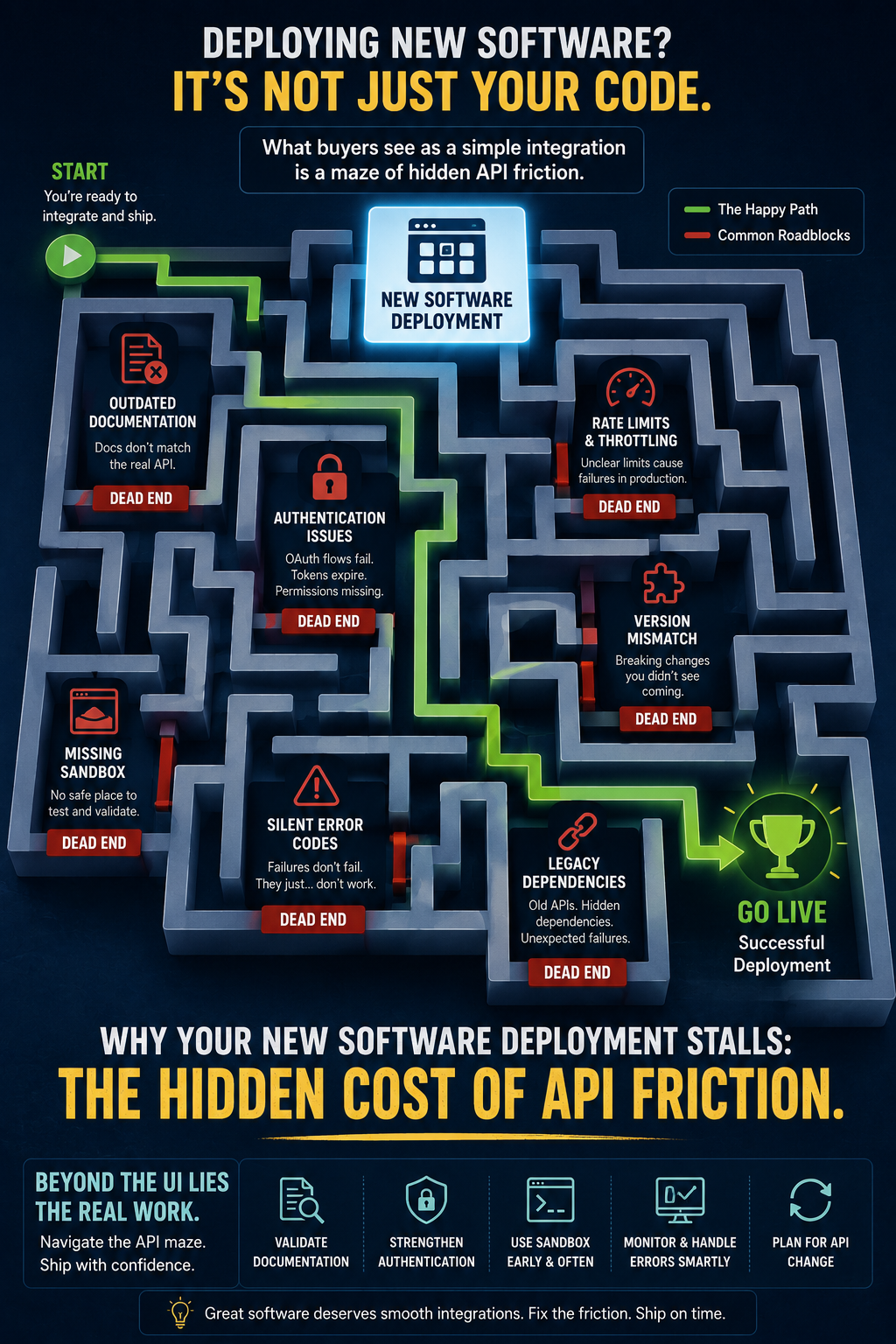
» Table 1: API Friction Roadblocks and Their Root Causes
| Technical Friction Roadblocks | What Happens? | Why is Deployment Delayed? |
| Outdated Documentation | You are reading an API version that was shipped two updates ago | Your developers wasted their days copy-pasting examples that won’t work |
| Authentication Issues | OAuth tokens expire mid-session. Project outlines aren’t documented. | Basic data transfer is blocked before testing begins |
| Missing Sandbox | There is no safe environment for testing. It comes with just a production environment. | Testing can put the live systems at risk |
| Silent Error Codes | You don’t get an error code when integration fails. It stops working | Debugging becomes guesswork without a starting point |
| Version Mismatch | A vendor update changes your API behaviour without warning. | Integration stops working suddenly, even though no one changed the code |
| Legacy Dependencies | There is a workaround, but it was never documented. So, your team doesn’t get it. | Nobody on your current team can safely modify the legacy system without risking breaking it |
Most things written about API friction reduce it to bad documentation. But they miss talking about what all the actual cost hides.
To understand this friction better, you must decipher the cognitive, architectural, and operational load your developers face while trying to integrate with or maintain the software service.
It exists in every unnecessary authentication step, unhelpful error message, and outdated code that stands between your team and a working connection.
You can no longer judge the software based on the interface you saw during a demo session. You must judge it based on the developer experience: how easy it is to use the solution during and after deployment.
The moment your internal integrations become difficult to work with, your engineering team will deprioritise this integration. Eventually, your procurement will become a shelf-bound asset that will never go live.
› Why Your Software Deployment Stalls: The Root Causes
Do you think your rollout fails because your engineers don’t have the required technical skill? No. It fails because they lack clarity.
Three design flaws show up again and again across enterprise environments that are the real reason behind onboarding friction.
It isn’t a minor issue. Postman’s 2025 State of the API report found 69% of developers now spend more than 10 hours a week on API related work, with over a quarter spending more than 20.
» Too Much Security, Too Little Access
Security matters and that’s not up for debate. But when security setup is confusing, it is the first thing that slows down your developers.
For instance, a complex or non-standard login process without a clear explanation can instantly slow down your developers’ progress.
Instead of building and deploying a solution, they are stuck unravelling the custom access policies. Additionally, they need to understand how often tokens need to refresh and work around rules nobody documented. All this happens before they can send a single test request.
» Too Much Data, Not Enough Flexibility
A good API should be predictable and easy to work with. But when it runs messy and oversized JSON or breaks when you leave an optional field empty, integrations slow down.
So, your team must write extra code just to hold the connection together. Then a small update ships and breaks everything, causing more delays.
» Failures You Never See
The error just doesn’t tell you anything at all. Often, that is the most frustrating part of all. You could get a generic 400 error or a 500 error with no explanation why it occurred. This makes it harder for you to pinpoint the problem.
Consequently, your developer has to sift through logs and create test cases to identify what went wrong. A truly usable API tells you which field failed, why, and how to fix it.
Width: 1024px, Height: 1536px
Width: 1024px, Height: 1536px
Width: 0px, Height: 0px
› The Power of Usable Interfaces: Why Developer Experience Is Your Best Retention Strategy
Once you know where onboarding friction comes from, the business case for fixing it becomes clear. At the centre of this is developer experience (DX), how easy or frustrating it is for your developer to work with your API. It isn’t just another nice-to-have aspect; it is what decides whether your investment gets used every day or sits on the shelf forgotten.
One simple way to measure DX is Time-to-First-Hello-World (TTFHW). The time it takes for your developer to go from zero to their first successful API call.
By getting this right, your team can go from purchase to production stage in just a few hours. That too without building custom solutions just to get a working connection with the API.
As your engineers don’t need to spend all their waking hours chasing support tickets or forums, they can ship features that you need faster.
Most engineers are vocal about tools that respect their time. This smooth integration becomes their advocacy, which helps majorly during renewal conversations.
» Table 2: Frictional vs High Usability API Design
| Category | Frictional Path | High Usability Path |
| Onboarding | Wait weeks to get approvals | Start working in minutes |
| Errors | No explanation given when something breaks | A clear message telling you what you need to fix |
| Changes | Updates that break your app but don’t offer a warning | You get advance notice before changes happen |
| Documentation | Doesn’t match how the API actually works | Always matches the live API |
› Developer Adoption Friction Points: The Five Pillars of Churn
You will experience five recurring friction points, even after fixing the root causes behind your stalled deployment. These problems quietly convince your engineering team to walk away from the integration.
It doesn’t happen overnight. The friction builds up sprint after sprint until integration quietly slips off the roadmap.
» Out of Sync Documentation
Your developer opens the vendor’s documentation. They follow everything exactly, and even copy the sample from the official guide only to note it failed. The endpoint has changed but somehow the docs haven’t caught up.
Nobody is sure whose fault it is, yours or the vendor’s. So, your vendor starts second-guessing every other line in the guide. A five-minute check turns into a full afternoon, just to confirm if the API even works the way it's documented.
And that isn’t rare. In Postman’s 2024 survey, 39% of developers point to inconsistent documentation as their single biggest roadblock.
» No Safe Testing Space
There’s no sandbox. Testing means risking real data, which is exactly the position no developer should be in.
Either they are expected to test inside a live environment, or you need to request a staging key. That might take some waiting, even days, before a sales representative approves it.
Integration is stuck even before your developer writes a single line of working code.
» SDKs That Fall Behind
Official SDKs are supposed to save your time, not waste it. Install it, and the gaps start showing up fast. Missing endpoints, untyped responses, and errors the documentation never mentioned.
What was supposed to save time turned into an obstacle. Your team ended up building a custom wrapper around the API to make it work. That’s hours of extra work just to get to the starting point the SDK should have provided.
» Unexpected Rate Limit Errors
Midway through testing, requests start failing with a 429 error. There’s no warning or indication of how long you have to wait before trying again.
Your developer had just started to use the API the way it was supposed to be used. But now they are forced to stop building and start writing retry logic instead.
All of it just to work around limits vendors never documented in the first place.
» Stuck With No Support
Eventually someone from your team runs into an edge case the documentation simply doesn’t cover. No amount of digging through forums or troubleshooting guides turns up an answer.
At that point, the only option left is a generic email to get in touch with the support team. It may take days before your developer gets a response. In the absence of a clear way forward, they would flag this integration as a risk and move on to something else more important on their sprint board.
› The Fix: A Strategic Framework to Eliminate API Friction
Fixing API friction isn’t just about documentation refresh. It is a design-level commitment your team can act on immediately. Three tactics consistently close that gap between a purchased platform and one your team actually adopts.
» Build Self-Service Onboarding from Day One
Every manual gatekeeper between your developer and a working endpoint needs to go. This means the moment your team signs up, they should have an isolated sandbox tenant and test keys waiting for them.
And if your team’s already running mature DevOps pipelines, wire it straight into your existing CI/CD setup. Don’t treat it as a one-time task someone has to remember to do. That alone separates a 15-minute setup from a multi-day stall.
» Keep Your API Specifications and Versioning Accurate
Every public endpoint should be tied to a validated OpenAPI specification. That keeps your documentation permanently in sync with what’s running in production. Pair it with accurate versioning at your end, and internal updates on your side will never break a customer’s live integration.
The right API management platform enforces this discipline automatically. It means you are never left waiting for something to break before you notice.
» Errors That Explain Themselves
Every error response should work as a debugging tool, not a dead end. That means when a request fails validation, your API must name the exact field that failed. It must also explain what went wrong and link back straight to the documentation that fixes it.
Get that right, and the barrier to entry drops low enough that deployments stop getting delayed before they even start. That way you turn developer satisfaction into advocacy that shows up in renewal numbers.
› FAQ
1. Why is my software deployment stalling after a smooth demo?
Ans. A demo tests the interface and not the integration. That’s why no one notices the API friction that causes the delay. Complicated authentication, rigid data formats, and even unhelpful error messages can cause this friction. But you don’t experience any of it till your engineering team starts building the solution using the live API.
2. How do I reduce API friction in an enterprise environment?
Ans. Start with these three fixes:
- Access to self-service sandbox
- Properly versioned API specification
- Clear and actionable error messages
Together, they address most deployment delay causes.
3. What are the most common developer adoption friction points?
Ans. The five most common friction points are outdated documentation, no sandbox to test your solution before deployment, SDKs that don’t match the real API, hard-to-reach support, and unexplained rate limits. Any of these can easily stall a well-funded rollout on its own.
4. What is the difference between API usability and integration speed?
Ans. API usability is how easy and predictable an API is to work with. Integration speed is the result of usability. If the API is usable, it integrates faster. A usable API may take some time to implement, but it wouldn’t stall.
› Conclusion
› Conclusion
Six weeks into your software contract, your engineering team shouldn’t be chasing authentication errors or undocumented data formats. A stalled deployment isn’t a people problem. It is API friction, the hidden technical tax, quietly sitting between your purchase and a working integration.
Once you name the problem, you can fix it. Every tactic mentioned here, from self-service sandboxes to clear error messages, exists to move your rollout from stalled to shipped.
Platforms that get this right don’t just close deals faster; they keep developers coming back. That’s something to watch for the next time you evaluate software.
Don’t just look at the interface. Pay attention to the developer experience behind it.
If your integration is still stuck in week six, the solution isn’t to keep adding engineering hours. Ask whether the platform was designed for a fast self-service rollout in the first place.
If your integration is still stuck at week six, the answer doesn’t lie in increasing engineering hours. It is worth asking if the platform was ever built for a fast, self-service rollout.
When choosing your next software platform, weigh API usability as seriously as the interface. A polished UI wins in the demo, but a usable API determines if the deployment actually ships or stalls.