On this page
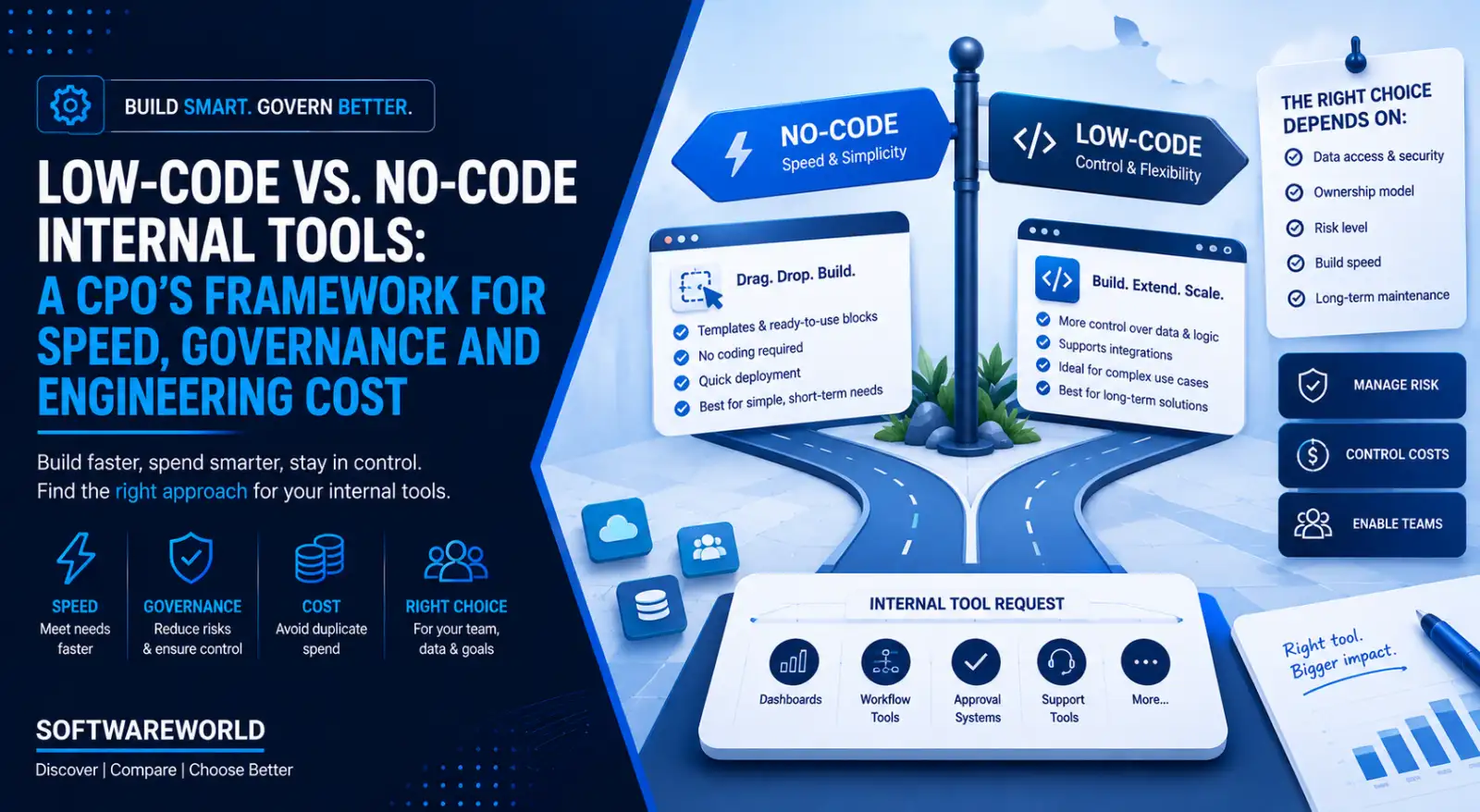
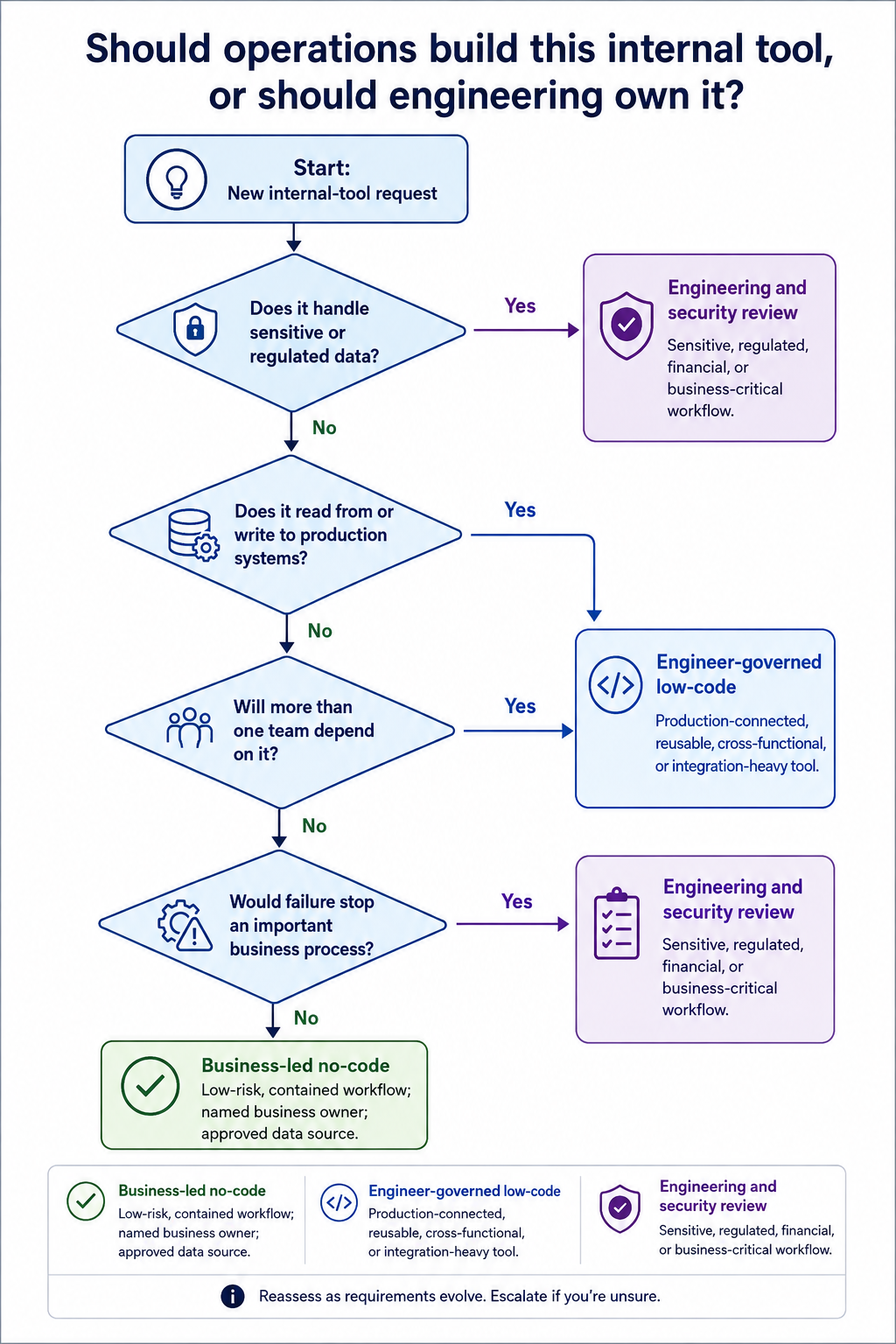
Operations teams can build a low-risk, temporary tool themselves using a no-code platform, provided it doesn’t access production systems or handle sensitive data. But when planning a tool that writes to production data, processes sensitive information, or will be used across multiple teams, it needs an engineer-governed low-code framework.
That is the low-code vs. no-code internal tools decision in brief.
An internal tool request doesn’t arrive with clarity. A dashboard that later becomes integral to operations often starts as a simple request: “support needs a better way to understand incoming requests.”
This guide will help you decide which approach works best for your needs. It doesn’t compare platforms feature-by-feature. Instead, it examines the factors that determine the real cost of an internal tool, like engineering time, platform spend, data risk, ownership, and maintenance. You also learn what happens when a temporary tool breaks or needs rescuing by engineering.
› Why Feature Comparisons Miss the Point
A dashboard can look finished long before it is operationally ready. Templates, drag-and-drop interfaces, and setup time matter when a team needs something quickly. But they don’t answer questions that become important once your team starts using the tool.
- Who owns it?
- Which data can it access?
- Who can change the logic?
- What happens when it breaks during a critical workflow?
Both no-code and low-code platforms can help teams build a usable internal dashboard fast. But what matters more is the level of control your business needs after the launch.
A temporary tracker that uses non-sensitive data may require only a business owner and basic access rules. The dashboard that pulls live customer data, writes back to the CRM, or serves multiple departments calls for stricter and cleaner governance. It requires documented logic, controlled changes, and even someone to maintain the system.
This is why feature comparisons miss the point. A platform isn't just a set of templates, UI components or integrations. Left ungoverned, this is how shadow IT starts, not through bad intent, but through a tool nobody formally reviewed. It becomes part of your company’s operating infrastructure the moment people start relying on it for decisions or to complete work.
Internal tooling isn’t low-stakes just because customers don’t see it.
Width: 0px, Height: 0px
Width: 1024px, Height: 1536px
Width: 0px, Height: 0px
Width: 1024px, Height: 1536px
Width: 1024px, Height: 1536px
Width: 1024px, Height: 1536px
Width: 1024px, Height: 1536px
Width: 1024px, Height: 1536px
Width: 1024px, Height: 1536px
Width: 0px, Height: 0px
The right choice will depend on the risk, data access, ownership model, build speed, and lifespan. Don’t use build speed alone as your deciding factor.
› Three Models, Not Two
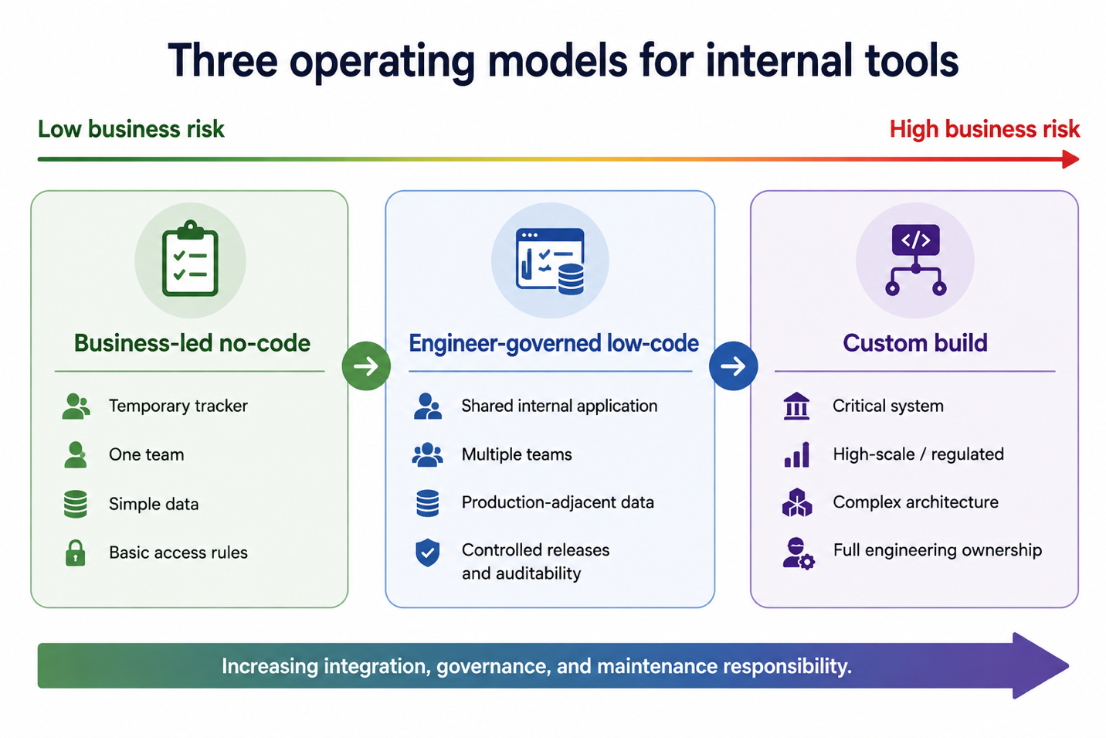
Building internal tools is not a simple choice between low-code and no-code. In practice, companies operate across three models, each with a different balance of speed, control, and maintenance responsibility.
This table shows who typically owns each internal tooling model, what it is best suited for, and where it commonly fails. Use it to identify which model your current request resembles.
| Model | Typical Owner | Best For | Main Failure Mode |
| Business-led no-code | Operations, RevOps, Analysts | Low-risk trackers, lightweight reporting tools, temporary workflow systems or request forms | The data flow is undocumented, and ownership is unclear. Nobody can confidently maintain the logic either. |
| Engineer-governed Low-Code | Engineering, Technical Product Data Teams | Internal admin panels, support tools, tools used by multiple teams, and operational dashboards | The team introduces more technical structure than the simple workflow requires. |
| Custom-build Application | Product and Engineering | High-scale, performance-sensitive, highly differentiated internal system | High upfront engineering effort with long-term maintenance commitment |
What is the real difference between low-code and no-code for internal tools? Retool and Appsmith are examples of engineer-governed low-code platforms. They help technical teams build internal applications faster while retaining greater control over data connections, collaboration, application logic, and releases. Appsmith also supports internal use cases like dashboards, database interfaces, and approval applications. No-code platforms are built for speed and ease of use by non-technical teams. The right choice depends on what the tool touches, not which one is better.
A platform category isn’t a governance model. No-code tools can be easily managed too, and low-code tools can be poorly governed. Check the controls available with your specific plan and the deployment you are considering. This includes role-based permissions, SSO, audit logs, source control, and environment separation. Appsmith documents Git-based version control and CI/CD workflows, while Retool documentation specifies that permissions and administrative capabilities are plan-dependent.
Tools such as Bubble, Glide, and Softr can be a strong fit for a business-led model when workflows remain contained, use approved data and have a named owner.
Don’t try to find which category is better. Look for the platform that offers better technical control of business risk. But if your team decides on a custom build, compare software development companies rather than platforms.
Width: 0px, Height: 0px
Width: 1106px, Height: 738px
Width: 1106px, Height: 738px
Width: 1106px, Height: 738px
Width: 1106px, Height: 738px
Width: 1106px, Height: 738px
Width: 1106px, Height: 738px
Width: 0px, Height: 0px
› What “Fast” Really Costs
The real cost of an internal tool is not limited to the time needed to build it. You can assess it by accounting for six elements.
Total Cost of Ownership = Build + Platform + Integration + Governance + Maintenance + Opportunity Cost
This is the breakdown of each element.
- Build Cost: The time spent on designing, configuring, testing, and launching the tool.
- Platform Cost: The fees you pay for subscriptions, workflow, environment, and environment plan
- Integration Cost: Cost of connecting APIs, databases, authentications, and data transformations
- Governance Cost: Access reviews, documentation, approvals, audit requirements, and ownership expenses.
- Maintenance Cost: Expenses incurred when processes, data sources, permissions, and even integration changes need to be fixed
- Opportunity Cost: The cost that builds up when main product work is delayed as engineers have to build, fix, or maintain an internal tool
Most organisations overlook this final cost.
Consider an example here. An operations team builds a customer-support dashboard using a no-code platform in a single day. Initially, the new dashboard only summarises incoming requests. Three months later, the business needs require a live CRM, customer-tier permissions, and even write-back actions in the tool.
Now it is no longer a lightweight reporting dashboard. It has become an operational infrastructure.
The team must start paying for the integrations, security reviews, documentation, and even access control. All these costs arrive together, usually when the team managing them is already under pressure.
No-code is not “cheap” because it is fast to start. It stays cost-effective for your business till the workflow is contained. Once the tool needs to grow, the cost of retrofitting governance exceeds the early cost you had established.
› Migration Guidance
When a tool outgrows the original scope, you don’t need to start with a panicked rebuild. You still have three options.
If the new requirement is narrow, like an approved integration or additional permission level, retrofit governance around the existing tool. Assign an owner to the tool, document its data flow, and restrict access.
If your tool now needs production write access, several data sources, custom logic, or support from multiple teams, move it to an engineer-governed low-code platform before gaps become incidents.
Lastly, if multiple departments rely on the tool every day, a custom-built application might be the right choice.
Don’t wait too long to decide which path your tool is on now.
› The Governance Test
Answer these five questions before approving any internal tool request. The more “yes” answers you have, especially for sensitive data, production access, and cross-team dependencies, the more likely the tool needs engineering and security involvement from the start.
| Question | If Yes | What It Means |
| Does it read or write to production data? | A failure can impact live operations and customer records | This requires engineering review, a tested connection to production systems, and controlled credentials |
| Does it handle PII, financial, or regulated data? | Data exposure can create financial, legal, and trust-related risks | Use an approved platform, involve security before launch, and restrict access |
| Will more than one team depend on this tool? | It becomes a shared infrastructure | Assign an owner, document how the tool works, and define who supports it when it fails |
| Does it need custom logic or several data sources? | Integrations can get fragile and difficult to troubleshoot | An engineer-governed platform becomes a safe choice in this case |
| Would a failure stop an important process | This tool is mission-critical | Treat this as an application. That means you define access rules, change controls, recovery plans, and monitoring. |
The purpose of a governance test is not to stop citizen development. It is to ensure the level of oversight matches the work your tool is doing.
For instance, a desk-booking tracker is usually built and managed by operations. It uses simple data sources, is supported by a single department, and has limited consequences even when it is unavailable for a few hours.
But the refund console is a different kind of example. It connects to your CRM, accesses customer information, allows employees to approve financial actions, and maintains a record of who did what. That is an internal application with operational, compliance, and even security implications.
This is the distinction that matters because governance doesn’t mean bureaucracy. It just means putting the right controls around the right risk level. For higher risk levels, access controls and important actions should be traceable. Avoid capturing sensitive information in logs.
Having a good internal tooling policy gives your operations a fast lane for low-risk work and a clear escalation path for when your tool starts accessing sensitive data or supporting multiple teams.
› The Decision Matrix
Save this table and pull it out every time you receive an internal tool request. It will help decide whether operations can build it in no-code or engineering should use a low-code framework.
| Decision Factor | Business-Led No-Code | Engineer-Governed Low-Code |
| Primary Goal | Launch a contained workflow immediately | Build a reusable tool using strong controls |
| Data Type | Non-sensitive and non-production data | Operational or production-connected data |
| Integration Complexity | One or two stable and fully approved connections | Multiple systems are connected with custom logic and reusable services |
| Change Frequency | Occasional changes by a small team | Frequent updates that require testing and review |
| User Scope | One team or limited audience | Multiple teams. May have broad internal use |
| Control Requirements | Basic permissions with a named owner | SSO, RBAC, source control, change control, and audit logs |
| Escalation Trigger | Sensitive data, production write access, additional teams | Complexity exceeds the platform’s limits. Might need to consider a custom build |
Read this table from left to right. If your request fits the left column, you can let operations build and manage the tool with no-code platforms. However, if it involves sensitive data, production write access, or use across multiple teams, involve your engineering team early.
This table gives teams a shared way to explain why a “quick dashboard” must be reviewed before launch.
For higher-risk tools, the control requirements aren’t unnecessary processes. They are least-privilege access, records of sensitive actions, and controlled system changes. These align with standard least-privilege access principles used across enterprise security frameworks.
Retool is one such example that offers role-based access control to manage organisation-wide settings and capabilities like SSO, audit logs, and source control. It depends on the plan you have opted for.
› Two Scenarios That Make This Concrete
These two scenarios illustrate how data access and failures impact the right platform decision.
A refund-review dashboard will require access to both customer records and payment history. It will apply approval rules and allow employees to take action based on the outcomes.
If this tool displays incorrect information or processes an incorrect refund, it can create financial, customer-service, and compliance problems. This tool handles sensitive data and writes back to core systems, so it belongs to an engineer-governed low-code environment.
Consider the desk-booking tracker. It doesn’t access customer data, serves a small internal group, and has limited consequences when it fails. At worst, two people would end up booking the same room. It is a contained, low-risk workflow the operations team can build and manage with a no-code tool.
The difference doesn’t lie in how the tool looks or which one builds the version faster. It lies in what happens when the tool goes wrong, is unavailable, or changes without proper review.
When you start with the right question, the right level of technical control needed becomes clear.
› The Bottom Line
Getting the low-code vs no-code internal tools decision right isn’t about which platform looks best in a demo.
Don’t spend your engineering time governing a tool that is genuinely low-risk and temporary. You should also avoid letting a fast no-code solution handle sensitive data, write data to core systems, or become essential to all internal teams without implementing the right controls.
Give operations a safe lane to build contained workflows. But bring in engineering when the tool you are planning has data access, business impact, and integrations that require stronger governance and ownership.
The platform’s template library matters less than this decision. First, decide the level of control your tool needs, then compare internal tool platforms based on governance features, deployment options, data access, and long-term fit.
Ready to shortlist a platform? Compare no-code vs low-code internal tool builders by deployment approaches, security controls, integrations, and pricing.
› FAQs
1. Can no-code tools be secure?
Ans. Yes. Security depends on how the tool is configured and the platform plan you have chosen. It doesn’t depend on the tool category. Most exposure comes from ungoverned use, such as no one reviewing what data the tool touches or who accesses it.
2. When should we migrate a tool from no-code to low-code?
Ans. You can move it when the tool starts writing to production data, handles sensitive data, or is used by more than one team. These three triggers matter more than how long the tool has existed and how well it works at the moment.
3. Do Retool and Appsmith require engineers to use them?
Ans. Both are built for technical users and deliver most value when someone with a coding background is involved in setup and maintenance. While non-engineers can work on parts of the tool, building and governing on these platforms works best when the engineering team gets involved.
4. Is no-code automatically shadow IT?
Ans. No. A no-code tool becomes shadow IT when it’s built and used without anyone formally reviewing what data it touches or who owns it. A reviewed and completely documented no-code tool with a named owner is governed, regardless of who built it.