
On this page
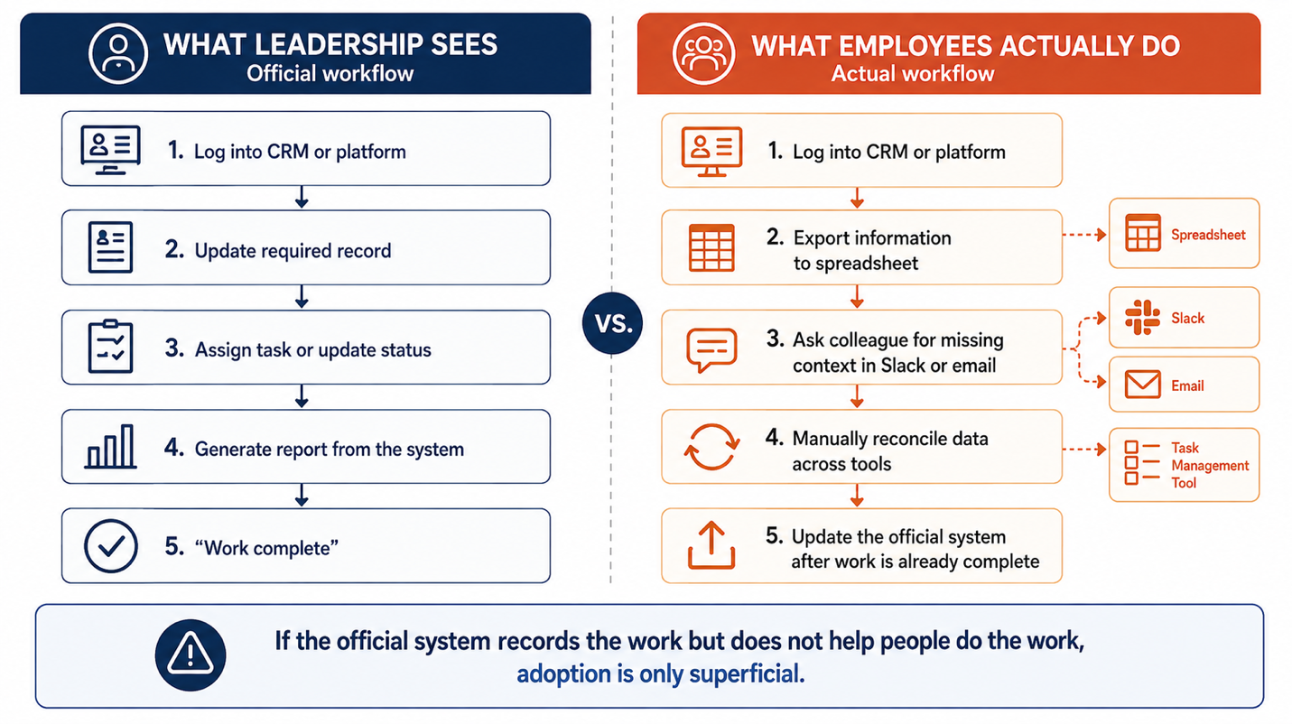
Think about the last major software rollout your team went through. There was a business case, a signed-off budget and even a rollout plan with training sessions built in. Yet, when you watch people work today, you see at least half the team still completing tasks in spreadsheets, email threads or unofficial tools. They are continuously working around the software you had paid for.
As renewal approaches, you are being asked to do it all again, and you are not sure it is worth it.
What you saw in that scenario is called shelfware. It’s when software that was bought and deployed never became part of the team’s real workflow. It’s tempting to blame poor training or a slow rollout for the problem. But the issue started much earlier, even before the purchase, when no one checked whether the tool actually matched how different people across the team get work done.
You must start there this time, by checking how actual teams work.
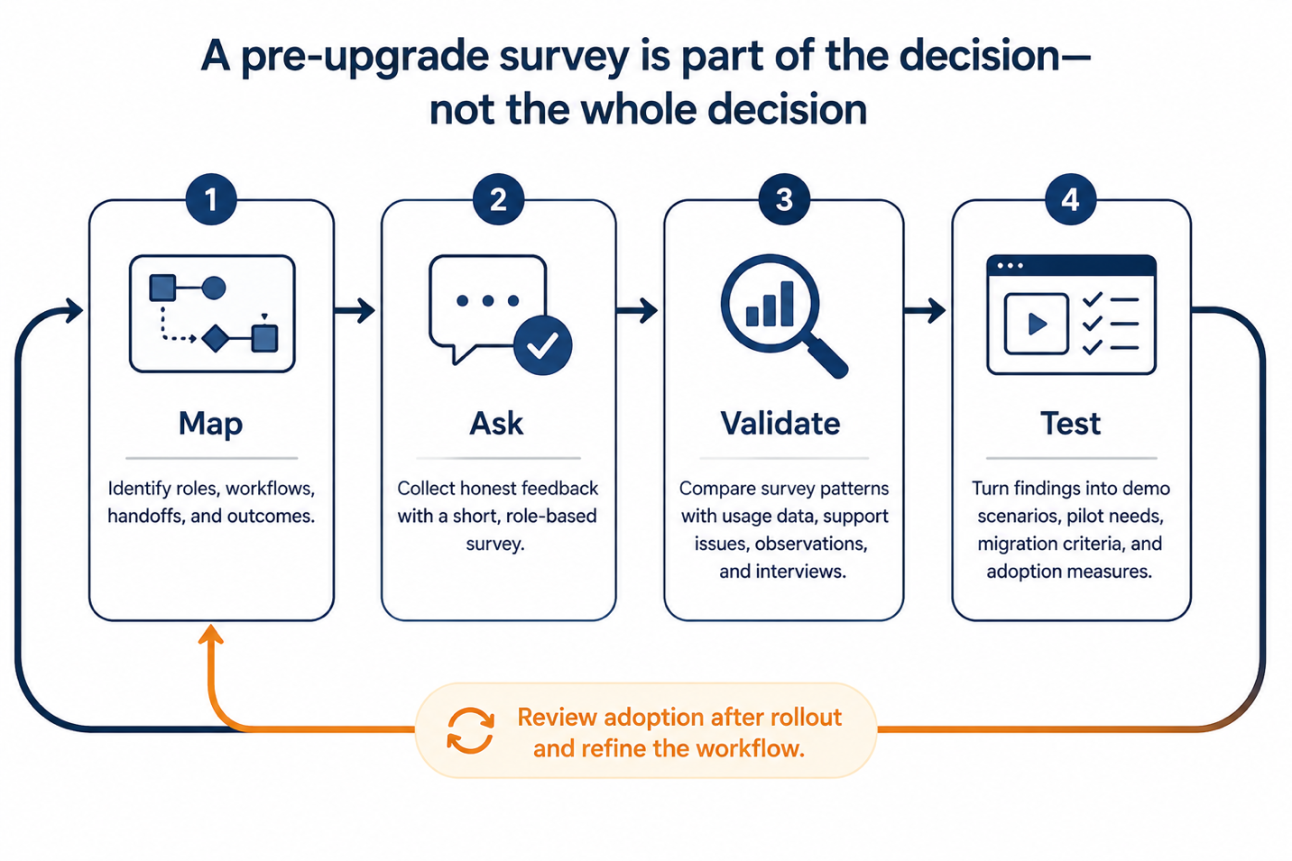
Run a short role-based survey before approving the upgrade. Ask employees what they still do outside the current system, where friction shows up in their day-to-day work, and what would make a new tool genuinely useful.
This article guides you through the software survey questions to ask, how to frame them so employees give honest feedback, and how to turn what you learn into stronger requirements before signing the next contract.
› Why Software Upgrades Become Shelfware
Shelfware doesn’t occur because you forgot to accommodate training in your budget or moved too quickly during rollout. These factors can make adoption harder, but they are often cited as explanations after shelfware occurs.
The problem lies deeper, at the beginning itself during the buying stage. The tool was selected for what it could do on paper. Factors like feature list, pricing tier, integrations and even leadership appeal were considered. But nobody checked if it would fit into the work people were already doing.
This mismatch creates costs that rarely appear clearly on the SaaS invoice.
In essence, you are spending more money on licenses for seats that are barely used, and your employees are continuously switching between official systems and the spreadsheet, inbox, chat or another tool to accomplish the task. Eventually, your resources are investing more time, reporting loses credibility as key information lives outside the system, and the cost keeps increasing.
There is one cost that is even harder to quantify: the loss of trust when employees feel a tool was chosen without anyone asking how they would use it.
» A login is not the same as adoption
Someone can sign in every day, complete the fields and export data to finish real work elsewhere. Product usage only tells you that someone opened the system; it doesn’t tell you whether the tool supports their workflow, where people got stuck or why they rely on workarounds.
You can close this gap with a well-designed internal survey. Usage data gives you signals while employee feedback offers context to these signals.
Evaluating software value through actual workflow evidence, such as manual workarounds, duplicate entry, support issues and direct user feedback, is more useful than relying on activity metrics alone.
Width: 0px, Height: 0px
Width: 1292px, Height: 724px
Width: 1292px, Height: 724px
Width: 1292px, Height: 724px
Width: 1292px, Height: 724px
Width: 1292px, Height: 724px
Width: 1292px, Height: 724px
Width: 1292px, Height: 724px
Width: 0px, Height: 0px
› Why Most Internal Software Surveys Miss the Real Problem
If you have sent a survey asking “Are you happy with our current tool stack?”, you already know the problem. The answers are too vague to help you with renewals, upgrades or even replacement decisions.
Three predictable reasons why your internal software survey fails.
» Asks for Opinions
Most surveys ask employees, “Do you like the tool?” which invites broad, low-value responses. You know how they feel about the tool, but it doesn’t tell you whether they are using something else. Asking “What do you do outside the tool to complete this task?” reveals the workaround or a broken handoff that you can investigate.
» Honesty Feels Risky
Employees are aware that the system was selected by their manager, IT team, or an executive sponsor. So they may hesitate to say that the tool slows them down. Without clear reassurance, they may offer safe feedback rather than sharing the feedback that improves the buying decision.
» Treats All Employees the Same
The internal surveys treat all users the same way. The sales manager may use the tool differently than the support agent, analyst, administrator, or team lead. Each role uses it for different tasks and outcomes. Combining their views into a single average satisfaction score can hide the role-specific friction.
Bring together the three kinds of signals mentioned in this table to get the best insight.
| Signal Type | What it tells you | What it cannot tell you alone |
| Product-usage data | If people logged in, used features, or completed tracked actions | Whether the activity is voluntary, efficient, or simply a requirement to complete the process |
| Employee software feedback | How employees experience the tool every day and where they encounter friction | Whether an individual complaint reflects a broader, role-specific issue without segmenting results. |
| Workflow evidence | How work moves between people, systems, tools, and handoffs | Whether another vendor can solve the problem without testing the workflow in a demo or pilot. |
Don’t diagnose intent with a single metric, such as a high login rate, low feature use, or negative comment. They are definitely signals to investigate but shouldn’t be considered evidence that adoption is struggling.
Review patterns across survey responses, real workflows, and even system data before deciding if the issue is product fit, integration, process design, or configuration.
Treat your internal software survey as an audit of how well the tool fits your work.
› Set Up the Survey So Employees Can Answer Honestly
Getting useful answers is about writing better questions and creating the right conditions before anyone opens the survey.
» State the Decision Surveys Will Influence
“We want your feedback” is too generic. You should tell your employees why you are asking these questions and what decisions their answers will influence.
This is how you should write the survey introduction.
“We are evaluating whether the current systems support your work. Your feedback will help us define requirements, shortlist and pilot criteria for renewal, upgrade or replacement.”
» Separate the Tool From the Person
State this directly while sending the internal survey. Employees aren’t being evaluated; there are no right answers, and the aim is to understand the tool’s fit with the work.
Explain that findings will be reported as themes by team, workflow, and role. An honest response matters even if the organisation retains the tool going forward. With this distinction, you help employees focus on what makes their work easier or harder.
» Use Anonymity Appropriately
Anonymity is important when employees feel exposed for criticising a leadership-backed tool or when people have concerns about workload, customer data, compliance and team performance.
If you have a small team, don’t promise anonymity. Group results broadly, remove all identifying details, and use follow-up interviews with explicit consent. In case of large teams, anonymous collection and role-based reporting let employees share candid and useful feedback before you purchase.
» Combine Survey Results with Short Interviews
A software adoption survey questions helps identify patterns, and short 15–20-minute interviews explain them better. If the survey response mentions “reporting is difficult,” it points to issues, such as manual data export, inconsistent field definitions or restricted access. A follow-up conversation would help you know the actual cause before you treat it as a vendor problem.
» Pre-survey Checklist
Before sending the survey, confirm:
- The specific renewal, upgrade, consolidation or replacement decision your survey will influence
- Roles, teams and even workflows that would need a separate analysis
- Product-usage, training, support-ticket or process data you want to compare against your responses
- Person accountable for reviewing these results and coordinating follow-up
- Date and format for sharing findings, discussing next steps and decisions with employees.
Width: 0px, Height: 0px
Width: 1292px, Height: 861px
Width: 1292px, Height: 861px
Width: 1292px, Height: 861px
Width: 1292px, Height: 861px
Width: 1292px, Height: 861px
Width: 0px, Height: 0px
Width: 0px, Height: 0px
› 18 Software User Adoption Survey Questions to Ask Before You Upgrade
The best software user adoption survey questions don’t ask employees to rate a tool out of five. They ask employees to describe their work, like the tasks they need to complete, obstacles that slow them down, workarounds they rely on, and conditions under which they would genuinely adopt something new.
Use these questions before a software upgrade, renewal, replacement, or consolidation project. Keep your survey focused, group the responses by role or workflow, and use follow-up interviews to understand context behind repeated issues.
» Questions Revealing Real Workflows and Workarounds
- What are the three most important tasks you complete in this system during a typical week?
- Which part of these tasks takes longer than it should?
- What spreadsheet, document, chat channel, inbox, or separate tool do you use to finish work that this system is supposed to handle?
- At what point in the workflow do you leave the current system, and what makes you leave it?
- Which handoff between your team and another team becomes harder because of this tool?
- What information do you have to enter, update, or copy more than once across different systems?
These questions reveal shadow workflows, duplicate effort, and even manual work that the usage dashboard may not show. They also help you locate real process gaps.
» Questions That Separate Essential Value from Feature Bloat
- Which features do you use in nearly every working week from the system?
- Which features do you avoid even when that tool gives it to you?
- If one feature disappeared tomorrow, which task would become slower or impossible to complete
- Which feature takes more effort to use than the value it gives you?
- What do you wish your current system could do without you needing a workaround?
- Which reports, dashboards, automations, or integrations do you rely on most? What decisions or tasks do they support?
The answers to these questions turn every broad feature request into a practical priority list. They help distinguish a true product-fit problem from a feature that exists but is poorly configured, difficult to find, or unsupported during training.
» Questions That Test Upgrade or Replacement Readiness
- What would make you willing to switch from the existing system to a new one?
- What would make you hesitate to adopt a replacement?
- Which existing data templates, reports, workflows, or integrations must carry over to the new tool for you to accomplish your job effectively?
- How much time could you spend learning a new system during the first month?
- What support would help you adopt the new tool: live training, office hours, designated team champion, documentation, or in-product guidance?
- Before the company commits to a new vendor, what is the one task the shortlisted product should prove it can support in a pilot?
All these questions turn employee feedback into pilot criteria, migration requirements, realistic onboarding plans, and vendor demo scenarios. Leadership can use these to define what replacement must prove before signing the contract.
› Better Questions Product Better Evidence
The wording you use in the survey helps determine the quality of evidence you receive. A weak question will only produce a broad opinion. Ask better questions that check for an obstacle, a workaround, or a consequence.
| What you need to learn | Weak question | Better question | How to use the answer? |
| Hidden workarounds | Do you use the system every single day? | What other tool do you use to finish work this system should handle? | Identify shadow IT, duplicate work, and integration gaps |
| Cognitive friction | Is the system easy to use? | Which task makes you stop, ask for help, or leave the system? | Separates broad dissatisfaction from the specific workflow, configuration, or usability issue |
| Feature value | Which features do you like in the tool? | If this feature disappeared tomorrow, what would break or grow slower in your work? | Prioritise capabilities that you must test during vendor selection or pilot |
| Migration risk | Would you use a new tool? | What would a new tool need to offer for you to make the switch confidently? | Define non-negotiable data, workflow, reporting, and integration requirements early |
| Training needs | Do you need training? | Which task can you complete independently with guidance or support? | Determines whether enablement can resolve the problem or if the product is a poor fit |
A generic software survey template focuses on overall usability and satisfaction. However, workflow-specific questions are likely to reveal practical barriers behind low adoption.
› Turn Responses Into a Safer Buying Decision
Once your survey closes, don’t think of satisfaction scores alone. You need to convert your employee feedback into evidence to support renewal, upgrade, replacement or consolidation decisions.
Segment the responses by role, team, and workflow to protect the anonymity of the responder. A complaint repeated across functions matters more than one isolated response. Additionally, a company-wide average can hide friction for people who use the system most.
Next, you must compare feedback with data such as product usage, feature activity, support tickets, and training records you already have. If employees say they avoid a feature, check if usage data supports it. If many people mention the same workaround, search for related help requests or duplicate data.
Sort repeated issues into these four categories.
- Product-fit: The software doesn’t support the workflow or outcome essential to the user
- Configuration: The capability exists, but the fields, automations, permissions, or dashboards make it hard to use
- Integration: Information doesn’t move reliably between systems or teams
- Enablement: This tool may fit the needs, but users require better training, documentation, and support
Each category points to a different action. If support agents lose context as conversation moves from chat to email, the issue is a product-fit gap. Knowing this, you can make it a requirement for vendors to demonstrate. For example, if you are evaluating support systems, ask your shortlisted help desk vendors to demonstrate the scope in their demos or to run a pilot.
A single standalone metric cannot help you understand the intent. High logins and low feature usage may indicate reluctant compliance, but it could also mean the tool is built for quick tasks. Use these patterns to question and get better feedback to steer your decisions in the right direction.
› Use Survey to Improve Vendor Demos, Trials and Negotiations
Your survey findings shouldn’t disappear into a slide deck. Turn them into a purchase scorecard to evaluate your shortlisted vendors.
Build every vendor demo around the three workflows your employees flagged. Ask the vendors to demonstrate live workflows, real handoffs, data, and integrations.
If employees are losing context when they move the issue from chat to email, ask vendors to show how their product preserves the conversation, assigns ownership, triggers escalation, and reports the outcome without manual reconciliation.
Use all these findings to choose pilot participants. Include the employees who do high-friction work in this survey. That is practical user acceptance testing, checking whether the product supports real work before you sign the contract.
Label each requirement before you move to pricing discussions.
- Essential: Must-have workflows, integrations, compliance, and data needs
- Useful: Valuable but not a deal breaker
- Unnecessary: Features only a few people will need or use
Set the 30-, 60-, and 90-day adoption checkpoints after completing the rollout. Validate your shortlist through independent reviews, pricing research, and comparisons.
› Conclusion
The safest software decision isn’t the one with the longest feature list or a smooth demo. It is the one that removes friction from the work your team already does.
Before your next renewal, upgrade, or replacement, use software user adoption survey questions to understand the different roles, how they work, where they leave the current system, and which new tool supports real adoption.
Survey your employees before shortlisting vendors and turn repeated workflow problems into clear requirements. Test these requirements in vendor demos or pilots, and use the outcomes to validate your shortlist. You should measure adoption even after the rollout.
Build your shortlist around the work your employees need to complete, and compare products using real feedback and evidence.
Ready to build a more confident software shortlist? Compare products by category, read verified user reviews, evaluate features side by side, and check pricing details before committing to your next software contract.
› FAQs
1. What are user adoption survey questions?
Ans. User adoption survey questions ask employees how they work today, which tools they use, and what they need from new software. Asking them before you buy helps you choose a tool your team will actually use.
2. When should you use software adoption survey questions: before or after buying?
Ans. Use them at both stages. Pre-purchase software adoption survey questions guide which tool you choose, while a follow-up survey 2–4 weeks after rollout shows how well your team is adapting.
3. What is an ideal number for a software adoption survey questions?
Ans. Aim for 10-15 core questions with a few more optional follow-ups as needed. You must understand workflows and adoption risk. A shorter survey is one that people actually finish.
4. Which user adoption survey questions should you ask before upgrading software?
Ans. Ask about current workflows, frustrations with existing tools, must-have features, comfort with learning new software, and training needs. For example: “Which tasks take you the most time today?”
Ans. Ask about current workflows, frustrations with existing tools, must-have features, comfort with learning new software, and training needs. For example: “Which tasks take you the most time today?”
5. How do you measure software user adoption?
Ans. Track active usage, feature adoption, time-to-proficiency, and satisfaction scores. Compare the results against the baseline from your user adoption survey questions to see whether the new tool improved how your team works.
Ans. Track active usage, feature adoption, time-to-proficiency, and satisfaction scores. Compare the results against the baseline from your user adoption survey questions to see whether the new tool improved how your team works.