On this page
A team in your organisation approved a $500-per-month software plan after several negotiation rounds with the vendor.
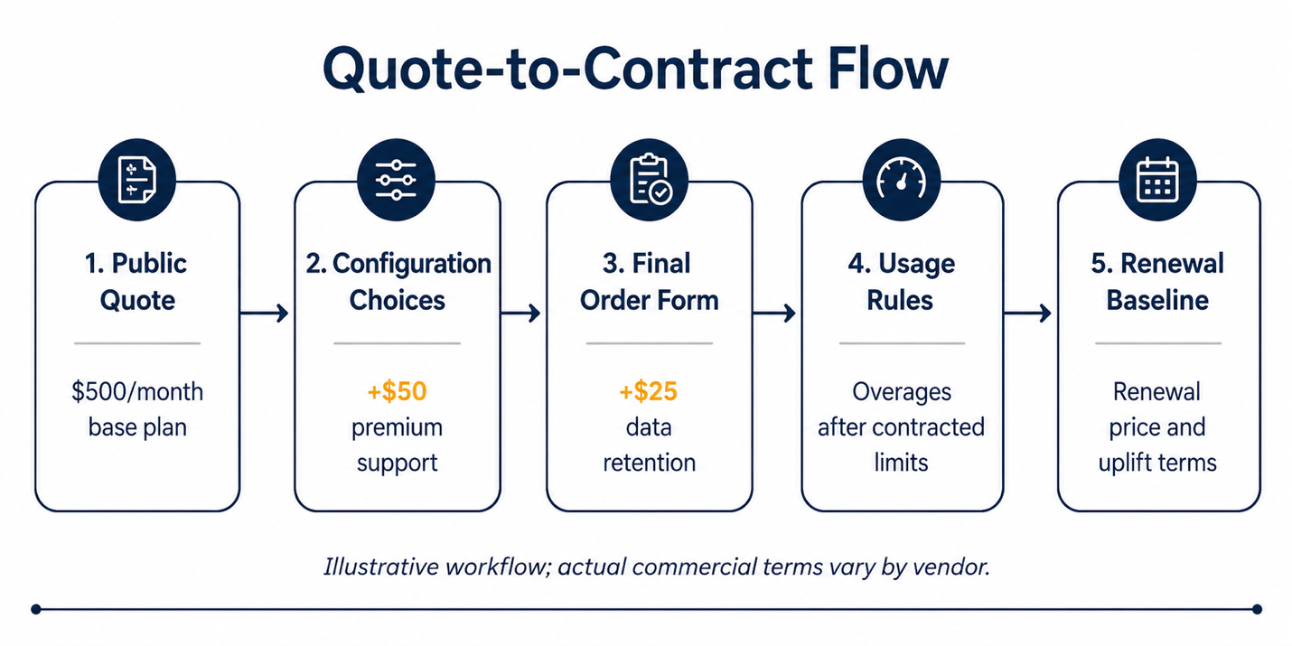
By the time they signed the order form, premium support and data retention increased the recurring fee to $575 per month. A separate onboarding fee was also added as a one-time implementation cost.
This isn’t an industry average, just a worked illustration. Actual costs vary by platform, seat count, and negotiated terms.
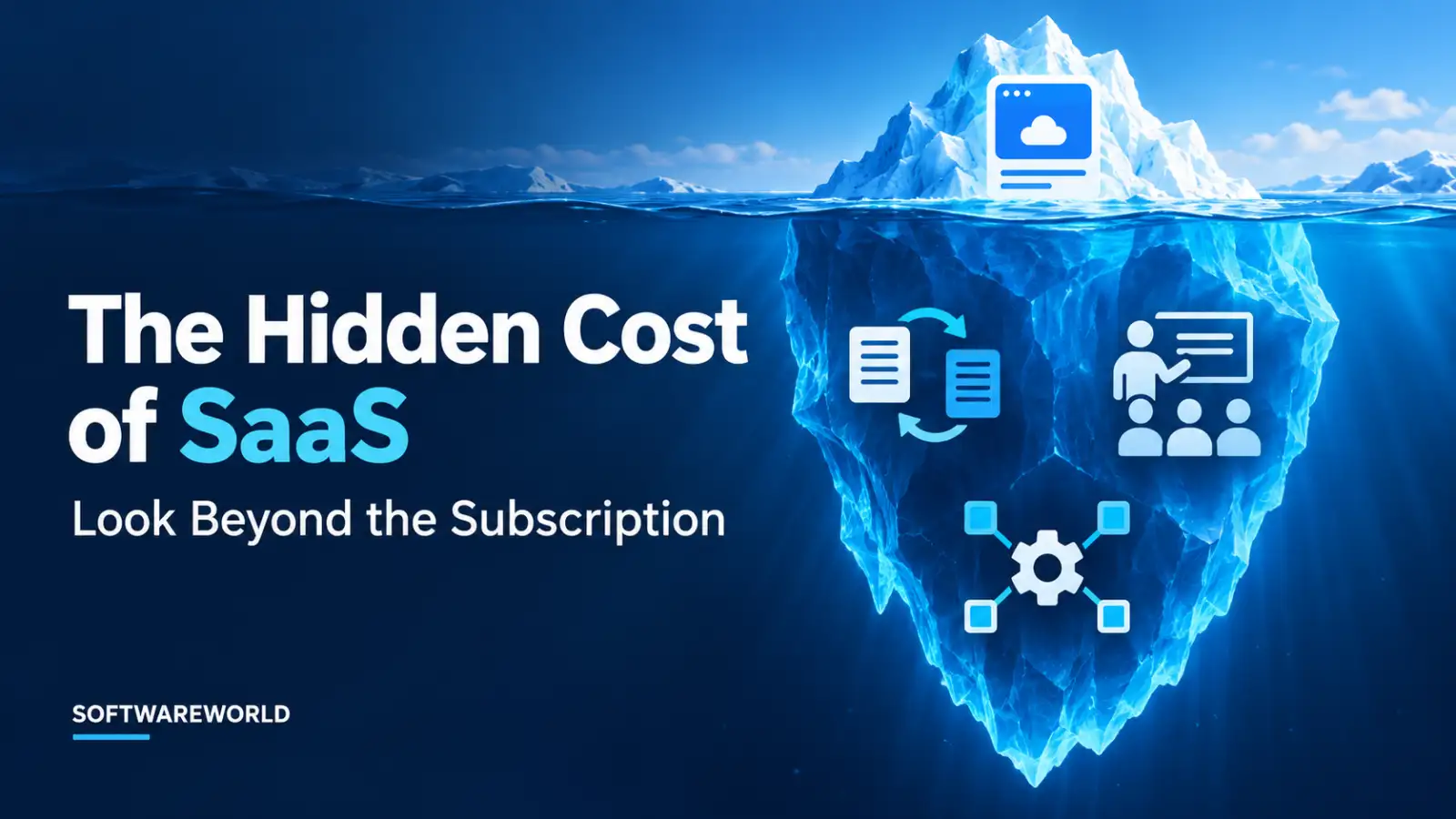
Consumption-based and AI-backed pricing make it difficult to predict the price, especially if you don’t review the usage rules, add-ons, and renewal terms together. The headline subscription price is only one part of your commercial commitment.
Hidden costs of SaaS and add-ons are charges that sit outside your headline subscription price and enter only through default selections, order-form bundles, renewal terms, or usage thresholds. While they aren’t always deceptive, you don’t notice them until you reach the final approval step.
This article helps you understand where these costs originate, how to spot them before signing the contract, and how to build a paper trail that protects your budget at renewal.
› What Are Hidden Costs of SaaS and Add-Ons?
Hidden Costs of SaaS and add-ons are recurring, usage-based services, renewal or exit-related charges that aren’t clear from the plan’s headline price.
Not every extra charge appearing on your SaaS bill behaves the same way. Understanding the difference is the first step toward controlling your software spend.
- Default Add-Ons: They are supporting tiers, training modules, extra environments, or extended data retention that may be bundled, preselected, or presented as the default unless you opt out.
- Threshold-driven Costs: These are the SaaS usage overage fees that are triggered when seat counts, storage, transactions, API calls, or contact volume exceed the limits mentioned in your contract.
- Services Cost: SaaS implementation costs for migration, integration, configuration, or custom onboarding. They are often one-time charges, but it is easy to underestimate their scope in hidden SaaS fees
- Renewal and Pricing Rule Costs: These include SaaS renewal price increases due to escalator clauses, higher minimum commitments, price resets, or auto-renewal terms.
- Exit Costs: A part of SaaS total cost of ownership that surfaces when you leave the tool. They are data export fees, transition support, migration work, and termination conditions.
Not every add-on is unnecessary or misleading. Some are essential for a regulated, high-volume, or business-critical deployment.
Grouping all five together into the “hidden fees” bucket is where your procurement evaluation is likely to fail. You cannot prevent a usage overage the same way you remove a preselected add-on. Each cost needs its own review point.
Review the final quote, pricing schedule, contract terms, statement of work, and order form to identify these costs before signing.
› How a Base Subscription Becomes a Larger Commitment
Your contract doesn’t move from quote to invoice in one step. It moves through five commercial stages, and the eventual cost changes at each point.
» Public Plan or Sales Quote
This sets the headline price for the subscription. It is usually the only number your team compares against the competitors' pricing models to determine their choice.
» Configuration Choices
Your team will select the support tiers, compliance settings, security add-ons, and data options at this commercial stage. It could be your procurement team’s decision or a default configuration applied by the vendor.
» Final Order Form
The form documents the commercial commitment. Often, it is the first document to show the complete subscription configuration.
» Usage Rules
Using these rules, you can determine what happens when your team exceeds the contracted limits for seats, storage, transactions, API calls, contacts, and other metered features.
» Renewal Baseline
Defines the future price, including renewal terms, minimum commitments, price-escalator clauses, and auto-renewal conditions.
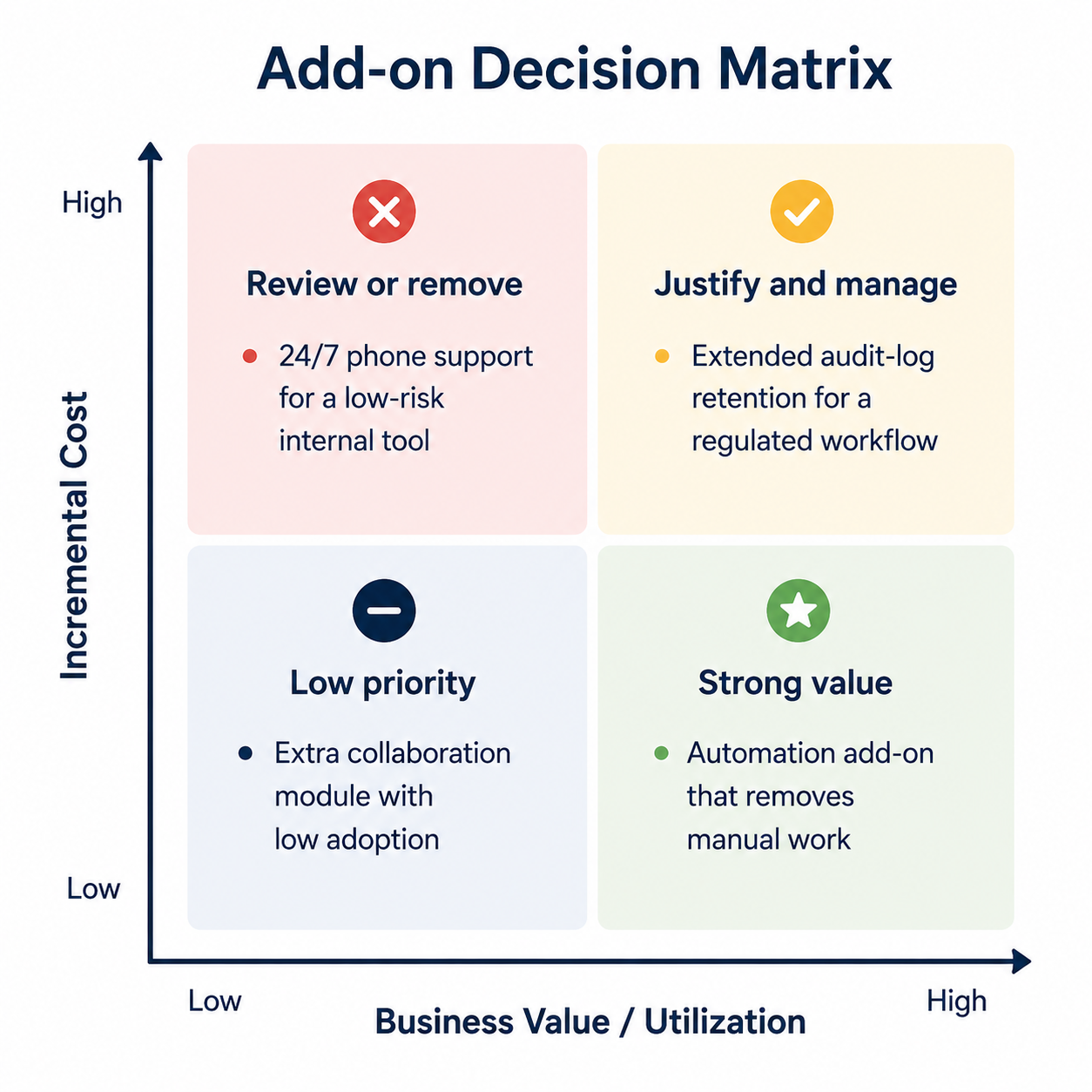
There’s a clear difference between a risky default and an honest upgrade. An honest upgrade is optional, tied to a genuine business need, and transparently priced. Expanded support for a customer-facing platform is a classic example of this upgrade.
The risky default is bundled or preselected by the vendor without a clear explanation, is difficult to remove, and is visible at final approval.
This is a documented pattern mentioned in the 2024 international review of 642 subscription websites and mobile apps. They found that 22.5% of companies selling both subscription and non-subscription options offered preselected services as default.
While the finding doesn’t establish the same rate in B2B SaaS, it shows preselection as a recognised commercial design pattern rather than an isolated buyer complaint.
Subscription-billing systems can apply vendor-configured bundles, metered usage, upgrade rules, and quantities. But the important question is which of these rules apply to your account and whether they match the scope your team approved.
Width: 0px, Height: 0px
Width: 1292px, Height: 646px
Width: 1292px, Height: 646px
Width: 0px, Height: 0px
Width: 1292px, Height: 646px
» An example of how hidden costs of SaaS and add-ons can change a $500 monthly subscription
| Cost layer | What changes | Monthly impact | Questions to ask |
| Headline subscription | Base plan for agreed users and included features | $500 | What is included in the base plan we are considering? |
| Premium support | Faster response times or expanded support coverage | +$50 | Does our workload need that support level? |
| Extended data retention | Longer log history or additional storage available | +$25 | What retention period do we actually need? |
| Guided onboarding | Migration, configuration, and assisted implementation | One time. Varies and not included in recurring total. | Is this optional, and what is included in its scope? |
| Estimated recurring total | Base plan plus recurring support and data add-ons | $575 | Which recurring items have a documented business owner? |
In this example, recurring cost rises from $500 to $575 per month, a 15% increase. The onboarding fee is a separate one-time cost.
›The Five Places SaaS Cost Creep Hides
A SaaS contract can look affordable at purchase but become expensive as your team configures, uses, renews, or exits the product. These costs can appear in data limits, usage rules, support packages, implementation scopes, and renewal terms. They are not always an obvious single line item.
You are posed with the challenge of identifying where each charge originates before it becomes a recurring commitment. These five areas show where SaaS cost creep begins and how to judge whether an add-on supports an actual business need.
» Premium Support Fees
Standard and paid support are not always the same. Premium support covers faster response times, 24/7 availability, priority escalation, or a named technical account. These services are very important for a customer-facing or business-critical platform.
Ask your vendor if the production risk and internal support capacity justify the extra cost, or whether you are paying for support your team is unlikely to use.
» Data Retention Pricing
How long a platform can store logs, activity history, recordings, audit data, or other operational information is answered in the data retention pricing heading. Longer storage may be needed for compliance, security investigations, reporting and troubleshooting, but it increases subscription cost.
Compare retention days, storage allocation, export rights, and audit-log access with your operational, security, and compliance requirements before accepting an upgrade. A default 90-day retention is valuable only if it is truly aligned with your business needs.
Width: 0px, Height: 0px
Width: 1254px, Height: 1254px
Width: 1254px, Height: 1254px
Width: 0px, Height: 0px
Width: 1254px, Height: 1254px
» SaaS Usage Overage Fees
The plan you are considering may appear flat-priced till usage crosses the contractual limit. SaaS usage overage fees, forced tier upgrades, and higher minimum seat commitments may apply when transactions, storage, API calls, events or user counts exceed the decided threshold.
This is a post-adoption risk. Forecast expected usage, monitor consumption using SaaS spend management tools, understand the units your vendor measures, and set internal alerts before you are expected to pay an overage or convert to a higher tier. Check the contract for clear terms on measurement period, true-up timing, overage rate, and whether the vendor can upgrade during the term.
» SaaS Implementation Costs
These are legitimate professional service charges for integrations, migrations, configurations, workflow design, custom onboarding, or training. Legitimate work still needs a defined scope from both parties.
Before approval, confirm who configures workflows, which systems are part of the integration, what is explicitly excluded, and how much data must be migrated. Account for internal time required from IT, marketing, security, operations, and data teams. Vendor fees are only part of the true implementation cost.
» SaaS Renewal Price Increases
A SaaS renewal price increase results from an auto-renewal deadline that was never mentioned on a calendar, a renewal calculated using list price, an annual price escalator, or an optional add-on that became the renewal baseline.
Read your renewal clause with the same level of scrutiny you gave the original price quote. Confirm uplift cap, notice period, pricing basis, right to reduce seats, and whether support, usage, or data charges are subject to increase.
Review support tiers and data retention against real operational needs, forecast usage against contractual limits, and define implementation scope before signing to avoid SaaS cost creep.
› Why Procurement Reviews Miss the Final Price
This isn’t your procurement team’s failure. It is a workflow gap. In most organisations, the business team evaluates the tool’s features while finance sees only the headline price. Procurement usually reviews commercial terms after other teams have already made the configuration decisions.
Meanwhile, the seller’s proposal, checkout screen, order form, statement of work and even the final invoice sit in separate inboxes or systems. And whoever is responsible for the contract may lack the technical context to judge whether API limits, log retention workflows, user roles or data volumes will create costs as your usage grows.
Renewals widen this gap further as they are often treated as an administrative task rather than a new commercial decision. Your year-one add-ons, usage thresholds and service levels quietly become part of the next contract’s baseline.
It helps to be precise about where responsibility sits. Subscription-billing systems can apply bundles, quantities, metered usage and upgrade logic as your business grows. The important question is which of the vendor-configured rules apply to your account and whether they match the scope your team approved.
› A Pre-Signature Checklist for Hidden Costs of SaaS and Add-Ons
Review final commercial documents along with initial sales quote before approving your new SaaS contract or renewal. The order form will record the purchased modules, seat or usage entitlements, billing frequency, term length and renewal mechanism. The statement of work should separately define services, deliverables, timelines, responsibilities and acceptance criteria.
» Order form checklist
| Review Area | What to Verify | Evidence to Save | Risk Avoided |
| Base entitlement | Plan name, modules within, user roles, seat count, included features, regions and environments | Initial quote and final order form | Paying for a plan or module that is different from the evaluated product |
| Preselected add-ons | Every support, training, data, security or feature add-on is intentionally selected and priced | Configuration screenshot, initial quote and order form | Unapproved recurring charges |
| Support and SLA | Support hours, channels, escalation path, exclusions, premium-support fee and response targets | Support exhibit, commercial schedule, SLA | Paying for unnecessary coverage or assuming support is included |
| Data and usage limits | Storage, retention, API calls, events, seats, exports, measurement period and overage rate | Pricing schedule and usage terms | Surprise overages, true-ups or forced upgrades |
| Implementation scope | Deliverables, integration, migration volume, timeline, acceptance criteria, exclusions and billing model | Statement of work | Scope creep, unplanned service fees, and delivery disputes |
| Renewal terms | Term length, renewal date, notice period, price-uplift cap, renewal price basis and reduction rights | Order form and master agreement | Missed cancellation windows and higher renewal commitments |
› Quote-to-Contract Reconciliation
Use this three-step process before you move from a quote to a contract.
1. Capture: Save the approved quote or pricing configuration before you move to the final purchase stage. Include all screenshots where the self-service flow allows options to be selected or deselected.
2. Reconcile: Compare the baseline against the checkout summary, order form, pricing schedule, statement of work, and billing schedule. Flag every difference you note in price, quantity, term, support level, and usage limit.
3. Assign: Give each paid line item a business owner who can answer these two questions: what outcome does this enable, and how will we know it is being used?
A simple SaaS add-on review sheet can make this framework repeatable. Track feature costs, billing frequency, owner, usage evidence, contract document, and renewal date. This turns a one-time approval check into a practical review habit for every new purchase or renewal. Several procurement software platforms can automate this reconciliation step for every renewal.
› Turn Price Transparency into Better Buying Decisions
Removing every add-on from your invoice isn’t the solution to your problem. You need to make sure the cost is visible, intentional, and proportionate to the value you are getting.
A premium support tier is crucial to a customer-facing platform with a small internal IT team. Similarly, extended data retention is essential for a regulated environment. Neither should be present on your contract as an unexamined default.
The most expensive SaaS add-on isn't necessarily the one with the highest price tag but the one your organisation renews without a clear reason to. Treat your checkout screen and order form as procurement checkpoints. That way, hidden SaaS fees and add-ons become decisions you can evaluate, negotiate, and defend.
The headline subscription price isn’t the final decision. The actual entitlement, usage rules, and renewal terms are.
Pricing pages rarely give you a full picture. Support tiers, retention limits and renewal terms surface mid-negotiation. Compare vendor pricing structures, support tiers and contract terms side by side before you get there so you aren’t spotting hidden add-ons for the first time on your order form.
› FAQs
1. What counts as hidden Costs of SaaS?
Ans. Any recurring, usage-based, renewal, implementation or exit-based charge that isn’t clearly mentioned or included in the headline subscription price or initial quote is a hidden SaaS cost. It is often disclosed only in the final order form, usage schedule, or renewal clause.
2. Are Saas add-ons always unnecessary?
Ans. No. Support, compliance, security, and implementation add-ons can be entirely appropriate when they meet a real operational or regulatory need. The main concern is whether you chose them deliberately and can measure their value.
3. How can you prevent SaaS billing surprises?
Ans. Compare your original quote against the final order form, verify every recurring and one-time charge, document your usage limits and overage rates and mention the renewal notice date on your calendar before signing the contract.