On this page
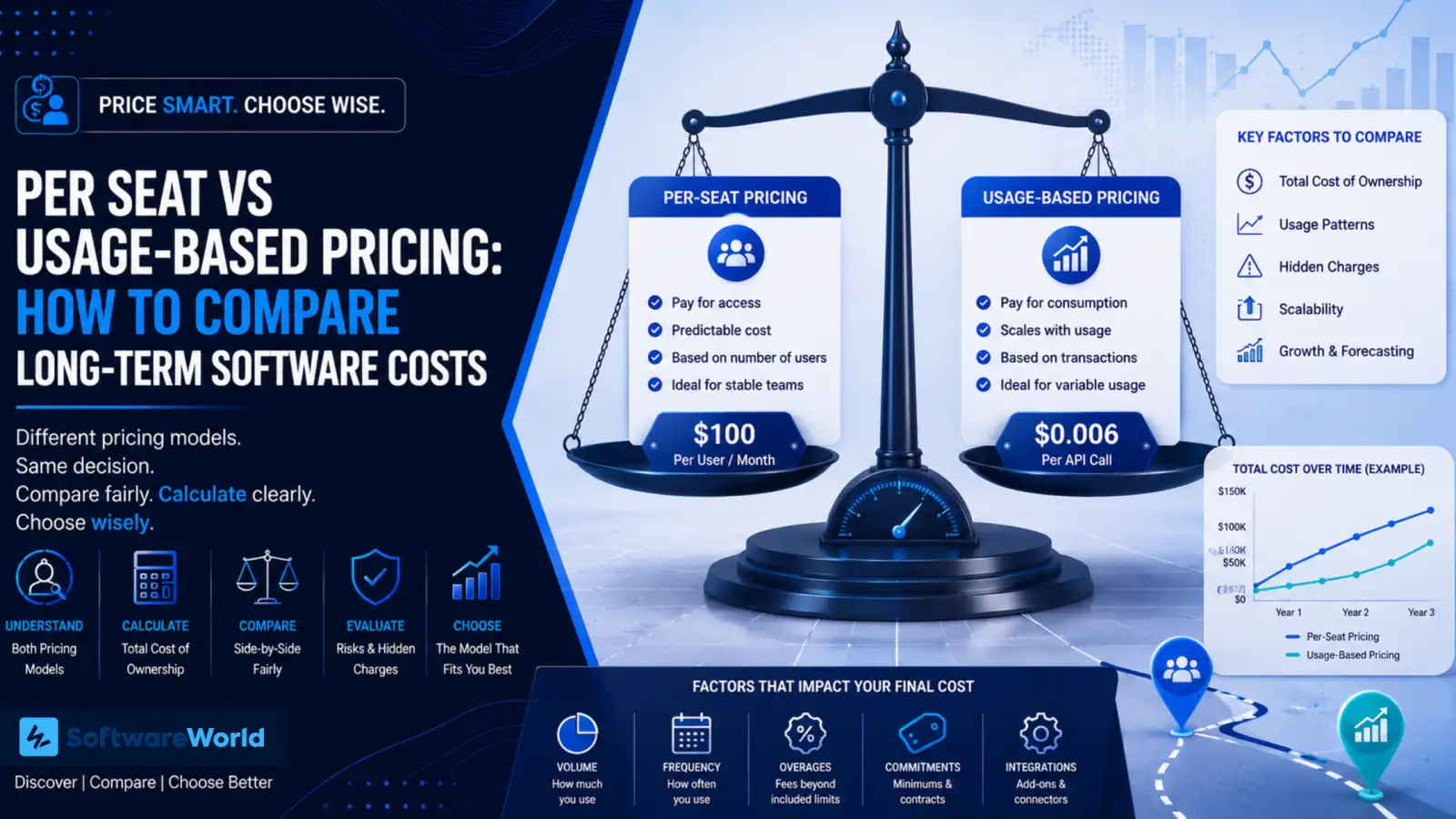
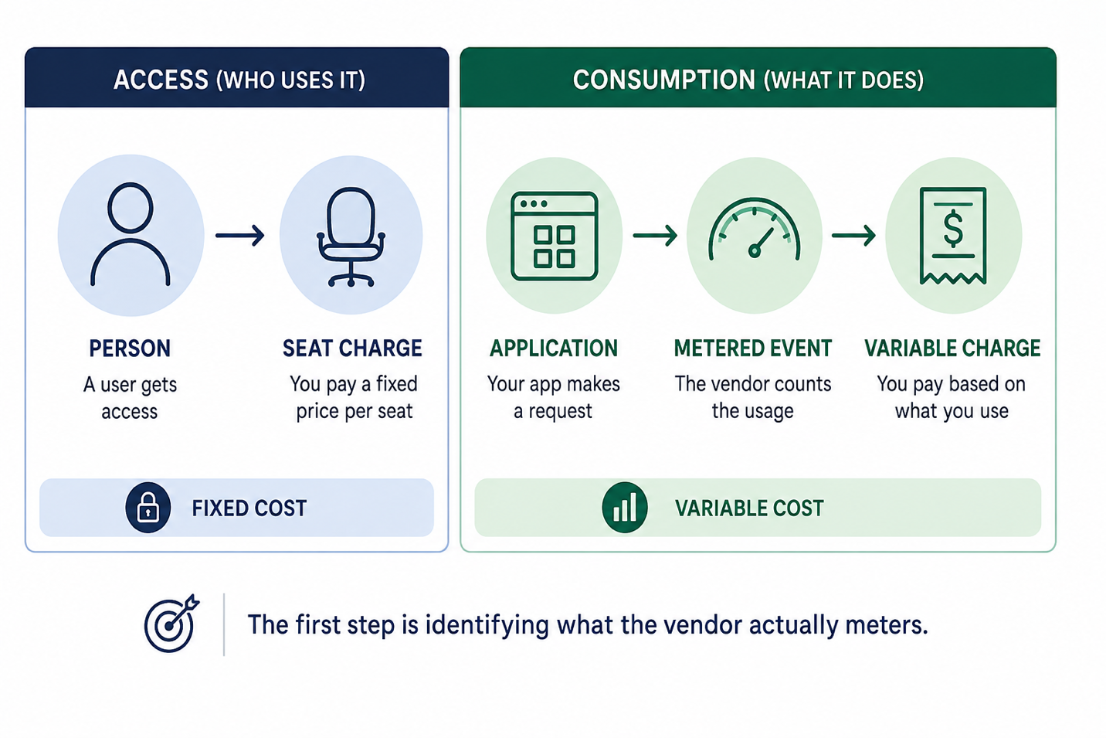
Two different software vendors just sent you a quote. One charges you $100 per user each month, and the other $0.006 per API call. Both tools may support your business processes, but they use different billing meters. Per-user seat charges you for access, while usage-based pricing charges for measurable consumption.
That makes these quotes difficult to compare. It is easier to predict your total cost using the per-seat proposal if you have a stable team size. A usage-based proposal costs less when transaction volume is low and predictable. However, retries, polling, overage terms and even minimum commitments can change your final bill.
To compare both proposals fairly, convert them into a single unit, such as total annual cost or cost per business outcome. In this guide, you learn how per-seat and usage-based pricing work, how to calculate their long-term cost and which contract questions to ask before signing.
Width: 0px, Height: 0px
Width: 1106px, Height: 738px
Width: 1106px, Height: 738px
Width: 1106px, Height: 738px
Width: 1106px, Height: 738px
Width: 1106px, Height: 738px
Width: 1106px, Height: 738px
Width: 1106px, Height: 738px
Width: 1106px, Height: 738px
› Why Per-Seat and Usage-Based Prices Cannot Be Compared Directly?
Per-seat pricing means you pay for the number and type of licenses included in your contract. Depending on your vendor, you will be charged based on per-active users, concurrent users, named users, or minimum seat commitment.
In a named-seat model, for instance, you will pay a recurring amount for each assigned user regardless of how frequently they use the platform. Other contracts may charge you only for active users or offer lower-priced viewer, light-user, and full-access tiers. All these differences can change your total cost.
Usage-based pricing links your bill to consumption. Your vendor may meter API calls, records processed, messages, storage, workflow runs, and compute time/credits. The contract will state what they count as a billable unit.
For example, one vendor may quote $100 per seat and another $0.006 per API call. You cannot compare these prices directly as they use different denominators. One measures licensed access and the other measures system activity.
Before deciding which quote is cheaper, convert both proposals into a shared unit. It could be annual cost per active user, processed record, completed workflow, or resolved case.
| Question | Per-seat Pricing | Usage-based Pricing |
| What triggers the charge? | A licensed or committed user who has the login credentials. | Any measured action or event that occurs in the platform. |
| What grows the cost? | Number of users with their access. | Transactions, API calls, compute, and even data storage. |
| How predictable is it? | Very. You must know seat minimums, inactive users, and annual increase in user size. | Less. Depends on usage tiers, overages, seasonal demand, and volume. |
| Biggest financial risk | Paying for seats nobody uses | Unexpected spikes in your bill |
| Best way to compare | Cost per active user or business outcome | Cost per transaction or business outcome |
Asking the right questions and knowing things beforehand avoids presenting either model as inherently forecastable or risky.
› How Do You Calculate the Total Cost of Each Model?
For a fair comparison, turn these quotes into a single format. Calculate them over the same period or include the same cost categories. Start with the annual subscription cost and then add platform, support, implementation, and annual fees for both.
» Per-Seat Pricing
This is how you can calculate the annual seat cost.
» Annual seat cost = (Paid seats X Price per seat per month X 12) + Additional fees
Confirm whether your contract includes a minimum number of seats, automatic annual increases, charges for external users, or different license tiers before calculating.
» Usage-based Pricing
Usage-based billing calculation is trickier than seat-based. A single business action can generate several billable events, all of which need to be included in the final bill.
» Billable Usage = Business transactions * average billable events per transaction * Operational usage factor
The Operational usage factor captures the effect of retries, polling, webhooks, and other system behaviour. It depends on the vendor’s metering definition. Confirm each item with your vendor.
One customer update can create more than one billable event.
Your operations team might update a customer record once. But the software performs several actions in the background.
The software needs to authenticate the request, validate data, look up related information, save the update, send notifications, or retry if something fails. When the platform retrieves large data, it needs to complete several requests through pagination.
For your team, it is a single customer update. The vendor’s billing system sees it as several usage events.
Before comparing a usage-based quote vs. a per-seat quote, ask your vendor what counts as a billable event and how it will appear on your invoice.
» Cost Per Business Outcome
Calculate the cost per outcome to compare both your proposals with the same denominator.
» Cost Per Outcome = Total cost over the period/Business outcomes over the same period
Your outcome could be a processed customer record, a completed order, a resolved case, or another result both systems support.
› Quick Example
Vendor A requires 200 seats at $100 per seat per month
Vendor B charges $0.006 per billable API call
| Scenario | Monthly Cost | Annual Cost |
| Per-seat: 200*$100 | $20,000 | $240,000 |
| Usage-based: 2.5 million *$0.006 | $15,000 | $180,000 |
| Usage-based: 3.5 million *$0.006 | $21,000 | $252,000 |
At 2.5 million billable calls per month, Vendor B appears to cost $5,000 less per month. It becomes $60,000 less per year.
But if we add retries, polling, pagination or new automation, it may increase usage to 3.5 million billable calls. Vendor B’s monthly cost rises to $21,000.
That is $1,000 more per month or $12,000 more than Vendor A’s seat-based quote for a year.
» The Crossover Point
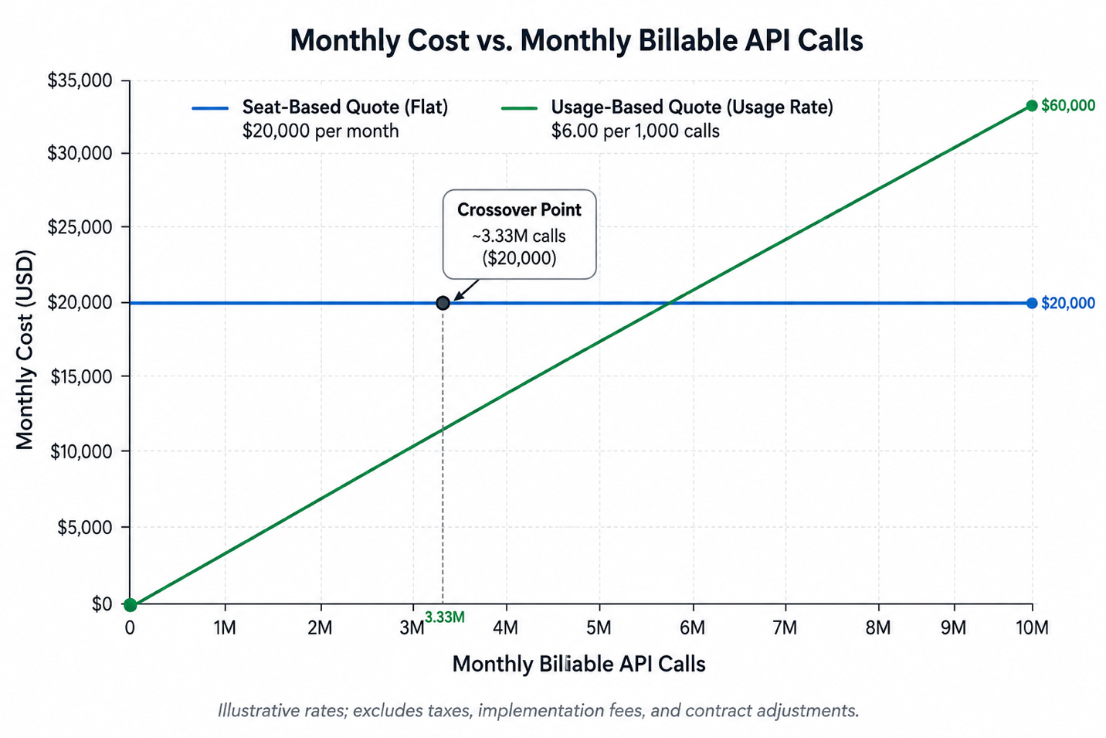
The crossover point is :
200*$100/$0.006 = 3,333,333 billable calls a month.
Below 3.33 million billable calls a month, the usage-based proposal is cheaper. Above this level, the 200-seat proposal is less expensive under these assumptions.
- Here are the assumptions made to come to this conclusion:
- Seat-based proposal requires 200 seats
- Each seat costs $100 per month
- Usage-based proposal charges $0.006 per billable API call
- All API calls are priced the same
- There’s no base platform fee, minimum usage commitment, or volume discount
- Comparison uses billable calls and not the business transactions.
If your vendor sets minimums, volume tiers, overage rates, different rates for different API calls, or platform fees, this final amount will automatically change.
Width: 0px, Height: 0px
Width: 1106px, Height: 738px
Width: 1106px, Height: 738px
Width: 1106px, Height: 738px
Width: 1106px, Height: 738px
Width: 1106px, Height: 738px
Width: 1106px, Height: 738px
› What Hidden Costs Can Change the Result?
The quoted price doesn’t always represent the full cost of the contract. You will note terms in both per-seat and usage-based contracts that impact your final price.
In per-seat pricing, review details like annual price increases, role-based license tiers, and minimum seat commitments. You might pay for access that you don’t use often, making it hard to justify the cost.
Review events that count as usage in the usage-based pricing. You might be charged when failed requests are retried, API calls increase for large datasets, or integrations check databases for updates. The total bill might also increase when you include usage commitments, tiers, and overage terms.
None of these are costs that you will absolutely incur. They depend on how your vendor defines their pricing and contract terms. This will help you walk into a room understanding what is metered and what happens when usage changes.
| Hidden Cost Driver | Why It Matters | What to Ask Your Vendor |
| Retries | The total number of failed or repeated requests may increase the billable event count | Are failed requests or retry attempts billed? Are they priced the same as successful requests? |
| Pagination | A single request may require multiple API calls. This is especially true for a large dataset | What is the maximum page size? Does each page count as a separate request and get billed differently? |
| Polling | Repeated checks for changes can generate usage. You may be billed even when no new data is returned | Does polling count as usage? What event-driven or webhook would you recommend? |
| Overages | The rate for usage more than the allowed/committed limit may be different | What is your overage rate? Will you send usage alerts, approval thresholds, or a spend cap? |
| Minimum Commitments | You may need to pay for the committed amount even when your usage is low | Do we need to commit to a minimum monthly, quarterly, or annual amount? Can unused volume roll over or be reallocated |
| Annual Price Increases | A fixed subscription may increase at renewal even if usage remains unchanged | What is the maximum permitted increase? |
Usage-based contracts may include a minimum spend or committed volume, with separate pricing for usage above the included allowance. The Contract should define the measured unit, commitment period, treatment of unused volume, and overage rates.
For per-seat contracts, you might notice renewal price increase clauses. Identify and cap them during the procurement stage.
› How Should You Plan for Future Cost?
The vendor quote you received tells you today’s price. A detailed cost model will help you understand what happens when your customer base, software usage, or even team size changes.
If your team grows, seat-based cost may increase because new employees may need paid access. Usage-based costs may stay similar, assuming billable activity doesn’t increase.
If usage increases as your customer base grows or orders increase, it might impact the cost. The exact price will depend on included allowances, volume tiers, and committed credits. A seat-based invoice will remain stable if the existing team and plan can support the added workload.
Before signing a contract with your vendor, test more than one use case. These examples should help you evaluate properly.
- Team size grows by 25%
- Usage doubles
- Demand surges during a busy season
- New integrations add billable events
- Usage falls below contracted minimum
| Scenario | Per-seat Impact | Usage-based Impact |
| Team size increases | May increase with additional licenses | May stay stable if activity doesn’t increase with team size |
| Usage doubles | Will remain stable | Will increase based on your tiers and allowances |
| Seasonal Spikes | Usually stable if you aren’t changing the number of seats | May trigger overages |
| Usage falls | Unused seats remain | Unused committed volume remains |
Build low, as-expected, and high scenarios using your historical usage. Apply contract minimums, volume tiers, and even credits instead of simply multiplying today’s invoice by projected growth.
» At a Glance: Per Seat vs Usage-Based Pricing
| Per-Seat Pricing | Usage-Based Pricing | |
| You pay for | Licensed users or access tiers | Defined usage events or units identified |
| Cost varies with | Headcount or access requirements | Transactions, data, compute, and other measured activity as stated |
| Forecasting depends on | Seat commitments, license tiers, and user growth | Usage patterns, such as commitments, overage terms, and allowances |
| Biggest risk | Paying for unused or underused seats | Paying for unplanned overages and consumption |
| Costs may grow when | More people need paid access or a higher license tier | Automation, system activity, or transaction volume increases |
| Best fit for | Users who need regular access and user counts are reasonably stable | Business cases where usage can be measured, monitored, and aligned with business activity |
| Watch out for | Minimums, renewal uplifts, and unused seats | Retries, pagination, commitment floors and overages |
Width: 1024px, Height: 1536px
Width: 1024px, Height: 1536px
Width: 1024px, Height: 1536px
Width: 1024px, Height: 1536px
› Which Pricing Model Should You Choose
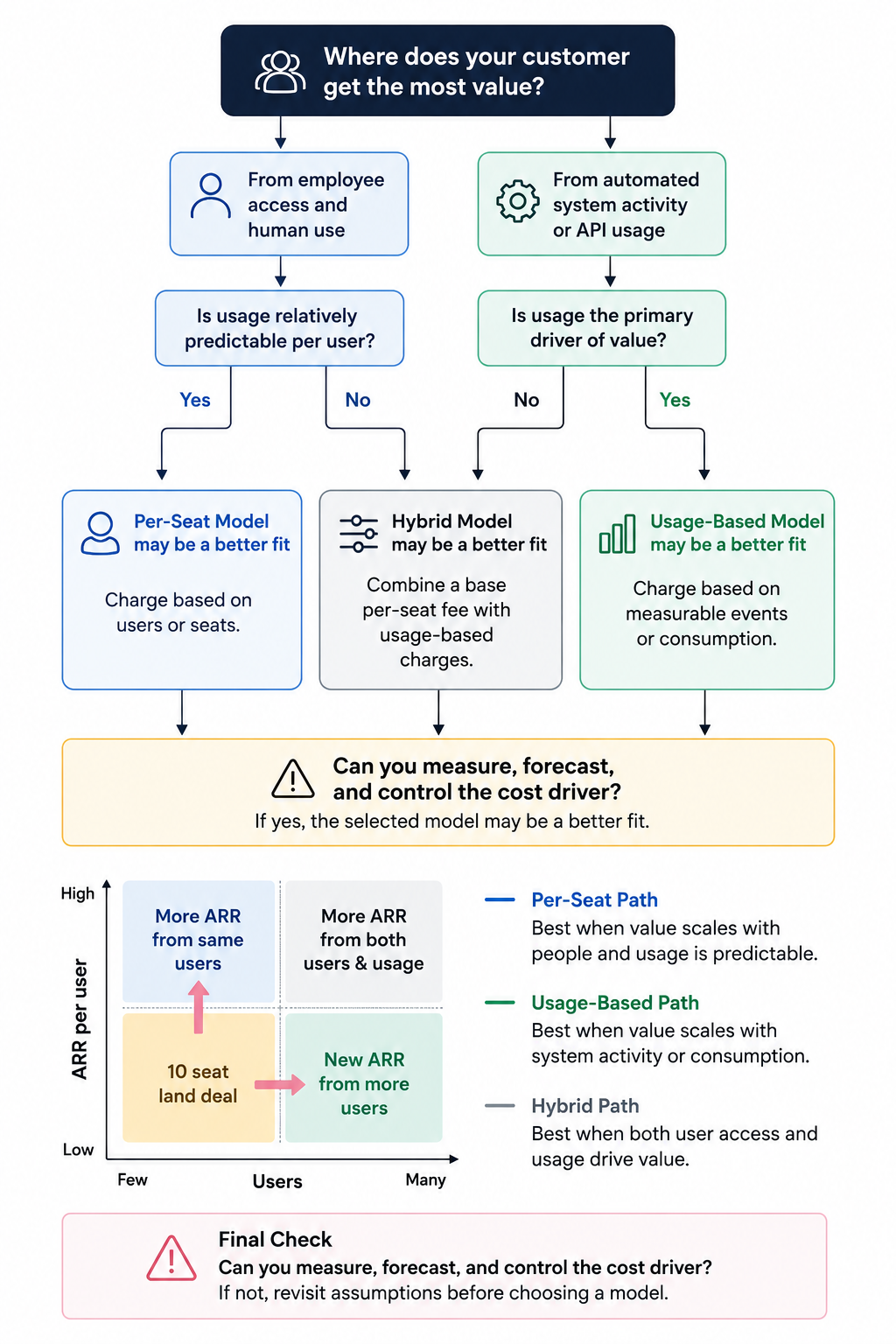
There is no universal winner. The better model will always depend on what drives software value and what you can measure or forecast realistically in your business.
Per-seat pricing works best if all your employees regularly access the platform, you have a stable user count, and your business needs a consistent recurring cost.
Go with usage-based pricing when software is primarily used through applications, automation, or workflow in place of individual logins. It works best when you have a clearly defined billing meter, monitor usage well, and have a practical way to control or approve unexpected increases.
Choose a hybrid model when you need a predictable baseline without compromising on the flexibility to scale. This model will include a base platform fee and a defined number of seats or usage units.
Hybrid pricing combines both fixed and metered elements, along with usage commitments and an overage structure.
The right model is the one that reflects how best your business uses software.
Using this framework, you can evaluate pricing through a procurement lens and a technical review of usage patterns to generate software costs.
› What Should You Ask Before Signing
Before committing to either model, get some clear answers about how the vendor defines, measures, and changes cost during your contract term.
» When Reviewing Per-Seat Quote
- Do inactive users cost the same as active users?
- Is there a minimum number of seats we need to pay for?
- Can we reduce seat count if team size shrinks?
- Can seats be reassigned when employees change roles or leave?
- How much can price increase at renewal?
› When Reviewing Usage-Based Quote
- What counts as a billable event or unit?
- Are failed calls, retries, pagination, and test-environment activity billable?
- What usage is included when applying overage charges?
- Can we set spend alerts, approval thresholds, or a hard spending cap?
If you are comparing proposals measuring costs differently, don’t start with the quoted unit. Use a shared cost model that reflects your users, contract commitment, expected growth, and billable activity.
The right software isn’t the option with the lowest quoted price. It is the one with a pricing model that matches how your team accesses, uses, and scales the product.
Explore reviews, pricing details, and alternatives to shortlisted options that fit your team’s usage, budget, and growth plans.
› FAQs
1. Is per-seat pricing cheaper than usage-based pricing?
Ans. Not always. Per-seat pricing costs less when your employees need regular access. However, usage-based pricing costs less when consumption is low, measurable, and tied to your business activities.
2. What is the biggest risk with usage-based billing?
Ans. The biggest risks include retries, polling, seasonal demand, backfills, and even unexpected costs. Always confirm the billing meter, overage rate, and included usage before proceeding.
3. What is the biggest risk with per-seat pricing?
Ans. In per-seat pricing, you might end up paying for unused licenses. That happens when employees leave, change roles, or you commit to more seats than needed.
4. Can you switch pricing models later?
Ans. Sometimes. The answer depends on the vendor’s contract terms. You can ask them whether you can move from one plan to another or convert unused credits before finalising.
5. When does a hybrid model make sense?
Ans. A hybrid model works best when you want a predictable base cost, but it should vary as per growth. This model combines a platform fee, seats or included usage, and predetermined overage rates.
Width: 0px, Height: 0px
Width: 0px, Height: 0px