

On this page
Over 94% of businesses currently use some form of CRM. This is often used for sales automation, lead management, and customer interaction management. It shows how organizations rely on CRM systems to track sales and streamline communication channels, ensuring a seamless customer experience.
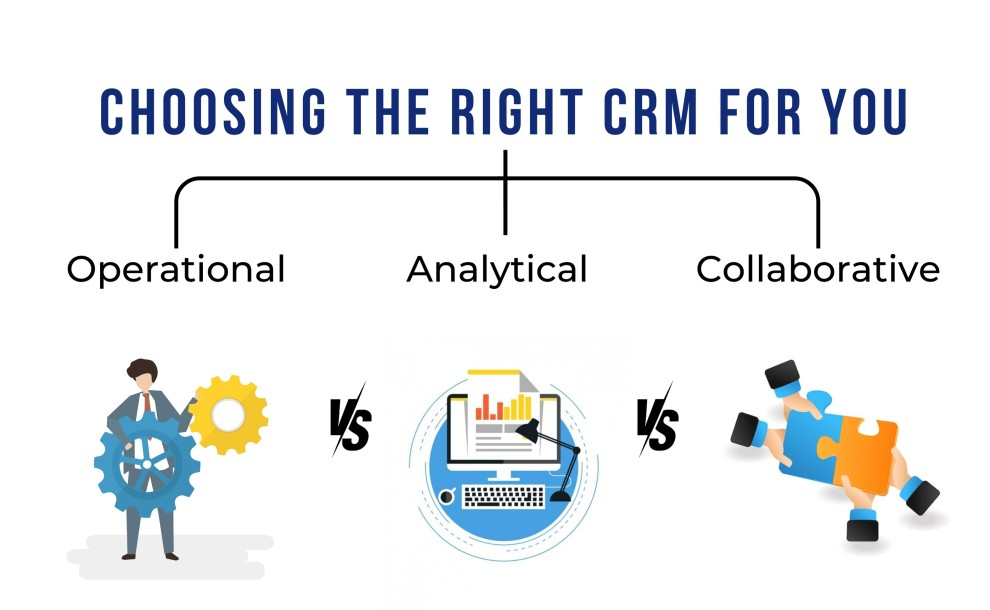

Overall, businesses choose from the three major types of CRMs
Width: 990px, Height: 610px
Width: 990px, Height: 610px
Width: 990px, Height: 610px
Width: 990px, Height: 610px
Width: 990px, Height: 610px
Width: 990px, Height: 610px
Width: 990px, Height: 610px
Width: 990px, Height: 610px
Width: 990px, Height: 610px
Width: 0px, Height: 0px
Width: 1007px, Height: 720px
Width: 0px, Height: 0pxSource
- Operational CRM - to automate customer-facing processes.
- Analytical CRM - to analyze and gain insights into customer behavior.
- Collaborative CRM - to share customer information across various departments.
However, within each of these major types of CRMs, businesses can either opt for a custom CRM or a customized CRM.
Yes, there’s a difference when we speak of custom CRM vs. customized based on its context and CRM implementation.
Custom CRM is about building a new CRM solution from scratch while Customized CRM involves leveraging an existing CRM platform like Salesforce or HubSpot and configuring it to suit a business’s requirements better. It is also called a customizable CRM.
This way, a custom CRM system is a wholly original build, while customizable CRM requires you to adopt standard CRM and adjust it for a more tailored fit.
Now that we know the basics let's check out each of these major types of CRM in terms of critical differences. This includes understanding their features, pros and cons, types of business, and choices, along with examples.
What is Custom CRM?
Typically, a custom CRM gives you plenty of customization options, allowing you to develop software from scratch. It's useful when you have very unique business needs that cannot be met by using out-of-the-box CRM system
Width: 660px, Height: 660px
Width: 660px, Height: 660px
Width: 660px, Height: 660px
Width: 0px, Height: 0px
Width: 660px, Height: 660px
Width: 660px, Height: 660px
Width: 660px, Height: 660px
Width: 660px, Height: 660px
Width: 660px, Height: 660px
Width: 660px, Height: 660px
Width: 660px, Height: 660px
Width: 660px, Height: 660px
Usually, you’d want a cloud CRM that is hosted online, remains device agnostic, and allows you to operate it from anywhere, on any device. You’d have this CRM created specifically for your business’s internal processes, workflows, and goals.
Think of it as a tool that provides more than basic functionalities like lead management or sales tracking. Instead, you can incorporate specialized features, leverage integrations, and design user interfaces that can handle complex tasks.
Features of Custom CRM
You can have custom CRM software built with unique features designed to fit your specific business operations. CRM features will enhance productivity, automate routine tasks, and support data-driven decision-making.
Tailored Dashboards & Reports
Custom CRMs offer personalized dashboards so that your team can access the metrics that matter most — be it sales forecasts or individual performance tracking.
Advanced Workflow Automation
You’d use custom CRM to automate complex workflows, such as a multi-stage approval process or detailed customer follow-ups.
Custom Integrations
Custom CRM will provide you with options for integrating third-party apps, proprietary software, and even legacy systems. This can help create a unified ecosystem for all your data.
Role-Based Access Control
You can set up custom access permissions based on roles so that sensitive information is only accessible to the right people.
Adaptable CRM Modules
Custom CRM will allow you to develop modules specifically for your operations. These can be inventory management for retail or compliance tracking for finance, making it more than just a customer management tool.
Customer Journey Mapping
A custom CRM can be designed to track every touchpoint and interaction, giving you a complete view of your customer journey.
Custom CRM Use Cases
Let’s understand custom CRM use cases with examples.
1) Healthcare Industry
A healthcare provider can use a custom CRM to manage patient records, manage appointment scheduling, and make sure it remains compliant with healthcare regulations such as HIPAA. Custom CRMs can also integrate with Electronic Health Record (EHR) systems and offer analytics for patient outcomes.
2) Real Estate
Agents and service providers in the real estate industry can use the cloud-based custom CRM to manage property listings, track buyer preferences, and automate follow-ups based on viewing schedules. Such a custom CRM will boast tools like contract management, property mapping, and commission calculations.
3) Financial Services
Financial services businesses can build custom CRMs to monitor compliance, track investments, and automate reporting to regulatory bodies. For example, a wealth management firm can use custom CRMs to manage sophisticated, complex customer profiles, investment histories, and risk profiles.
4) Supply Chain Management
Companies with intricate supply chains may require a CRM that tracks customer interactions and links to inventory management systems, order fulfillment processes, and supplier relationships.
Pros and Cons of Custom CRM
Pros:
- Highly tailored to business needs.
- Full control over features and functionalities.
- High scalability that grows and adapts as your business evolves.
- Full integration flexibility that allows seamless integration with other business tools.
- Enhanced security that includes advanced security measures.
Cons:
- High development cost.
- Time-consuming development, which takes months or longer.
- Requires dedicated maintenance to handle updates and troubleshooting.
- Potential over-engineering, which can complicate CRM use.
- Longer adoption time for teams that may need more training.
What is Customized CRM?
A customized CRM is an off-the-shelf CRM platform that provides different configuration options. It will enable you to maneuver specific features and interfaces that align with your business needs.
Certainly, it starts as a standard solution. But you have the power to tweak dashboards, add custom fields, and even integrate additional functionalities to suit your organizational workflow better. You can do all this without having to build software from scratch.
Unlike a custom CRM, which is developed from the ground up, a customizable CRM leverages a pre-built foundation. This makes software deployment and maintenance easier.
Features of Customizable CRM
Just as custom CRMs have features that make them a lucrative business choice, we also have customizable CRMs that provide a range of features. With customized CRM, you can adjust settings, add new functionalities, or integrate existing tools.
Here’s a list of features you can use with customizable CRM.
Configurable Dashboards
Businesses can modify dashboards to display the metrics that matter most. Now, this can be sales performance, marketing KPIs, or support tickets—giving teams a clear view of priorities.
Custom Fields and Modules
Customized CRM software allows you to create custom fields for specific data points. For instance, a retail business can add fields for customer tracking or order history, making it easier to tailor sales approaches.
Workflow Automation
Automate repetitive tasks like follow-up emails, lead assignments, and deal stage updates. This ensures that sales teams can focus more on nurturing leads than on administrative tasks.
Integration Capabilities
Connect third-party applications like payment gateways, accounting software, or even legacy systems, ensuring all your data flows smoothly between tools.
Role-Based Permissions
Set different access levels so only certain team members can view or edit sensitive information. This is particularly useful for maintaining data security across departments.
Customized CRM Use Cases
There are many platforms that you can adopt for customized CRMs, like Zoho, Salesforce, HubSpot, etc. Such tools are useful for businesses that want to adapt off-the-shelf solutions for specific needs without building from scratch.
Yet, you still get the flexibility in tweaking modules, adding fields, and integrating third-party tools.
Here are some quick examples:
1) Retail Industry
Retailers can use customized CRM software to create unique customer segmentation rules for loyalty programs. Also, you get to integrate cloud CRM solutions for inventory management and even track in-store purchases.
2) Real Estate
Real estate agencies and agents can use custom CRM systems like Zoho to add custom workflows for managing property listings. These systems help automate follow-ups and even set reminders for client viewings.
3) Healthcare Providers
Customizable CRMs are helpful in healthcare industries to track patient appointment schedules, integrate electronic health records, and send automated follow-ups. It contributes to compliance adherence and quick, hassle-free communication.
Pros and Cons of Customized CRM
Pros:
- It is a cost-effective option as compared to custom CRM, for which you pay to build from scratch.
- Quick implementation as you leverage pre-built platforms for greater customization.
- Ease of Use since most customizable CRMs come with a user-friendly interface.
- Scalable options that help you start small and expand as needed.
- Cloud-based flexibility with customizable offering cloud solutions.
Cons:
- Limited customization as you can tweak features that the platform allows.
- Subscription costs incurred on a monthly or annual basis.
- Third-party dependencies, as you rely on external tools and plugins, cause compatibility issues.
- Over-customization risk, where tweaking too many elements can make the CRM complex.
- Security concerns as cloud CRM solutions may have data privacy concerns.
Custom CRM vs. Customizable CRM: When to Choose Which One?
Now that we have discussed the major differences, features, and pros and cons of both these CRM subtypes, it's time to discuss tips on when to choose which one. So, if you are still deciding whether to go for custom CRM or customized CRM, here are a few things you should know.
When to Choose Custom CRM
Businesses and organizations can opt for custom CRM under the following circumstances.
1) Complex Business Processes:
If you have highly specialized workflows that standard CRMs can’t accommodate, then you’re better off with custom CRM. It is common for organizations to function in healthcare, finance, or large-scale manufacturing industries.
2) You Need Complete Ownership:
For those of you looking to have complete control over your CRM, a custom CRM is an ideal solution. With a custom CRM, you can build unique features, manage security protocols, and avoid licensing fees for additional modules.
3) Integration with Proprietary Tools:
Want to connect CRM to legacy systems? Custom CRM is your go-to choice because most out-of-the-box CRMs cannot ensure legacy integrations, so building your solution is the way to go.
4) Long-Term Scalability and Customization:
If you foresee scaling your business with very specific features in the future, a custom CRM will help you expand without the constraints of a pre-built system.
When to Choose Customizable CRM
Choose customized CRM for your business in the following circumstances:
1) You Need Quick Deployment:
Customized CRM software like Salesforce or Zoho can be up and running in days or weeks. So, choose a customizable CRM if you want a solution that’s easy to configure and ready for use without a long development timeline.
2) Budget Constraints Exist:
Does your business lack the resources for a full-scale custom CRM? If so, choose a customizable CRM as a cost-effective option, which will allow you to get a customized experience without spending too much.
3) More Flexibility and Less Complexity:
Customizable CRMs are ideal for businesses that need some level of personalization. For instance, you can add custom fields or build automated workflows but not get to deal with highly complex functionalities.
4) You Want Built-in Support and Upgrades:
With a customizable CRM, updates, security patches, and feature enhancements are handled by the provider. It means you don't have to invest time and money to get into those maintenance headaches.
Conclusion
Now, you must have a clear idea about which ones to go for when you are confused between custom CRM and customizable CRN. It is not just about the features and budgets but also how your business sees and intends to use that particular CRM.
So, make sure the choice you make aligns with your long-term vision to unlock growth and simplify operations.
That said, if your business has very specific demands out of a tool, a custom CRM system is ideal. However, a customizable CRM may just do the job if your business needs flexibility without the heavy investment.


